DicomSRSave
- MLModule
genre
author
package
dll
definition
see also
DicomREGSave,DicomSCSave,DicomFIDSave,RTObjectSave,ImageSave,itkImageFileWriter,DirectDicomImport,MultiFileVolumeListImageOutput,MultiFileVolumeListSROutput,MultiFileVolumeListRTOutput,MultiFileVolumeListWaveformOutput,MultiFileVolumeListIteratorOutputkeywords
DICOM,output,save,export,file,create,structured,report
Purpose
Creates and composes a DICOM structured report and exports it to different file formats or fields.
The module class provides the following features:
Inheriting DICOM information from input sources such as ML images, DICOM files, or a DirectDicomImport module.
Composition of a small set of sections with selectable code meanings.
Replacement of placeholders for DICOM tags, image information to insert information from other sources into the generated document.
Exporting the document to HTML and XML fields (shown in the GUI), and to selectable file formats such as .dcm, .html, and .xml.
Most functionality available from the used dcmtk class is provided except of
digitally signing the document,
user controlled creation or setting Series-, SOPInstance- or StudyUIDs,
other character sets than the default ones created by the dcmtk document, and
the currently used codes and meanings are taken from dcmtk examples, and no verification dictionaries or verification itself is performed on the generated document.
For further structured report related information see http://www.dclunie.com/pixelmed/DICOMSR.book.pdf.
Windows
Default Panel
Input Fields
input0
- name: input0, type: Image
At this input an ML image with DICOM information can be connected. If
Input Selectoris set appropriately and when using the buttonInherit DICOM Information (CTRL\+R)this information will be used to replace all DICOM information fields in this module.
inputBase
- name: inputBase, type: MLBase
This is a Base connector which can be used to provide the DICOM tree from which tags can be inherited; it is only used if
Input Selectoris set accordingly. It supports DICOM tree and MultiFileVolumeList Base objects as inputs.
Parameter Fields
Field Index
Visible Fields
File Name (unresolvedFileName)
- name: unresolvedFileName, type: String, deprecated name: unresolvedDcmInputFileName
If a loading operation from disk is selected as input in the
Input Selectorthen the file name from which the DICOM tree shall be loaded is specified here. Otherwise this field is insensitive.
True File Name
Input Selector
- name: inputSelector, type: Enum, default: ImageConnector, deprecated name: inheritanceInput
Selects the input from which DICOM information shall be inherited when ‘Inherit DICOM Information’ is triggered. Placeholders in text sections: All placeholders in texts will be replaced by two question marks “??” if a DICOM tag cannot be found in the specified input, otherwise the found DICOM tag string will be inserted. While inheriting field values with
Inherit DICOM Information (CTRL\+R): All fields whose corresponding DICOM tag is not found in the source will be set to an empty string, all others will be filled with the found information.
Values:
Title |
Name |
Description |
|---|---|---|
Image Connector |
ImageConnector |
If |
File |
File |
All DICOM information is retrieved from the file given in field |
Base Connector |
BaseConnector |
If |
InIdx
- name: inputVolumeIndex, type: Integer, default: 0, minimum: 0, deprecated name: ddiOutVolIdx
This field selects the volume from the connected DirectDicomImport which shall be used as source for DICOM tags.
#Volumes
- name: numVolumes, type: Integer, persistent: no, deprecated name: numDDIVolumes
This read-only field shows number of available volumes in the DirectDicomImport.
Inherit DICOM Information (CTRL+R)
- name: inheritDICOMTags, type: Trigger
If this button is pressed then from the source specified in
Input SelectorDICOM information is retrieved if possible. If available the all DICOM specific fields are replaced by the input information. If no DICOM information is found then the fields are left unchanged. Be careful, because handwritten DICOM tags values are overwritten!
Save (Ctrl+S)
- name: save, type: Trigger
If this button is pressed then dependent on the selected check boxes
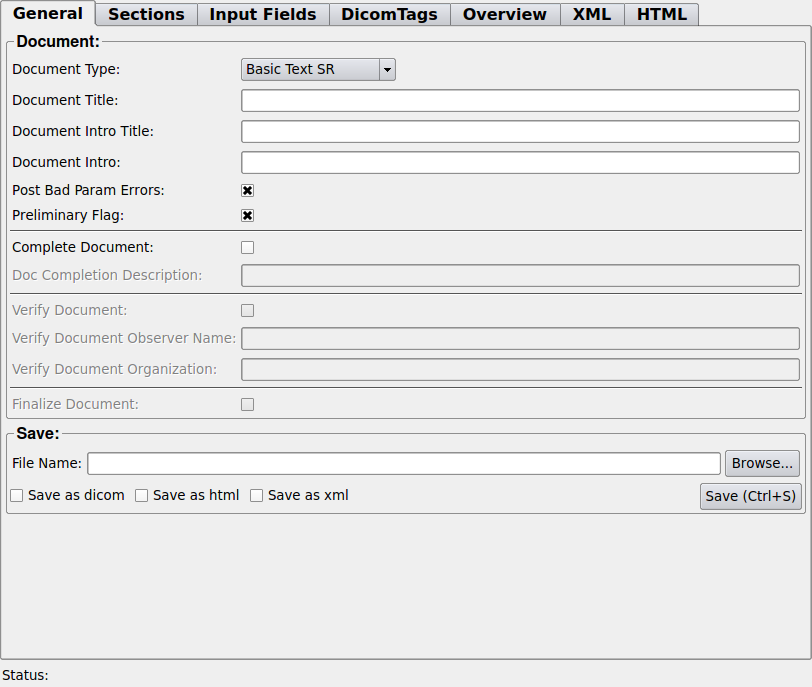
Save As DICOM,Save As HTML, andSave As XMLthe structured report files is saved in files with the selected content types. The file name byFile Nameand the suffixes are “.dcm”, “.html”, and “.xml”, respectively.
File Name (fileName)
- name: fileName, type: String
The path and name of the structured report file to be written.
Post Bad Param Errors
- name: postBadParamErrors, type: Bool, default: TRUE
If enabled then bad parameters are posted as ML error, otherwise they are only shown in status field.
Status
- name: status, type: String, persistent: no
Shows general information and messages.
Document Type
- name: documentType, type: Enum, default: BasicTextSR
Determines the Structured Report document type to be created.
Values:
Title |
Name |
|---|---|
Basic Text SR |
BasicTextSR |
Comprehensive SR |
ComprehensiveSR |
Enhanced SR |
EnhancedSR |
Save As DICOM
- name: saveAsDICOM, type: Bool, default: FALSE
If enabled then the structured report is written into a DICOM ‘File Name.dcm’ file when save is pressed.
Save As XML
- name: saveAsXML, type: Bool, default: FALSE
If enabled then the structured report is written into an XML ‘File Name.html’ file when save is pressed.
Short Info
- name: shortInfo, type: String, persistent: no
Shows the structured reporting short information.
Long XMLInfo
- name: longXMLInfo, type: String, persistent: no
Shows the structured reporting short information in XML format.
Save As HTML
- name: saveAsHTML, type: Bool, default: FALSE
If enabled then the structured report is written into an HTML ‘File Name.html’ file when save is pressed.
Long HTMLInfo
- name: longHTMLInfo, type: String, persistent: no
Shows the structured reporting dump.
Complete Document
- name: completeDocument, type: Bool, default: FALSE
If enabled then the document will be completed after creation and Document Completion Description Fld will be set as description.
Doc Completion Description
- name: docCompletionDescription, type: String
This description is used when the document is completed due to enabled Complete Document flag.
Verify Document
- name: verifyDocument, type: Bool, default: FALSE
If enabled then the document will be verified after creation and VerifyDocumentObserverName and VerifyDocumentOrganization will be set.
Verify Document Observer Name
- name: verifyDocumentObserverName, type: String
The observer name which is set if the document verification flag is, because ‘Verify Document’ and ‘Complete Document’ are on.
Verify Document Organization
- name: verifyDocumentOrganization, type: String
The organization which is set if the document verification flag is set, because ‘Verify Document’ and ‘Complete Document’ are on.
Finalize Document
- name: finalizeDocument, type: Bool, default: FALSE
If enabled then the document will be finalized as a last step before storing it; note that this does NOT include any digital signing or so.
Document Title
- name: documentTitle, type: String
The title of the document.
Document Intro Title
- name: documentIntroTitle, type: String
The title of the document introduction.
Document Intro
- name: documentIntro, type: String
The introduction text of the document.
Preliminary Flag
- name: preliminaryFlag, type: Bool, default: TRUE
If enabled the document is set to a non final state.
Patients Name
- name: patientsName, type: String
The name of the patient this report is created for.
Patient ID
- name: patientID, type: String
String/number used to identify the patient.
Patient Birth Date Year
- name: patientBirthDateYearEnum, type: Enum, default: 1900
The selectable year of birth of the patient; ‘User Defined’ allows manual specification.
Values:
Title |
Name |
|---|---|
User Defined |
User Defined |
1900 |
1900 |
1901 |
1901 |
1902 |
1902 |
1903 |
1903 |
1904 |
1904 |
1905 |
1905 |
1906 |
1906 |
1907 |
1907 |
1908 |
1908 |
1909 |
1909 |
1910 |
1910 |
1911 |
1911 |
1912 |
1912 |
1913 |
1913 |
1914 |
1914 |
1915 |
1915 |
1916 |
1916 |
1917 |
1917 |
1918 |
1918 |
1919 |
1919 |
1920 |
1920 |
1921 |
1921 |
1922 |
1922 |
1923 |
1923 |
1924 |
1924 |
1925 |
1925 |
1926 |
1926 |
1927 |
1927 |
1928 |
1928 |
1929 |
1929 |
1930 |
1930 |
1931 |
1931 |
1932 |
1932 |
1933 |
1933 |
1934 |
1934 |
1935 |
1935 |
1936 |
1936 |
1937 |
1937 |
1938 |
1938 |
1939 |
1939 |
1940 |
1940 |
1941 |
1941 |
1942 |
1942 |
1943 |
1943 |
1944 |
1944 |
1945 |
1945 |
1946 |
1946 |
1947 |
1947 |
1948 |
1948 |
1949 |
1949 |
1950 |
1950 |
1951 |
1951 |
1952 |
1952 |
1953 |
1953 |
1954 |
1954 |
1955 |
1955 |
1956 |
1956 |
1957 |
1957 |
1958 |
1958 |
1959 |
1959 |
1960 |
1960 |
1961 |
1961 |
1962 |
1962 |
1963 |
1963 |
1964 |
1964 |
1965 |
1965 |
1966 |
1966 |
1967 |
1967 |
1968 |
1968 |
1969 |
1969 |
1970 |
1970 |
1971 |
1971 |
1972 |
1972 |
1973 |
1973 |
1974 |
1974 |
1975 |
1975 |
1976 |
1976 |
1977 |
1977 |
1978 |
1978 |
1979 |
1979 |
1980 |
1980 |
1981 |
1981 |
1982 |
1982 |
1983 |
1983 |
1984 |
1984 |
1985 |
1985 |
1986 |
1986 |
1987 |
1987 |
1988 |
1988 |
1989 |
1989 |
1990 |
1990 |
1991 |
1991 |
1992 |
1992 |
1993 |
1993 |
1994 |
1994 |
1995 |
1995 |
1996 |
1996 |
1997 |
1997 |
1998 |
1998 |
1999 |
1999 |
2000 |
2000 |
2001 |
2001 |
2002 |
2002 |
2003 |
2003 |
2004 |
2004 |
2005 |
2005 |
2006 |
2006 |
2007 |
2007 |
2008 |
2008 |
2009 |
2009 |
2010 |
2010 |
2011 |
2011 |
2012 |
2012 |
2013 |
2013 |
2014 |
2014 |
2015 |
2015 |
2016 |
2016 |
2017 |
2017 |
2018 |
2018 |
2019 |
2019 |
2020 |
2020 |
2021 |
2021 |
2022 |
2022 |
2023 |
2023 |
2024 |
2024 |
2025 |
2025 |
2026 |
2026 |
2027 |
2027 |
2028 |
2028 |
2029 |
2029 |
2030 |
2030 |
2031 |
2031 |
2032 |
2032 |
2033 |
2033 |
2034 |
2034 |
2035 |
2035 |
2036 |
2036 |
2037 |
2037 |
2038 |
2038 |
2039 |
2039 |
2040 |
2040 |
2041 |
2041 |
2042 |
2042 |
2043 |
2043 |
2044 |
2044 |
2045 |
2045 |
2046 |
2046 |
2047 |
2047 |
2048 |
2048 |
2049 |
2049 |
2050 |
2050 |
2051 |
2051 |
2052 |
2052 |
2053 |
2053 |
2054 |
2054 |
2055 |
2055 |
2056 |
2056 |
2057 |
2057 |
2058 |
2058 |
2059 |
2059 |
Patient Birth Date Year String
- name: patientBirthDateYearString, type: String, default: 1900
The year of the patient birth as string. Can be modified manually only if ‘Patient Sex’ is ‘User Defined’.
Patient Birth Date Month
- name: patientBirthDateMonthEnum, type: Enum, default: 01-January
The selectable month of birth of the patient; ‘User Defined’ allows manual specification. For convenience the module also allows and translates values such as “03-March” or “March” to the required value component “03”, respectively. See DICOM tag Patient’s Birth Day (0010,0030).
Values:
Title |
Name |
|---|---|
User Defined |
User Defined |
01-January |
01-January |
02-February |
02-February |
03-March |
03-March |
04-April |
04-April |
05-May |
05-May |
06-June |
06-June |
07-July |
07-July |
08-August |
08-August |
09-September |
09-September |
10-October |
10-October |
11-November |
11-November |
12-December |
12-December |
Patient Birth Date Month String
- name: patientBirthDateMonthString, type: String, default: 01-January
The month of birth of the patient; ‘User Defined’ allows manual specification. For convenience the module also allows and translates values such as “03-March” or “March” to the required value component “03”, respectively. See DICOM tag Patient’s Birth Day (0010,0030).
Patient Birth Date Day
- name: patientBirthDateDayEnum, type: Enum, default: 01
The selectable Day of birth of the patient; ‘User Defined’ allows manual specification.
Values:
Title |
Name |
|---|---|
User Defined |
User Defined |
01 |
01 |
02 |
02 |
03 |
03 |
04 |
04 |
05 |
05 |
06 |
06 |
07 |
07 |
08 |
08 |
09 |
09 |
10 |
10 |
11 |
11 |
12 |
12 |
13 |
13 |
14 |
14 |
15 |
15 |
16 |
16 |
17 |
17 |
18 |
18 |
19 |
19 |
20 |
20 |
21 |
21 |
22 |
22 |
23 |
23 |
24 |
24 |
25 |
25 |
26 |
26 |
27 |
27 |
28 |
28 |
29 |
29 |
30 |
30 |
31 |
31 |
Patient Birth Date Day String
- name: patientBirthDateDayString, type: String, default: 01
The day of the patient birth as string. Can be modified manually only if ‘Patient Birth Date Day’ is ‘User Defined’.
Patient Sex
- name: patientSexEnum, type: Enum, default: Other
The selectable sex of the patient; ‘User Defined’ allows manual specification.
Values:
Title |
Name |
|---|---|
Other |
Other |
Female |
Female |
Male |
Male |
User Defined |
User Defined |
Patient Sex String
- name: patientSexString, type: String, default: Other
The sex of the patient as string. Can be modified manually only if ‘Patient Sex’ is ‘User Defined’.
Study Instance UID
- name: studyInstanceUID, type: String
DICOM tag: Study Instance UID (0020,000D) Unique identifier for the study. If available then see
Autoand C.12.2 Common Instance Reference Module in the DICOM standard for details and important dependent settings. Must contain up to 64 characters from ‘0’-‘9’ or ‘.’.
Create new UID (createStudyInstanceUID)
- name: createStudyInstanceUID, type: Trigger
Creates a new Study Instance UID
Auto (autoCreateStudyInstanceUID)
- name: autoCreateStudyInstanceUID, type: Bool, default: TRUE
If enabled for each written file a new Study Instance UID is created. If disabled the currently set one is used.
Study Date
- name: studyDate, type: String
DICOM tag: Study Date (0008,0020). The date the study started. May be empty.
Study Time
- name: studyTime, type: String
DICOM tag: Study Time (0008,0030). The time the study started. May be empty.
Referring Physician Name
- name: referringPhysicianName, type: String
DICOM tag: The related physician.
Study UID
- name: studyUID, type: String
DICOM tag: The study UID which references the study for which this report is created.
Accession Number
- name: accessionNumber, type: String
DICOM tag: The accession number.
Study Description
- name: studyDescription, type: String
DICOM tag: The study for which this report is created.
Series Instance UID
- name: seriesInstanceUID, type: String
DICOM tag: Series Instance UID (0020,000E). Unique identifier of the series, must be non-empty in case of some enhanced contexts. Must contain up to 64 characters from ‘0’-‘9’ or ‘.’.
Create new UID (createSeriesInstanceUID)
- name: createSeriesInstanceUID, type: Trigger
Creates a new Series Instance UID
Auto (autoCreateSeriesInstanceUID)
- name: autoCreateSeriesInstanceUID, type: Bool, default: TRUE
If enabled for each written file a new Series Instance UID is created. If disabled the currently set one is used.
Series Number
- name: seriesNumber, type: String
DICOM tag: Series Number (0020,0011). Integer number with at most 12 digits; tag must exist and in most contexts it must have a non-empty value; in a few IODs it is allowed to be empty.
Inherit Series Number
- name: inheritSeriesNumber, type: Bool, default: TRUE
Sometimes it is not desired to inherit the Series Number tag from the input, because it’s set by the module user. For this purpose it can be disabled.
Laterality
- name: laterality, type: Enum, default: DoNotWriteTagValue
DICOM tag: Laterality (0020,0060). Allowed values: ‘L’ (Left), ‘R’ (Right), and empty value (WriteEmptyTagValue). Note that not writing the tag value may violate the DICOM standard under some circumstances.
Values:
Title |
Name |
|---|---|
Do Not Write Tag Value |
DoNotWriteTagValue |
Write Empty Tag Value |
WriteEmptyTagValue |
L |
L |
R |
R |
Use Empty Laterality Tag If Not Found On Inheritance
- name: useEmptyLateralityTagIfNotFoundOnInheritance, type: Bool, default: TRUE
In may contexts the Laterality tag (0020,0060) must be available but is allowed to be empty, however, often it cannot be inherited since it is not part of the DICOM. This field allows to inherit a state that always an empty tag value is written instead of skipping it which perhaps would violate the DICOM standard. Also depends on other Laterality tags.
Series Description
- name: seriesDescription, type: String
DICOM tag: The series for which this report is created.
Manufacturer
- name: manufacturer, type: String
DICOM tag: Company creating this report.
Manufacturer Model Name
- name: manufacturerModelName, type: String
DICOM tag: Model name determined by the manufacturer.
Device Serial Number
- name: deviceSerialNumber, type: String
DICOM tag: The serial number of the device.
Software Versions
- name: softwareVersions, type: String
DICOM tag: The software version.
Instance Number
- name: instanceNumber, type: String
DICOM tag: The instance number.
Patient Orientation
- name: patientOrientation, type: String
DICOM tag: Patient Orientation (0020,0020). May be empty. Must obey value representation CS (Uppercase characters, ‘0’-‘9’, the SPACE character, and underscore ‘_’, of the Default Character Repertoire, 16 bytes maximum).
Content Date
- name: contentDate, type: String
DICOM tag: The content date.
Content Time
- name: contentTime, type: String
DICOM tag: The content time.
Open Sub Section00
- name: openSubSection00, type: Bool, default: FALSE
Determines whether the entry is placed in a subsection or after the previous one.
Close Sub Section00
- name: closeSubSection00, type: Bool, default: FALSE
Determines whether after the entry a previous subsection is closed.
Coding Value And Meaning00
- name: codingValueAndMeaning00, type: Enum
The coding and the menaning of the field content
Values:
Title |
Name |
|---|---|
User Defined |
User Defined |
IHE.01-Document Title |
IHE.01-Document Title |
IHE.02-Observation Context Mode |
IHE.02-Observation Context Mode |
Ihe.03-direct |
IHE.03-DIRECT |
IHE.04-Recording Observer’s Name |
IHE.04-Recording Observer’s Name |
IHE.05-Recording Observer’s Organization Name |
IHE.05-Recording Observer’s Organization Name |
IHE.06-Observation Context Mode |
IHE.06-Observation Context Mode |
Ihe.07-patient |
IHE.07-PATIENT |
IHE.08-Section Heading |
IHE.08-Section Heading |
IHE.09-Report Text |
IHE.09-Report Text |
IHE.10-Image Reference |
IHE.10-Image Reference |
DT.01-Radiology Report |
DT.01-Radiology Report |
DT.03-Ultrasound Report |
DT.03-Ultrasound Report |
DT.04-CT Report |
DT.04-CT Report |
DT.05-MR Report |
DT.05-MR Report |
DT.06-Consultation Report |
DT.06-Consultation Report |
RE.01-History |
RE.01-History |
RE.02-Request |
RE.02-Request |
RE.03-Procedure |
RE.03-Procedure |
Re.04- |
RE.04- |
RE.05-Finding |
RE.05-Finding |
RE.06-Impression |
RE.06-Impression |
RE.07-Recommendation |
RE.07-Recommendation |
RE.08-Conclusion |
RE.08-Conclusion |
CODE 01-Description |
CODE_01-Description |
CODE 02-Diagnosis |
CODE_02-Diagnosis |
CODE 03-Treatment |
CODE_03-Treatment |
CODE 04-Referring Physician |
CODE_04-Referring Physician |
CODE 05-Hospital Name |
CODE_05-Hospital Name |
CODE 06-Redlands Clinic |
CODE_06-Redlands Clinic |
CODE 07-PA Chest |
CODE_07-PA Chest |
CODE 08-Abdomen |
CODE_08-Abdomen |
CODE 09-Chief Complaint |
CODE_09-Chief Complaint |
CODE 10-Present Illness |
CODE_10-Present Illness |
CODE 11-Past History |
CODE_11-Past History |
CODE 12-Illnesses |
CODE_12-Illnesses |
CODE 13-Allergies |
CODE_13-Allergies |
CODE 14-Medications |
CODE_14-Medications |
CODE 15-Operations |
CODE_15-Operations |
CODE 16-Social |
CODE_16-Social |
CODE 17-Family History |
CODE_17-Family History |
CODE 18-Family History |
CODE_18-Family History |
CODE 19-Discharge Summary |
CODE_19-Discharge Summary |
CODE 20-History of present Illness |
CODE_20-History of present Illness |
CODE 21-Physical Examination |
CODE_21-Physical Examination |
CODE 22-Admitting Diagnosis |
CODE_22-Admitting Diagnosis |
CODE 23-Laboratory Data on Admission |
CODE_23-Laboratory Data on Admission |
CODE 24-Hospital Course and Treatment |
CODE_24-Hospital Course and Treatment |
CODE 25-Surgical Procedures |
CODE_25-Surgical Procedures |
CODE 26-Discharge Diagnosis |
CODE_26-Discharge Diagnosis |
CODE 27-Teeth Present |
CODE_27-Teeth Present |
CODE 28-Orthodontic/Pediatric Assessment |
CODE_28-Orthodontic/Pediatric Assessment |
CODE 29-Other |
CODE_29-Other |
SH.06-Findings |
SH.06-Findings |
IR.02-Best illustration of finding |
IR.02-Best illustration of finding |
OR.01-Physician |
OR.01-Physician |
Code Meaning00
- name: codeMeaning00, type: String
The meaning of the field content for the case that ‘Usewr Defined’ is selected in ‘Coding Value And Meaning’.
Sub Section Container Title00
- name: subSectionContainerTitle00, type: String
If ‘OpenSubSection’ is true then this defines the title of the container of the subsection; otherwise it is ignored.
Sub Section Title00
- name: subSectionTitle00, type: String
If ‘OpenSubSection’ is true then this defines the title of the subsection; otherwise it is ignored.
Subsection Text (subSectionText00)
- name: subSectionText00, type: String
If ‘OpenSubSection’ is true then this defines the text content of the subsection; otherwise it is ignored.
Text (sectionText00)
- name: sectionText00, type: String
A text section of the structured report to be created.
Open Sub Section01
- name: openSubSection01, type: Bool, default: FALSE
Determines whether the entry is placed in a subsection or after the previous one.
Close Sub Section01
- name: closeSubSection01, type: Bool, default: FALSE
Determines whether after the entry a previous subsection is closed.
Coding Value And Meaning01
- name: codingValueAndMeaning01, type: Enum
The coding and the menaning of the field content
Values:
Title |
Name |
|---|---|
User Defined |
User Defined |
IHE.01-Document Title |
IHE.01-Document Title |
IHE.02-Observation Context Mode |
IHE.02-Observation Context Mode |
Ihe.03-direct |
IHE.03-DIRECT |
IHE.04-Recording Observer’s Name |
IHE.04-Recording Observer’s Name |
IHE.05-Recording Observer’s Organization Name |
IHE.05-Recording Observer’s Organization Name |
IHE.06-Observation Context Mode |
IHE.06-Observation Context Mode |
Ihe.07-patient |
IHE.07-PATIENT |
IHE.08-Section Heading |
IHE.08-Section Heading |
IHE.09-Report Text |
IHE.09-Report Text |
IHE.10-Image Reference |
IHE.10-Image Reference |
DT.01-Radiology Report |
DT.01-Radiology Report |
DT.03-Ultrasound Report |
DT.03-Ultrasound Report |
DT.04-CT Report |
DT.04-CT Report |
DT.05-MR Report |
DT.05-MR Report |
DT.06-Consultation Report |
DT.06-Consultation Report |
RE.01-History |
RE.01-History |
RE.02-Request |
RE.02-Request |
RE.03-Procedure |
RE.03-Procedure |
Re.04- |
RE.04- |
RE.05-Finding |
RE.05-Finding |
RE.06-Impression |
RE.06-Impression |
RE.07-Recommendation |
RE.07-Recommendation |
RE.08-Conclusion |
RE.08-Conclusion |
CODE 01-Description |
CODE_01-Description |
CODE 02-Diagnosis |
CODE_02-Diagnosis |
CODE 03-Treatment |
CODE_03-Treatment |
CODE 04-Referring Physician |
CODE_04-Referring Physician |
CODE 05-Hospital Name |
CODE_05-Hospital Name |
CODE 06-Redlands Clinic |
CODE_06-Redlands Clinic |
CODE 07-PA Chest |
CODE_07-PA Chest |
CODE 08-Abdomen |
CODE_08-Abdomen |
CODE 09-Chief Complaint |
CODE_09-Chief Complaint |
CODE 10-Present Illness |
CODE_10-Present Illness |
CODE 11-Past History |
CODE_11-Past History |
CODE 12-Illnesses |
CODE_12-Illnesses |
CODE 13-Allergies |
CODE_13-Allergies |
CODE 14-Medications |
CODE_14-Medications |
CODE 15-Operations |
CODE_15-Operations |
CODE 16-Social |
CODE_16-Social |
CODE 17-Family History |
CODE_17-Family History |
CODE 18-Family History |
CODE_18-Family History |
CODE 19-Discharge Summary |
CODE_19-Discharge Summary |
CODE 20-History of present Illness |
CODE_20-History of present Illness |
CODE 21-Physical Examination |
CODE_21-Physical Examination |
CODE 22-Admitting Diagnosis |
CODE_22-Admitting Diagnosis |
CODE 23-Laboratory Data on Admission |
CODE_23-Laboratory Data on Admission |
CODE 24-Hospital Course and Treatment |
CODE_24-Hospital Course and Treatment |
CODE 25-Surgical Procedures |
CODE_25-Surgical Procedures |
CODE 26-Discharge Diagnosis |
CODE_26-Discharge Diagnosis |
CODE 27-Teeth Present |
CODE_27-Teeth Present |
CODE 28-Orthodontic/Pediatric Assessment |
CODE_28-Orthodontic/Pediatric Assessment |
CODE 29-Other |
CODE_29-Other |
SH.06-Findings |
SH.06-Findings |
IR.02-Best illustration of finding |
IR.02-Best illustration of finding |
OR.01-Physician |
OR.01-Physician |
Code Meaning01
- name: codeMeaning01, type: String
The meaning of the field content for the case that ‘Usewr Defined’ is selected in ‘Coding Value And Meaning’.
Sub Section Container Title01
- name: subSectionContainerTitle01, type: String
If ‘OpenSubSection’ is true then this defines the title of the container of the subsection; otherwise it is ignored.
Sub Section Title01
- name: subSectionTitle01, type: String
If ‘OpenSubSection’ is true then this defines the title of the subsection; otherwise it is ignored.
Subsection Text (subSectionText01)
- name: subSectionText01, type: String
If ‘OpenSubSection’ is true then this defines the text content of the subsection; otherwise it is ignored.
Text (sectionText01)
- name: sectionText01, type: String
A text section of the structured report to be created.
Open Sub Section02
- name: openSubSection02, type: Bool, default: FALSE
Determines whether the entry is placed in a subsection or after the previous one.
Close Sub Section02
- name: closeSubSection02, type: Bool, default: FALSE
Determines whether after the entry a previous subsection is closed.
Coding Value And Meaning02
- name: codingValueAndMeaning02, type: Enum
The coding and the menaning of the field content
Values:
Title |
Name |
|---|---|
User Defined |
User Defined |
IHE.01-Document Title |
IHE.01-Document Title |
IHE.02-Observation Context Mode |
IHE.02-Observation Context Mode |
Ihe.03-direct |
IHE.03-DIRECT |
IHE.04-Recording Observer’s Name |
IHE.04-Recording Observer’s Name |
IHE.05-Recording Observer’s Organization Name |
IHE.05-Recording Observer’s Organization Name |
IHE.06-Observation Context Mode |
IHE.06-Observation Context Mode |
Ihe.07-patient |
IHE.07-PATIENT |
IHE.08-Section Heading |
IHE.08-Section Heading |
IHE.09-Report Text |
IHE.09-Report Text |
IHE.10-Image Reference |
IHE.10-Image Reference |
DT.01-Radiology Report |
DT.01-Radiology Report |
DT.03-Ultrasound Report |
DT.03-Ultrasound Report |
DT.04-CT Report |
DT.04-CT Report |
DT.05-MR Report |
DT.05-MR Report |
DT.06-Consultation Report |
DT.06-Consultation Report |
RE.01-History |
RE.01-History |
RE.02-Request |
RE.02-Request |
RE.03-Procedure |
RE.03-Procedure |
Re.04- |
RE.04- |
RE.05-Finding |
RE.05-Finding |
RE.06-Impression |
RE.06-Impression |
RE.07-Recommendation |
RE.07-Recommendation |
RE.08-Conclusion |
RE.08-Conclusion |
CODE 01-Description |
CODE_01-Description |
CODE 02-Diagnosis |
CODE_02-Diagnosis |
CODE 03-Treatment |
CODE_03-Treatment |
CODE 04-Referring Physician |
CODE_04-Referring Physician |
CODE 05-Hospital Name |
CODE_05-Hospital Name |
CODE 06-Redlands Clinic |
CODE_06-Redlands Clinic |
CODE 07-PA Chest |
CODE_07-PA Chest |
CODE 08-Abdomen |
CODE_08-Abdomen |
CODE 09-Chief Complaint |
CODE_09-Chief Complaint |
CODE 10-Present Illness |
CODE_10-Present Illness |
CODE 11-Past History |
CODE_11-Past History |
CODE 12-Illnesses |
CODE_12-Illnesses |
CODE 13-Allergies |
CODE_13-Allergies |
CODE 14-Medications |
CODE_14-Medications |
CODE 15-Operations |
CODE_15-Operations |
CODE 16-Social |
CODE_16-Social |
CODE 17-Family History |
CODE_17-Family History |
CODE 18-Family History |
CODE_18-Family History |
CODE 19-Discharge Summary |
CODE_19-Discharge Summary |
CODE 20-History of present Illness |
CODE_20-History of present Illness |
CODE 21-Physical Examination |
CODE_21-Physical Examination |
CODE 22-Admitting Diagnosis |
CODE_22-Admitting Diagnosis |
CODE 23-Laboratory Data on Admission |
CODE_23-Laboratory Data on Admission |
CODE 24-Hospital Course and Treatment |
CODE_24-Hospital Course and Treatment |
CODE 25-Surgical Procedures |
CODE_25-Surgical Procedures |
CODE 26-Discharge Diagnosis |
CODE_26-Discharge Diagnosis |
CODE 27-Teeth Present |
CODE_27-Teeth Present |
CODE 28-Orthodontic/Pediatric Assessment |
CODE_28-Orthodontic/Pediatric Assessment |
CODE 29-Other |
CODE_29-Other |
SH.06-Findings |
SH.06-Findings |
IR.02-Best illustration of finding |
IR.02-Best illustration of finding |
OR.01-Physician |
OR.01-Physician |
Code Meaning02
- name: codeMeaning02, type: String
The meaning of the field content for the case that ‘Usewr Defined’ is selected in ‘Coding Value And Meaning’.
Sub Section Container Title02
- name: subSectionContainerTitle02, type: String
If ‘OpenSubSection’ is true then this defines the title of the container of the subsection; otherwise it is ignored.
Sub Section Title02
- name: subSectionTitle02, type: String
If ‘OpenSubSection’ is true then this defines the title of the subsection; otherwise it is ignored.
Subsection Text (subSectionText02)
- name: subSectionText02, type: String
If ‘OpenSubSection’ is true then this defines the text content of the subsection; otherwise it is ignored.
Text (sectionText02)
- name: sectionText02, type: String
A text section of the structured report to be created.
Open Sub Section03
- name: openSubSection03, type: Bool, default: FALSE
Determines whether the entry is placed in a subsection or after the previous one.
Close Sub Section03
- name: closeSubSection03, type: Bool, default: FALSE
Determines whether after the entry a previous subsection is closed.
Coding Value And Meaning03
- name: codingValueAndMeaning03, type: Enum
The coding and the menaning of the field content
Values:
Title |
Name |
|---|---|
User Defined |
User Defined |
IHE.01-Document Title |
IHE.01-Document Title |
IHE.02-Observation Context Mode |
IHE.02-Observation Context Mode |
Ihe.03-direct |
IHE.03-DIRECT |
IHE.04-Recording Observer’s Name |
IHE.04-Recording Observer’s Name |
IHE.05-Recording Observer’s Organization Name |
IHE.05-Recording Observer’s Organization Name |
IHE.06-Observation Context Mode |
IHE.06-Observation Context Mode |
Ihe.07-patient |
IHE.07-PATIENT |
IHE.08-Section Heading |
IHE.08-Section Heading |
IHE.09-Report Text |
IHE.09-Report Text |
IHE.10-Image Reference |
IHE.10-Image Reference |
DT.01-Radiology Report |
DT.01-Radiology Report |
DT.03-Ultrasound Report |
DT.03-Ultrasound Report |
DT.04-CT Report |
DT.04-CT Report |
DT.05-MR Report |
DT.05-MR Report |
DT.06-Consultation Report |
DT.06-Consultation Report |
RE.01-History |
RE.01-History |
RE.02-Request |
RE.02-Request |
RE.03-Procedure |
RE.03-Procedure |
Re.04- |
RE.04- |
RE.05-Finding |
RE.05-Finding |
RE.06-Impression |
RE.06-Impression |
RE.07-Recommendation |
RE.07-Recommendation |
RE.08-Conclusion |
RE.08-Conclusion |
CODE 01-Description |
CODE_01-Description |
CODE 02-Diagnosis |
CODE_02-Diagnosis |
CODE 03-Treatment |
CODE_03-Treatment |
CODE 04-Referring Physician |
CODE_04-Referring Physician |
CODE 05-Hospital Name |
CODE_05-Hospital Name |
CODE 06-Redlands Clinic |
CODE_06-Redlands Clinic |
CODE 07-PA Chest |
CODE_07-PA Chest |
CODE 08-Abdomen |
CODE_08-Abdomen |
CODE 09-Chief Complaint |
CODE_09-Chief Complaint |
CODE 10-Present Illness |
CODE_10-Present Illness |
CODE 11-Past History |
CODE_11-Past History |
CODE 12-Illnesses |
CODE_12-Illnesses |
CODE 13-Allergies |
CODE_13-Allergies |
CODE 14-Medications |
CODE_14-Medications |
CODE 15-Operations |
CODE_15-Operations |
CODE 16-Social |
CODE_16-Social |
CODE 17-Family History |
CODE_17-Family History |
CODE 18-Family History |
CODE_18-Family History |
CODE 19-Discharge Summary |
CODE_19-Discharge Summary |
CODE 20-History of present Illness |
CODE_20-History of present Illness |
CODE 21-Physical Examination |
CODE_21-Physical Examination |
CODE 22-Admitting Diagnosis |
CODE_22-Admitting Diagnosis |
CODE 23-Laboratory Data on Admission |
CODE_23-Laboratory Data on Admission |
CODE 24-Hospital Course and Treatment |
CODE_24-Hospital Course and Treatment |
CODE 25-Surgical Procedures |
CODE_25-Surgical Procedures |
CODE 26-Discharge Diagnosis |
CODE_26-Discharge Diagnosis |
CODE 27-Teeth Present |
CODE_27-Teeth Present |
CODE 28-Orthodontic/Pediatric Assessment |
CODE_28-Orthodontic/Pediatric Assessment |
CODE 29-Other |
CODE_29-Other |
SH.06-Findings |
SH.06-Findings |
IR.02-Best illustration of finding |
IR.02-Best illustration of finding |
OR.01-Physician |
OR.01-Physician |
Code Meaning03
- name: codeMeaning03, type: String
The meaning of the field content for the case that ‘Usewr Defined’ is selected in ‘Coding Value And Meaning’.
Sub Section Container Title03
- name: subSectionContainerTitle03, type: String
If ‘OpenSubSection’ is true then this defines the title of the container of the subsection; otherwise it is ignored.
Sub Section Title03
- name: subSectionTitle03, type: String
If ‘OpenSubSection’ is true then this defines the title of the subsection; otherwise it is ignored.
Subsection Text (subSectionText03)
- name: subSectionText03, type: String
If ‘OpenSubSection’ is true then this defines the text content of the subsection; otherwise it is ignored.
Text (sectionText03)
- name: sectionText03, type: String
A text section of the structured report to be created.
Open Sub Section04
- name: openSubSection04, type: Bool, default: FALSE
Determines whether the entry is placed in a subsection or after the previous one.
Close Sub Section04
- name: closeSubSection04, type: Bool, default: FALSE
Determines whether after the entry a previous subsection is closed.
Coding Value And Meaning04
- name: codingValueAndMeaning04, type: Enum
The coding and the menaning of the field content
Values:
Title |
Name |
|---|---|
User Defined |
User Defined |
IHE.01-Document Title |
IHE.01-Document Title |
IHE.02-Observation Context Mode |
IHE.02-Observation Context Mode |
Ihe.03-direct |
IHE.03-DIRECT |
IHE.04-Recording Observer’s Name |
IHE.04-Recording Observer’s Name |
IHE.05-Recording Observer’s Organization Name |
IHE.05-Recording Observer’s Organization Name |
IHE.06-Observation Context Mode |
IHE.06-Observation Context Mode |
Ihe.07-patient |
IHE.07-PATIENT |
IHE.08-Section Heading |
IHE.08-Section Heading |
IHE.09-Report Text |
IHE.09-Report Text |
IHE.10-Image Reference |
IHE.10-Image Reference |
DT.01-Radiology Report |
DT.01-Radiology Report |
DT.03-Ultrasound Report |
DT.03-Ultrasound Report |
DT.04-CT Report |
DT.04-CT Report |
DT.05-MR Report |
DT.05-MR Report |
DT.06-Consultation Report |
DT.06-Consultation Report |
RE.01-History |
RE.01-History |
RE.02-Request |
RE.02-Request |
RE.03-Procedure |
RE.03-Procedure |
Re.04- |
RE.04- |
RE.05-Finding |
RE.05-Finding |
RE.06-Impression |
RE.06-Impression |
RE.07-Recommendation |
RE.07-Recommendation |
RE.08-Conclusion |
RE.08-Conclusion |
CODE 01-Description |
CODE_01-Description |
CODE 02-Diagnosis |
CODE_02-Diagnosis |
CODE 03-Treatment |
CODE_03-Treatment |
CODE 04-Referring Physician |
CODE_04-Referring Physician |
CODE 05-Hospital Name |
CODE_05-Hospital Name |
CODE 06-Redlands Clinic |
CODE_06-Redlands Clinic |
CODE 07-PA Chest |
CODE_07-PA Chest |
CODE 08-Abdomen |
CODE_08-Abdomen |
CODE 09-Chief Complaint |
CODE_09-Chief Complaint |
CODE 10-Present Illness |
CODE_10-Present Illness |
CODE 11-Past History |
CODE_11-Past History |
CODE 12-Illnesses |
CODE_12-Illnesses |
CODE 13-Allergies |
CODE_13-Allergies |
CODE 14-Medications |
CODE_14-Medications |
CODE 15-Operations |
CODE_15-Operations |
CODE 16-Social |
CODE_16-Social |
CODE 17-Family History |
CODE_17-Family History |
CODE 18-Family History |
CODE_18-Family History |
CODE 19-Discharge Summary |
CODE_19-Discharge Summary |
CODE 20-History of present Illness |
CODE_20-History of present Illness |
CODE 21-Physical Examination |
CODE_21-Physical Examination |
CODE 22-Admitting Diagnosis |
CODE_22-Admitting Diagnosis |
CODE 23-Laboratory Data on Admission |
CODE_23-Laboratory Data on Admission |
CODE 24-Hospital Course and Treatment |
CODE_24-Hospital Course and Treatment |
CODE 25-Surgical Procedures |
CODE_25-Surgical Procedures |
CODE 26-Discharge Diagnosis |
CODE_26-Discharge Diagnosis |
CODE 27-Teeth Present |
CODE_27-Teeth Present |
CODE 28-Orthodontic/Pediatric Assessment |
CODE_28-Orthodontic/Pediatric Assessment |
CODE 29-Other |
CODE_29-Other |
SH.06-Findings |
SH.06-Findings |
IR.02-Best illustration of finding |
IR.02-Best illustration of finding |
OR.01-Physician |
OR.01-Physician |
Code Meaning04
- name: codeMeaning04, type: String
The meaning of the field content for the case that ‘Usewr Defined’ is selected in ‘Coding Value And Meaning’.
Sub Section Container Title04
- name: subSectionContainerTitle04, type: String
If ‘OpenSubSection’ is true then this defines the title of the container of the subsection; otherwise it is ignored.
Sub Section Title04
- name: subSectionTitle04, type: String
If ‘OpenSubSection’ is true then this defines the title of the subsection; otherwise it is ignored.
Subsection Text (subSectionText04)
- name: subSectionText04, type: String
If ‘OpenSubSection’ is true then this defines the text content of the subsection; otherwise it is ignored.
Text (sectionText04)
- name: sectionText04, type: String
A text section of the structured report to be created.
Input00
- name: input00, type: String
Field whose value can be inserted in the structured report by using the tag $(input00).
Input01
- name: input01, type: String
Field whose value can be inserted in the structured report by using the tag $(input01).
Input02
- name: input02, type: String
Field whose value can be inserted in the structured report by using the tag $(input02).
Input03
- name: input03, type: String
Field whose value can be inserted in the structured report by using the tag $(input03).
Input04
- name: input04, type: String
Field whose value can be inserted in the structured report by using the tag $(input04).
Input05
- name: input05, type: String
Field whose value can be inserted in the structured report by using the tag $(input05).
Input06
- name: input06, type: String
Field whose value can be inserted in the structured report by using the tag $(input06).
Input07
- name: input07, type: String
Field whose value can be inserted in the structured report by using the tag $(input07).
Input08
- name: input08, type: String
Field whose value can be inserted in the structured report by using the tag $(input08).
Input09
- name: input09, type: String
Field whose value can be inserted in the structured report by using the tag $(input09).