PreprocessForNNUNetInference
Purpose
This module applies a similar preprocessing as nnU-Net and was developed as part of the NNUNetInference macro that allows to run inference on models trained with nnU-Net in MeVisLab. If you use it outside NNUNetInference, you should be familiar with nnU-Net and know what you are doing, but that is typically not necessary.
Usage
The parameters need to be set up according to the plans.pkl or plans.json file that nnU-Net created when training your model. Connect your image and press Update.
Details
The module performs the preprocessing steps that nnU-Net’s own inference would also perform (see http://doi.org/10.1038/s41592-020-01008-z for details):
Non-zero cropping: This is always done by nnU-Net but can be disabled by setting
Crop input to non\-zero regionsbecause it typically has no effect other than changing the output size.Resampling: nnU-Net expects a fixed input voxel size which is set by
Voxel Size. By default nnU-Net uses third-order spline resampling which is here replaced by Lanczos3 resampling for ease of implementation. Like nnU-Net, we use nearest neighbor resampling for the out-of-plane dimension on anisotropic images (maxVoxelSize / minVoxelSize > 3).Intensity normalization: nnU-Net has different normalization schemes depending on the image modality.
Normalization Scheme“none” does not normalize at all, “nonCT” subtracts mean and standard deviation ofinImage(aka z-score normalization), “CT” uses fixedMeanandStandard Deviation(assuming Hounsfield units) and additionally clips atLower Clipping ThresholdandUpper Clipping Threshold, and “CT2” uses only clipping and no z-scoring. It is also possible toUse only non\-zero regions for nonCT and CT2 z\-score, which happens in nnU-Net if non-zero cropping reduces the image size by more than 25%.Padding: If after cropping and resampling the image is smaller than the desired patch size (
Minimum Output Image Size), it is zero-padded.
Windows
Default Panel
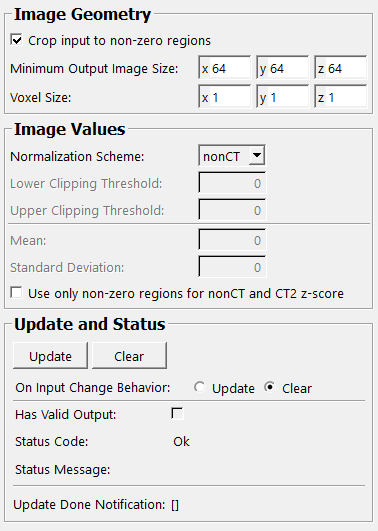
Input Fields
inImage
- name: inImage, type: Image, deprecated name: input0
Image to be preprocessed (and then to be fed into a trained nnU-Net model)
Output Fields
outImage
- name: outImage, type: Image, deprecated name: output0
Preprocessed image that can be fed into a trained nnU-Net model.
outImageWithoutPadding
Parameter Fields
Field Index
|
|
|
|
|
|
|
||
|
|
|
|
|
|
|
|
|
|
|
|
|
Visible Fields
Update
- name: update, type: Trigger
Initiates update of all output field values.
Clear
- name: clear, type: Trigger
Clears all output field values to a clean initial state.
On Input Change Behavior
- name: onInputChangeBehavior, type: Enum, default: Clear, deprecated name: shouldAutoUpdate,shouldUpdateAutomatically
Declares how the module should react if a value of an input field changes.
Values:
Title |
Name |
Deprecated Name |
|---|---|---|
Update |
Update |
TRUE |
Clear |
Clear |
FALSE |
[]
- name: updateDone, type: Trigger, persistent: no
Notifies that an update was performed (Check status interface fields to identify success or failure).
Has Valid Output
- name: hasValidOutput, type: Bool, persistent: no
Indicates validity of output field values (success of computation).
Status Code
- name: statusCode, type: Enum, persistent: no
Reflects module’s status (successful or failed computations) as one of some predefined enumeration values.
Values:
Title |
Name |
|---|---|
Ok |
Ok |
Invalid input object |
Invalid input object |
Invalid input parameter |
Invalid input parameter |
Internal error |
Internal error |
Status Message
- name: statusMessage, type: String, persistent: no
Gives additional, detailed information about status code as human-readable message.
Crop input to non-zero regions
Use only non-zero regions for nonCT and CT2 z-score
- name: inUseNonZeroRegionForZScore, type: Bool, default: FALSE
If true, only non-zero voxels (AFTER normalizing image values regarding DICOM Rescale Intercept and Slope) are considered when computing mean and standard deviation for z scoring (in nonCT and CT2 z-score normalization mode).
Minimum Output Image Size
- name: inMinimumOutImageSize, type: IntVector3, default: 64 64 64, deprecated name: inPatchSize
Desired minimum output image size. Should be equals to the patch size of the neural network applied later on.
Voxel Size
- name: inVoxelSize, type: Vector3, default: 1 1 1
Desired output voxel size.
Normalization Scheme
- name: inNormalizationScheme, type: Enum, default: nonCT
Scheme by which image values are normalized.
Values:
Title |
Name |
Description |
|---|---|---|
CT |
CT |
Normalize by z-scoring with |
CT2 |
CT2 |
Normalize by clipping with |
nonCT |
nonCT |
Normalize by z-scoring with mean and standard deviation of input. |
none |
none |
Do not normalize. |
Lower Clipping Threshold
- name: inLowerClippingThreshold, type: Double, default: 0
Threshold below which image values are clipped if
Normalization Schemeis CT or CT2.
Upper Clipping Threshold
- name: inUpperClippingThreshold, type: Double, default: 0
Threshold above which image values are clipped if
Normalization Schemeis CT or CT2.
Mean
- name: inMean, type: Double, default: 0
Value that is subtracted from the image if
Normalization Schemeis CT.
Standard Deviation
- name: inStandardDeviation, type: Double, default: 0
Value by which the image is divided if
Normalization Schemeis CT.