AddNoise
- MLModule
genre
author
package
dll
definition
keywords
uniform,gaussian,white,random,disturbance,inhomogeneity,testing,segmentation,gray,gaussian,speckle,salt,pepper,checkerboard
Purpose
The AddNoise module produces noise from various distributions.
Usage
Connect an image, choose a distribution, and set the parameters. Note that only scalar input images are currently supported, i.e., adding noise to vector or tensor images is not supported.
Details
Random numbers are generated using the boost library and the lagged_fibonacci607 random number generator. The following noise distributions are available:
Uniform |
Adds uniformly distributed noise to the image: I = I + noise |
Gaussian |
Adds Gaussian noise of mean m and variance v to the image: I = I + noise |
Gaussian DTI |
Adds complex Gaussian noise of variance v to the MR signal |
Salt & Pepper |
Adds salt and pepper noise to the image (intensity=amplitude or amplitude2 for density*100% of the voxels): I = I + noise |
Speckle |
Adds multiplicative noise (Gaussian white noise of variance v) to the image: I = I + I*noise |
Tips
If just a noise image is desired, produce a constant image with the ConstantImage module and attach it to the AddNoise module.
Windows
Default Panel
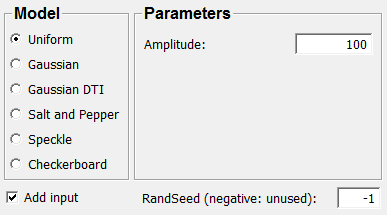
Input Fields
A scalar image volume. Vector and tensor images are not yet supported.
input0
- name: input0, type: Image
Output Fields
A noisy image.
output0
- name: output0, type: Image
Parameter Fields
Field Index
|
|
|
|
|
|
|
|
|
|
|
|
|
|
|
Visible Fields
Gray Value 1 (Salt)
- name: amplitude, type: Float, default: 100
Add Input
- name: addInput, type: Bool, default: TRUE
If checked, the voxel values of the input image are being added to the output (noise) voxel values.
RandSeed (negative: unused)
- name: randSeed, type: Integer, default: -1
Sets the seed for the random number generator.
If a negative number is selected, a seed is chosen based on the current time.
Noise Type
- name: noiseType, type: Enum, default: Uniform
Defines the type of noise that is being generated.
Values:
Title |
Name |
Description |
||||||
|---|---|---|---|---|---|---|---|---|
Gaussian |
Gaussian |
|
||||||
Gaussian Dti |
GaussianDti |
|
||||||
Salt Pepper |
SaltPepper |
|
||||||
Speckle |
Speckle |
|
||||||
Checkerboard |
Checkerboard |
Mean Value
- name: mean, type: Float, default: 0
sigma (additive)
- name: sigma, type: Float, default: 1
sigma (input image)
- name: sigmaIn, type: Float, default: 0
sigma (output image)
- name: sigmaOut, type: Float, default: 0
Gray Value 2 (Pepper)
- name: amplitude2, type: Float, default: 100
Density
- name: density, type: Float, default: 0.050000001