Arithmetic0
- MLModule
author
package
dll
definition
see also
keywords
add,subtract,multiply,divide,vector,Vector3,exp,log,root,sqrt,sin,cos,tan,arccos,arcsin,arctan,logic,and,or,xor,DICOM,dicom,time,date,duration,diff,relative,error,growth,conversion,effective,diameter,ml,mm,volume
Purpose
The module Arithmetic0 performs arithmetic operations on one or two scalar or vec3 arguments. Some modes for the DICOM types date and time related to long integers are also available.
There is no input or output image. It provides a simple substitute for SoCalculator, useful, e.g., in cases where you want easier-to-understand networks, where Open Inventor modules should not be used (i.e., for networks to be integrated in a non-Open Inventor environment), or where the delayed evaluation and/ or multiple notifications from SoCalculator cause problems or simply for new users who might find SoCalculator somewhat difficult to use.
Some special operations are implemented to handle temporal information in the formats usually encountered in DICOM tags, a functionality not easily implemented without scripting.
Warning
Please note that careless or excessive use of this module in place of scripted field arithmetic is likely to produce notification avalanches in more complex networks, resulting in many unintended recomputations of results that might slow down your network considerably!
Usage
Select the arithmetic operation you want to apply to the one or two arguments required by the operation.
Windows
Default Panel
Parameter Fields
Field Index
|
|
|
|
|
|
|
|
|
|
|
|
|
|
|
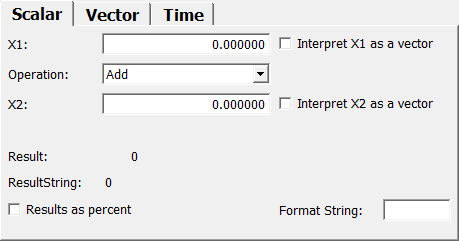
Input and result arguments are implemented as vec3 Fields; however, since MeVisLab fields can be connected to fields of different type, you may simply connect any scalar field or small vector to the vec3 inputs (Argument 1 and Argument 2 fields) or from the vec3 result field, and should usually get the desired result. For ease of usage, the first component of each vector is also provided in a related scalar field. In order to do things like scalar multiplication of a vector the fields arg1/2XAsVec can be used.
If these are true, a value argNX = x will be used like the vector (x,x,x) rather than (x,0,0) which is the default. Beware: When connecting a vector to one of the scalar fields only the vectors x component is used.
The components of the result is also given in separate fields; to enable easier usage in cases where a single scalar result will be used, e.g., in a macro GUI.
In case of operations dealing with time and or date, the result will in addition be given as a ResultString usable, e.g., in GUI fields, annotations, or filenames.
For other operations, the resultString contains the integer part of the vector components separated by “,” or only the first vector component if the other two are zero.
This feature again is intended for use in annotations or filenames. The resultString is available under the TimeAndDate tab only.
Visible Fields
Argument 1
- name: arg1, type: Vector3, default: 0 0 0
Sets a first scalar argument.
Date
- name: arg1X, type: Double, default: 0
Sets a first argument of type Date.
Interpret X1 as a vector
- name: arg1XAsVec, type: Bool, default: FALSE
If checked, the
Argument 1is interpreted as a 3D vector with all the same entries.
Operation
- name: operation, type: Enum, default: Add
Defines the operation on
Argument 1(andArgument 2).
Values:
Title |
Name |
|---|---|
#Basic Two Arg Ops# |
#BasicTwoArgOps# |
Add |
Add |
Subtract |
Subtract |
Multiply |
Multiply |
Divide |
Divide |
Int Divide |
IntDivide |
Int Modulo |
IntModulo |
Min |
Min |
Max |
Max |
Abs Min |
AbsMin |
Abs Max |
AbsMax |
Power |
Power |
Root |
Root |
Add Half |
AddHalf |
Subtract Half |
SubtractHalf |
#Basic One Arg Ops# |
#BasicOneArgOps# |
Abs |
Abs |
Square |
Square |
Square Root |
SquareRoot |
Signum |
Signum |
Invert |
Invert |
Negative |
Negative |
exp |
exp |
Log2 |
Log2 |
Log |
Log |
Log10 |
Log10 |
Sin |
Sin |
Cos |
Cos |
Tan |
Tan |
Arc Sin |
ArcSin |
Arc Cos |
ArcCos |
Arc Tan |
ArcTan |
Rad To Deg |
RadToDeg |
Deg To Rad |
DegToRad |
Floor |
Floor |
Round |
Round |
Ceil |
Ceil |
Log Round |
LogRound |
#Special Two Arg Ops# |
#SpecialTwoArgOps# |
Arc Tan2 |
ArcTan2 |
Average |
Average |
Rel Error |
RelError |
Growth Rate |
GrowthRate |
Time Diff Sec |
TimeDiffSec |
Time Diff Min |
TimeDiffMin |
Time Diff Hour |
TimeDiffHour |
#Special One Arg Ops# |
#SpecialOneArgOps# |
Time Split |
TimeSplit |
Date Split |
DateSplit |
Date And Time |
DateAndTime |
Anonymized Date |
AnonymizedDate |
Volume To Eff Diameter |
VolumeToEffDiameter |
Eff Diameter To Volume |
EffDiameterToVolume |
#Logical Ops# |
#LogicalOps# |
Equal |
Equal |
Greater |
Greater |
Smaller |
Smaller |
Greater Or Eq |
GreaterOrEq |
Smaller Or Eq |
SmallerOrEq |
And |
And |
Or |
Or |
Xor |
Xor |
Bitwise And |
BitwiseAnd |
Bitwise Or |
BitwiseOr |
Bitwise Xor |
BitwiseXor |
First Arg |
FirstArg |
Second Arg |
SecondArg |
#One Vector Ops# |
#OneVectorOps# |
Length |
Length |
Norm1 |
Norm1 |
Max Norm |
MaxNorm |
Normalize |
Normalize |
Component Product |
ComponentProduct |
Component Sum |
ComponentSum |
#Two Vector Ops# |
#TwoVectorOps# |
Dot Product |
DotProduct |
Cos Angle |
CosAngle |
Rad Angle |
RadAngle |
Deg Angle |
DegAngle |
Cross Product |
CrossProduct |
Normalized Cross Prod. |
NormalizedCrossProd. |
Argument 2
- name: arg2, type: Vector3, default: 0 0 0
Sets a second scalar argument.
Time/Date2
- name: arg2X, type: Double, default: 0
Sets a second argument of type Date.
Interpret X2 as a vector
- name: arg2XAsVec, type: Bool, default: FALSE
If checked, the
Argument 2is being interpreted as a 3D vector with all the same entries.
Results As Percent
- name: resultsAsPercent, type: Bool, default: FALSE
If checked, the result string is appended by a percent sign.
Format String
- name: formatString, type: String
Sets a formatting string for
ResultStringin C-style.
Result Vec.
- name: result, type: Vector3, persistent: no
Shows the result of the vector operation.
X
- name: resultX, type: Double, persistent: no
Shows the result of the scalar operation or the first component of the vector result.
Y
- name: resultY, type: Double, persistent: no
Shows the second component of the result of the vector operation.
Z
- name: resultZ, type: Double, persistent: no
Shows the third component of the result of the vector operation.
ResultString
- name: resultString, type: String, persistent: no
Shows the result as a formatted string. Use the
Format String.Warning
If
Format Stringis empty, the value will be printed as an integer, with the digits after the decimal point truncated; no rounding will occur in this case.