CloneImageAsEmptyImage
- MacroModule
author
package
definition
see also
Purpose
The module CloneImageAsEmptyImage clones an input image in most of the important aspects and fills it with the image’s minimum value.
The module does not clone the DICOM tree or the c-, t- , or u-dimension info vectors.
Use this module to create a clone of a large image for network exchange if the actual image content is not important.
Usage
Connect an image to the module’s input, press Clone.
The image input can be disconnected now and the network containing this module can be saved. On reopening the network, this module generates an empty image with the same properties as the previously cloned image.
If an example network should be exchanged and the used images are too large and their content is not important, use this module to provide a comparable input for the consumer modules.
Windows
Default Panel
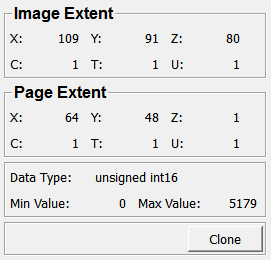
Input Fields
input0
- name: input0, type: Image
Output Fields
output0
- name: output0, type: Image
Parameter Fields
Field Index
|
|
|
|
|
|
|
|
|
|
|
|
|
|
|
|
|
|
|
|
|
|
|
Visible Fields
X (imageSizeX)
- name: imageSizeX, type: Integer, default: 128, minimum: 1, maximum: 1.07374e+09
Shows the image’s extent in the x-dimension.
Y (imageSizeY)
- name: imageSizeY, type: Integer, default: 128, minimum: 1, maximum: 1.07374e+09
Shows the image’s extent in the y-dimension.
Z (imageSizeZ)
- name: imageSizeZ, type: Integer, default: 128, minimum: 1, maximum: 1.07374e+09
Shows the image’s extent in the z-dimension.
C (imageSizeC)
- name: imageSizeC, type: Integer, default: 1, minimum: 1, maximum: 1.07374e+09
Shows the image’s extent in the c-dimension.
T (imageSizeT)
- name: imageSizeT, type: Integer, default: 1, minimum: 1, maximum: 1.07374e+09
Shows the image’s extent in the t-dimension.
U (imageSizeU)
- name: imageSizeU, type: Integer, default: 1, minimum: 1, maximum: 1.07374e+09
Shows the image’s extent in the u-dimension.
X (pageSizeX)
- name: pageSizeX, type: Integer, default: 64
Shows the image’s page extent in the x-dimension.
Y (pageSizeY)
- name: pageSizeY, type: Integer, default: 64
Shows the image’s page extent in the y-dimension.
Z (pageSizeZ)
- name: pageSizeZ, type: Integer, default: 1
Shows the image’s page extent in the z-dimension.
C (pageSizeC)
- name: pageSizeC, type: Integer, default: 1
Shows the image’s page extent in the c-dimension.
T (pageSizeT)
- name: pageSizeT, type: Integer, default: 1
Shows the image’s page extent in the t-dimension.
U (pageSizeU)
- name: pageSizeU, type: Integer, default: 1
Shows the image’s page extent in the u-dimension.
Data Type
- name: dataType, type: Enum, default: float
Shows the image’s data type.
Values:
Title |
Name |
|---|---|
int8 |
int8 |
unsigned int8 |
unsigned int8 |
int16 |
int16 |
unsigned int16 |
unsigned int16 |
int32 |
int32 |
unsigned int32 |
unsigned int32 |
float |
float |
double |
double |
int64 |
int64 |
unsigned int64 |
unsigned int64 |
complexf |
complexf |
complexd |
complexd |
quaternionf |
quaternionf |
quaterniond |
quaterniond |
vecf2 |
vecf2 |
vec2 |
vec2 |
vecf3 |
vecf3 |
vec3 |
vec3 |
vecf4 |
vecf4 |
vec4 |
vec4 |
vecf5 |
vecf5 |
vec5 |
vec5 |
vecf6 |
vecf6 |
vec6 |
vec6 |
vecf7 |
vecf7 |
vec7 |
vec7 |
vecf8 |
vecf8 |
vec8 |
vec8 |
vecf9 |
vecf9 |
vec9 |
vec9 |
vecf10 |
vecf10 |
vec10 |
vec10 |
vecf16 |
vecf16 |
vec16 |
vec16 |
vecf32 |
vecf32 |
vec32 |
vec32 |
vecf64 |
vecf64 |
vec64 |
vec64 |
matf2 |
matf2 |
mat2 |
mat2 |
matf3 |
matf3 |
mat3 |
mat3 |
matf4 |
matf4 |
mat4 |
mat4 |
matf5 |
matf5 |
mat5 |
mat5 |
matf6 |
matf6 |
mat6 |
mat6 |
Vector2i8 |
Vector2i8 |
Vector2i16 |
Vector2i16 |
Vector2i32 |
Vector2i32 |
Vector2i64 |
Vector2i64 |
Vector3i8 |
Vector3i8 |
Vector3i16 |
Vector3i16 |
Vector3i32 |
Vector3i32 |
Vector3i64 |
Vector3i64 |
Vector4i8 |
Vector4i8 |
Vector4i16 |
Vector4i16 |
Vector4i32 |
Vector4i32 |
Vector4i64 |
Vector4i64 |
Vector5i8 |
Vector5i8 |
Vector5i16 |
Vector5i16 |
Vector5i32 |
Vector5i32 |
Vector5i64 |
Vector5i64 |
Vector6i8 |
Vector6i8 |
Vector6i16 |
Vector6i16 |
Vector6i32 |
Vector6i32 |
Vector6i64 |
Vector6i64 |
Vector7i8 |
Vector7i8 |
Vector7i16 |
Vector7i16 |
Vector7i32 |
Vector7i32 |
Vector7i64 |
Vector7i64 |
Vector8i8 |
Vector8i8 |
Vector8i16 |
Vector8i16 |
Vector8i32 |
Vector8i32 |
Vector8i64 |
Vector8i64 |
Vector9i8 |
Vector9i8 |
Vector9i16 |
Vector9i16 |
Vector9i32 |
Vector9i32 |
Vector9i64 |
Vector9i64 |
Vector10i8 |
Vector10i8 |
Vector10i16 |
Vector10i16 |
Vector10i32 |
Vector10i32 |
Vector10i64 |
Vector10i64 |
Vector16i8 |
Vector16i8 |
Vector16i16 |
Vector16i16 |
Vector16i32 |
Vector16i32 |
Vector16i64 |
Vector16i64 |
Vector32i8 |
Vector32i8 |
Vector32i16 |
Vector32i16 |
Vector32i32 |
Vector32i32 |
Vector32i64 |
Vector32i64 |
Vector64i8 |
Vector64i8 |
Vector64i16 |
Vector64i16 |
Vector64i32 |
Vector64i32 |
Vector64i64 |
Vector64i64 |
Min Value
- name: minValue, type: Double, default: 0
Shows the image’s minimum value.
This value is used to fill up the output image.
Max Value
- name: maxValue, type: Double, default: 1
Shows the image’s maximum value.
Clone
- name: clone, type: Trigger
When pressed, the input image is clone in its most important aspects.
If the module’s input is not connected, no value is changed and an information string is printed to the debug console of MeVisLab.