ColorTable
Purpose
The module ColorTable generates color images with a pre- or user defined color table.
Usage
Select a predefined color table or define a color gradient by choosing a first and a last color of the color list, or enter values for user defined colors. It is also possible to scale the resulting color table with scaling factors.
Windows
Default Panel
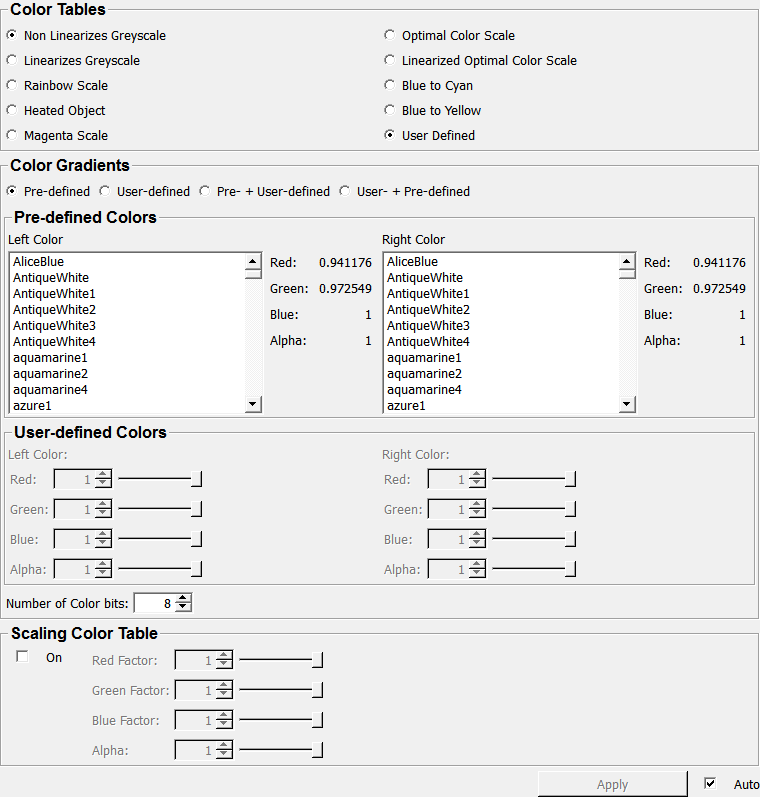
Output Fields
output0
- name: output0, type: Image
An ML image with the set color table.
outputLUT
- name: outputLUT, type: SoNode
A LUT defined by this module.
Parameter Fields
Field Index
|
|
|
|
|
|
|
|
|
|
|
|
|
|
|
|
|
|
|
|
|
|
|
|
|
|
|
|
|
|
Visible Fields
Color Table Select
- name: colorTableSelect, type: Enum, default: UserDefined
Defines a predefined color table.
Values:
Title |
Name |
|---|---|
Non Linearizes Greyscale |
NonLinearizesGreyscale |
Linearizes Greyscale |
LinearizesGreyscale |
Rainbow Scale |
RainbowScale |
Heated Object |
HeatedObject |
Magenta Scale |
MagentaScale |
Optimal Color Scale |
OptimalColorScale |
Linearized Optimal Color Scale |
LinearizedOptimalColorScale |
Blue To Cyan |
BlueToCyan |
Blue To Yellow |
BlueToYellow |
User Defined |
UserDefined |
Define Select
- name: defineSelect, type: Enum, default: PreDefinedColors
Defines which colors are used to defined the color table.
Values:
Title |
Name |
Description |
|---|---|---|
Pre Defined Colors |
PreDefinedColors |
Use the predefined colors in |
Self Defined Colors |
SelfDefinedColors |
Use self-defined colors. |
Pre And Self Defined |
PreAndSelfDefined |
Use a predefined color on the left hand side of the spectrum and a user defined color on the right hand side. |
Self And Pre Defined |
SelfAndPreDefined |
Use a user defined color on the left hand side of the spectrum and a predefined color on the right hand side. |
Color Left
- name: colorLeft, type: String, persistent: no
Sets the left color of the gradient.
Color Right
- name: colorRight, type: String, persistent: no
Sets the right color of the gradient.
Red (redLeft)
- name: redLeft, type: Float, default: 1, minimum: 0, maximum: 1
Sets the red channel value of the left gradient color.
Green (greenLeft)
- name: greenLeft, type: Float, default: 1, minimum: 0, maximum: 1
Sets the green channel value of the left gradient color.
Blue (blueLeft)
- name: blueLeft, type: Float, default: 1, minimum: 0, maximum: 1
Sets the blue channel value of the left gradient color.
Alpha (alphaLeft)
- name: alphaLeft, type: Float, default: 1, minimum: 0, maximum: 1
Sets the alpha channel value of the left gradient color.
Red (redRight)
- name: redRight, type: Float, default: 1, minimum: 0, maximum: 1
Sets the red channel value of the right gradient color.
Green (greenRight)
- name: greenRight, type: Float, default: 1, minimum: 0, maximum: 1
Sets the green channel value of the right gradient color.
Blue (blueRight)
- name: blueRight, type: Float, default: 1, minimum: 0, maximum: 1
Sets the blue channel value of the right gradient color.
Alpha (alphaRight)
- name: alphaRight, type: Float, default: 1, minimum: 0, maximum: 1
Sets the alpha channel value of the right gradient color.
Red (redLeftPreDef)
- name: redLeftPreDef, type: Float, default: 0.94117647
Sets the red channel value of the left predefined color.
Green (greenLeftPreDef)
- name: greenLeftPreDef, type: Float, default: 0.97254902
Sets the green channel value of the left predefined color.
Blue (blueLeftPreDef)
- name: blueLeftPreDef, type: Float, default: 1
Sets the blue channel value of the left predefined color.
Alpha (alphaLeftPreDef)
- name: alphaLeftPreDef, type: Float, default: 1
Sets the alpha channel value of the left predefined color.
Red (redRightPreDef)
- name: redRightPreDef, type: Float, default: 0.94117647
Sets the red channel value of the right predefined color.
Green (greenRightPreDef)
- name: greenRightPreDef, type: Float, default: 0.97254902
Sets the green channel value of the right predefined color.
Blue (blueRightPreDef)
- name: blueRightPreDef, type: Float, default: 1
Sets the blue channel value of the right predefined color.
Alpha (alphaRightPreDef)
- name: alphaRightPreDef, type: Float, default: 1
Sets the alpha channel value of the right predefined color.
Factorize
- name: factorize, type: Bool, default: FALSE
If checked, the color values can be scaled.
Red Factor
- name: redFactor, type: Float, default: 1, minimum: 0, maximum: 1
Sets the scaling factor for the red channel.
Green Factor
- name: greenFactor, type: Float, default: 1, minimum: 0, maximum: 1
Sets the scaling factor for the green channel.
Blue Factor
- name: blueFactor, type: Float, default: 1, minimum: 0, maximum: 1
Sets the scaling factor for the blue channel.
Alpha (alphaFactor)
- name: alphaFactor, type: Float, default: 1, minimum: 0, maximum: 1
Sets the scaling factor for the alpha channel.
Number of Color bits
- name: numberOfElements, type: Integer, default: 8, minimum: 1, maximum: 16
Sets the number of color bits.
Apply
- name: apply, type: Trigger
When pressed, the current settings are applied.
Auto Apply
- name: autoApply, type: Bool, default: TRUE
If checked, the changing of any setting triggers an updated of the output.