GenerateImageForBoundingBox
- MLModule
author
package
dll
definition
see also
keywords
Purpose
The module GenerateImageForBoundingBox generates an ML image that is fully enclosed within an axis-aligned bounding box.
The bounding box can be set directly through fields or obtained from an attached Open Inventor scene.
Details
The resulting image is empty and all voxel values are set to 0.
If any component of the voxel size, image extent, or user-set bounding box is invalid, the output image will be invalid. Additionally, the user-set bounding box becomes invalid if a negative margin is set, resulting in an empty bounding box, which will also invalidate the output image.
If the input Open Inventor bounding box is empty, the output image is invalid.
Windows
Default Panel
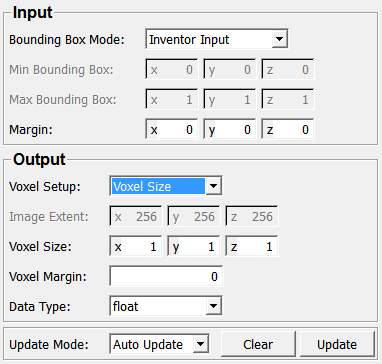
Input Fields
inputInventorScene
- name: inputInventorScene, type: SoNode
Output Fields
output0
- name: output0, type: Image
Parameter Fields
Field Index
|
|
|
|
|
|
|
|
|
|
|
|
|
|
|
Visible Fields
Bounding Box Mode
- name: boundingBoxMode, type: Enum, default: InventorInput
Defines how the bounding box is obtained.
Values:
Title |
Name |
Description |
|---|---|---|
Inventor Input |
InventorInput |
The bounding box is obtained from the input Open Inventor scene. Note: you have to press |
Bounding Box Fields |
BoundingBoxFields |
The bounding box is defined by the |
Min Bounding Box
- name: minBoundingBox, type: Vector3, default: 0 0 0
Sets the minimum corner of the bounding box.
Max Bounding Box
- name: maxBoundingBox, type: Vector3, default: 1 1 1
Sets the maximum corner of the bounding box.
Margin
- name: margin, type: Vector3, default: 0 0 0
Sets a margin by extending the input bounding box by this value (minimum and maximum).
Voxel Setup
- name: voxelSetup, type: Enum, default: VoxelSize
Defines how the image extent and the voxel size of the output image is defined.
Values:
Title |
Name |
Description |
|---|---|---|
Image Extent |
ImageExtent |
Sets the image extent explicitly and the voxel size is computed. |
Voxel Size |
VoxelSize |
Sets the voxel size explicitly and the image extent is computed. |
Image Extent
- name: imageExtent, type: Vector3, default: 256 256 256
Sets the image extent.
Voxel Size
- name: voxelSize, type: Vector3, default: 1 1 1
Sets the voxel size.
Voxel Margin
- name: voxelMargin, type: Integer, default: 0, minimum: 0
Sets a margin in voxels for the output image.
Data Type
- name: dataType, type: Enum, default: float
Defines the data type of the output image.
Values:
Title |
Name |
|---|---|
int8 |
int8 |
unsigned int8 |
unsigned int8 |
int16 |
int16 |
unsigned int16 |
unsigned int16 |
int32 |
int32 |
unsigned int32 |
unsigned int32 |
float |
float |
double |
double |
int64 |
int64 |
unsigned int64 |
unsigned int64 |
complexf |
complexf |
complexd |
complexd |
quaternionf |
quaternionf |
quaterniond |
quaterniond |
vecf2 |
vecf2 |
vec2 |
vec2 |
vecf3 |
vecf3 |
vec3 |
vec3 |
vecf4 |
vecf4 |
vec4 |
vec4 |
vecf5 |
vecf5 |
vec5 |
vec5 |
vecf6 |
vecf6 |
vec6 |
vec6 |
vecf7 |
vecf7 |
vec7 |
vec7 |
vecf8 |
vecf8 |
vec8 |
vec8 |
vecf9 |
vecf9 |
vec9 |
vec9 |
vecf10 |
vecf10 |
vec10 |
vec10 |
vecf16 |
vecf16 |
vec16 |
vec16 |
vecf32 |
vecf32 |
vec32 |
vec32 |
vecf64 |
vecf64 |
vec64 |
vec64 |
matf2 |
matf2 |
mat2 |
mat2 |
matf3 |
matf3 |
mat3 |
mat3 |
matf4 |
matf4 |
mat4 |
mat4 |
matf5 |
matf5 |
mat5 |
mat5 |
matf6 |
matf6 |
mat6 |
mat6 |
Vector2i8 |
Vector2i8 |
Vector2i16 |
Vector2i16 |
Vector2i32 |
Vector2i32 |
Vector2i64 |
Vector2i64 |
Vector3i8 |
Vector3i8 |
Vector3i16 |
Vector3i16 |
Vector3i32 |
Vector3i32 |
Vector3i64 |
Vector3i64 |
Vector4i8 |
Vector4i8 |
Vector4i16 |
Vector4i16 |
Vector4i32 |
Vector4i32 |
Vector4i64 |
Vector4i64 |
Vector5i8 |
Vector5i8 |
Vector5i16 |
Vector5i16 |
Vector5i32 |
Vector5i32 |
Vector5i64 |
Vector5i64 |
Vector6i8 |
Vector6i8 |
Vector6i16 |
Vector6i16 |
Vector6i32 |
Vector6i32 |
Vector6i64 |
Vector6i64 |
Vector7i8 |
Vector7i8 |
Vector7i16 |
Vector7i16 |
Vector7i32 |
Vector7i32 |
Vector7i64 |
Vector7i64 |
Vector8i8 |
Vector8i8 |
Vector8i16 |
Vector8i16 |
Vector8i32 |
Vector8i32 |
Vector8i64 |
Vector8i64 |
Vector9i8 |
Vector9i8 |
Vector9i16 |
Vector9i16 |
Vector9i32 |
Vector9i32 |
Vector9i64 |
Vector9i64 |
Vector10i8 |
Vector10i8 |
Vector10i16 |
Vector10i16 |
Vector10i32 |
Vector10i32 |
Vector10i64 |
Vector10i64 |
Vector16i8 |
Vector16i8 |
Vector16i16 |
Vector16i16 |
Vector16i32 |
Vector16i32 |
Vector16i64 |
Vector16i64 |
Vector32i8 |
Vector32i8 |
Vector32i16 |
Vector32i16 |
Vector32i32 |
Vector32i32 |
Vector32i64 |
Vector32i64 |
Vector64i8 |
Vector64i8 |
Vector64i16 |
Vector64i16 |
Vector64i32 |
Vector64i32 |
Vector64i64 |
Vector64i64 |
Update Mode
- name: updateMode, type: Enum, default: Off
Defines the update mode of this module.
Values:
Title |
Name |
Description |
|---|---|---|
Off |
Off |
The output image is left unchanged on any parameter change. |
Auto Update |
AutoUpdate |
The output image is updated on any parameter change. |
Auto Clear |
AutoClear |
The output image is invalidated on any parameter change. |
Update
- name: update, type: Trigger
When pressed, the module computes a new output image.
Clear
- name: clear, type: Trigger
When pressed, the output image is cleared.