GetVoxelValue
- MLModule
genre
author
package
dll
definition
see also
keywords
Purpose
The module GetVoxelValue gets the value of an input image to a corresponding world or voxel coordinate.
The value is written into a field, so it can be used in a network.
Windows
Default Panel
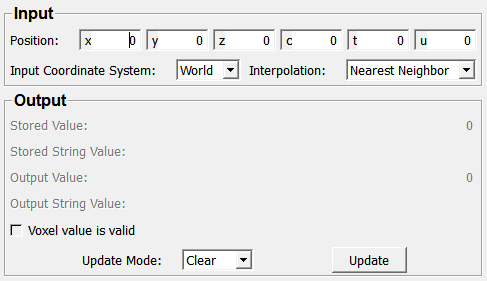
Input Fields
input0
- name: input0, type: Image
Parameter Fields
Field Index
|
|
|
|
|
|
|
|
|
|
|
|
|
|
|
Visible Fields
Position
- name: position, type: Vector6, default: 0 0 0 0 0 0, deprecated name: worldCoordinateInput
Sets the position that is interpreted according to
Input Coordinate System.
Stored Value
- name: storedValue, type: Double, persistent: no, deprecated name: voxelDoubleValue
Shows the actual image value at the given position.
Stored String Value
- name: storedStringValue, type: String, persistent: no, deprecated name: voxelStringValue
Shows the actual image value at the given position as a string.
Voxel value is valid
- name: valid, type: Bool, persistent: no, deprecated name: voxelValueValid
Shows whether the output fields are valid.
Update Mode
- name: updateMode, type: Enum, default: AutoClear
Defines the update mode of this module.
Values:
Title |
Name |
Deprecated Name |
Description |
|---|---|---|---|
Clear |
AutoClear |
Off |
Nothing happens if the input or any field changes. |
Update |
AutoUpdate |
The output fields are computed anew on any field or input image change. |
Output Value
- name: outputValue, type: Double, persistent: no
Shows the medical image value at the given position. This means that the DICOM Rescale/Slope of the input image are applied to the image value.
Output String Value
- name: outputStringValue, type: String, persistent: no
Shows the medical image value at the given position as a string. This means that the DICOM Rescale/Slope of the input image are applied to the image value.
Input Coordinate System
- name: coordinateType, type: Enum, default: World
Defines the coordinate system the
Positionis interpreted in.
Values:
Title |
Name |
|---|---|
World |
World |
Voxel |
Voxel |
Update
- name: update, type: Trigger, deprecated name: updateButton
When pressed, the module computes anew.
Interpolation
- name: interpolation, type: Enum, default: NearestNeighbor
Defines the used interpolation.
Values:
Title |
Name |
Description |
|---|---|---|
Nearest Neighbor |
NearestNeighbor |
Selects the nearest voxel value and does not interpolate. |
Trilinear |
Trilinear |
Calculates the result value using trilinear interpolation on eight neighboring voxels. At the borders, it clamps to the edges of the image. NOTE: Trilinear interpolation is currently supported only for scalar types. For non-scalar types, the module always uses nearest neighbor sampling. |