KeyCounter
- MacroModule
genre
author
package
definition
see also
keywords
Purpose
The module KeyCounter implements a numerical counter that can be incremented and decremented by pressing a key in a viewer.
It can be used to cycle through a number of application modes (e.g., mouse functions) in an application.
Windows
Default Panel
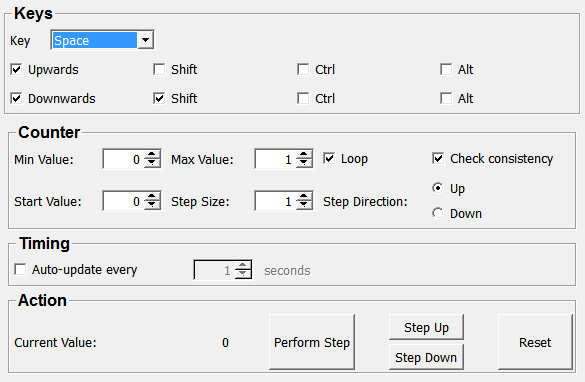
Output Fields
outNode
- name: outNode, type: SoNode, deprecated name: outputNode
Parameter Fields
Field Index
|
|
|
|
|
|
|
|
|
|
|
|
|
|
|
|
|
|
|
|
|
|
|
Visible Fields
Key
- name: key, type: Enum, default: SPACE, deprecated name: hotKey
Defines the key that controls the counter.
Values:
Title |
Name |
|---|---|
Any |
ANY |
Left Shift |
LEFT_SHIFT |
Right Shift |
RIGHT_SHIFT |
Left Control |
LEFT_CONTROL |
Right Control |
RIGHT_CONTROL |
Left Alt |
LEFT_ALT |
Right Alt |
RIGHT_ALT |
Number 0 |
NUMBER_0 |
Number 1 |
NUMBER_1 |
Number 2 |
NUMBER_2 |
Number 3 |
NUMBER_3 |
Number 4 |
NUMBER_4 |
Number 5 |
NUMBER_5 |
Number 6 |
NUMBER_6 |
Number 7 |
NUMBER_7 |
Number 8 |
NUMBER_8 |
Number 9 |
NUMBER_9 |
A |
A |
B |
B |
C |
C |
D |
D |
E |
E |
F |
F |
G |
G |
H |
H |
I |
I |
J |
J |
K |
K |
L |
L |
M |
M |
N |
N |
O |
O |
P |
P |
Q |
Q |
R |
R |
S |
S |
T |
T |
U |
U |
V |
V |
W |
W |
X |
X |
Y |
Y |
Z |
Z |
Home |
HOME |
Left Arrow |
LEFT_ARROW |
Up Arrow |
UP_ARROW |
Right Arrow |
RIGHT_ARROW |
Down Arrow |
DOWN_ARROW |
Page Up |
PAGE_UP |
Page Down |
PAGE_DOWN |
Prior |
PRIOR |
Next |
NEXT |
End |
END |
Pad Enter |
PAD_ENTER |
Pad F1 |
PAD_F1 |
Pad F2 |
PAD_F2 |
Pad F3 |
PAD_F3 |
Pad F4 |
PAD_F4 |
Pad 0 |
PAD_0 |
Pad 1 |
PAD_1 |
Pad 2 |
PAD_2 |
Pad 3 |
PAD_3 |
Pad 4 |
PAD_4 |
Pad 5 |
PAD_5 |
Pad 6 |
PAD_6 |
Pad 7 |
PAD_7 |
Pad 8 |
PAD_8 |
Pad 9 |
PAD_9 |
Pad Add |
PAD_ADD |
Pad Subtract |
PAD_SUBTRACT |
Pad Multiply |
PAD_MULTIPLY |
Pad Divide |
PAD_DIVIDE |
Pad Space |
PAD_SPACE |
Pad Tab |
PAD_TAB |
Pad Insert |
PAD_INSERT |
Pad Delete |
PAD_DELETE |
Pad Period |
PAD_PERIOD |
F1 |
F1 |
F2 |
F2 |
F3 |
F3 |
F4 |
F4 |
F5 |
F5 |
F6 |
F6 |
F7 |
F7 |
F8 |
F8 |
F9 |
F9 |
F10 |
F10 |
F11 |
F11 |
F12 |
F12 |
Backspace |
BACKSPACE |
Tab |
TAB |
Return |
RETURN |
Enter |
ENTER |
Pause |
PAUSE |
Scroll Lock |
SCROLL_LOCK |
Escape |
ESCAPE |
Key Delete |
KEY_DELETE |
Num Lock |
NUM_LOCK |
Caps Lock |
CAPS_LOCK |
Shift Lock |
SHIFT_LOCK |
Space |
SPACE |
Apostrophe |
APOSTROPHE |
Comma |
COMMA |
Minus |
MINUS |
Period |
PERIOD |
Slash |
SLASH |
Semicolon |
SEMICOLON |
Equal |
EQUAL |
Bracketleft |
BRACKETLEFT |
Backslash |
BACKSLASH |
Bracketright |
BRACKETRIGHT |
Grave |
GRAVE |
Insert |
INSERT |
Right Super |
RIGHT_SUPER |
Left Super |
LEFT_SUPER |
Exclam |
EXCLAM |
Quotedbl |
QUOTEDBL |
Numbersign |
NUMBERSIGN |
Dollar |
DOLLAR |
Percent |
PERCENT |
Ampersand |
AMPERSAND |
Parenleft |
PARENLEFT |
Parenright |
PARENRIGHT |
Asterisk |
ASTERISK |
Plus |
PLUS |
Colon |
COLON |
Less |
LESS |
Greater |
GREATER |
Question |
QUESTION |
At |
AT |
Asciicircum |
ASCIICIRCUM |
Underscore |
UNDERSCORE |
Braceleft |
BRACELEFT |
Bar |
BAR |
Braceright |
BRACERIGHT |
Asciitilde |
ASCIITILDE |
Upwards
- name: upEnable, type: Bool, default: TRUE
If checked, pressing the defined key increases the counter value.
Shift (upShift)
- name: upShift, type: Bool, default: FALSE
If checked, pressing the SHIFT modifier increases the counter.
Ctrl (upCtrl)
- name: upCtrl, type: Bool, default: FALSE
If checked, pressing the CTRL modifier increases the counter.
Alt (upAlt)
- name: upAlt, type: Bool, default: FALSE
If checked, pressing the ALT modifier increases the counter.
Downwards
- name: downEnable, type: Bool, default: TRUE
If checked, pressing the defined key decreases the counter value.
Shift (downShift)
- name: downShift, type: Bool, default: TRUE
If checked, pressing the SHIFT modifier decreases the counter.
Ctrl (downCtrl)
- name: downCtrl, type: Bool, default: FALSE
If checked, pressing the CTRL modifier decreases the counter.
Alt (downAlt)
- name: downAlt, type: Bool, default: FALSE
If checked, pressing the ALT modifier decreases the counter.