LoadBase
- MLModule
genre
author
package
dll
definition
see also
keywords
Purpose
The module LoadBase loads a ml.Base-derived object from a file.
Tips
There are several possible reasons for the Error - Object could not be loaded message.
Usually, the reason is simply an incorrect file (such as a version conflict or something similar).
However, the message will also appear when you attempt to load (and thus create) objects of classes declared in a DLL that has not been loaded yet.
For example, you cannot load a CSOList object if the DLL MLCSO is not loaded. The solution is to add a module from that DLL to the network before pressing the “load” button.
Usually, there will be such a module in your network anyway, as you likely need it to process the object you want to load; therefore, this error will occur only rarely.
Windows
Default Panel
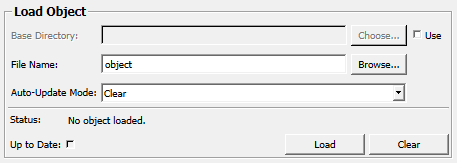
Output Fields
outObject
- name: outObject, type: MLBase, deprecated name: outputBaseObject
loaded object
Parameter Fields
Field Index
|
|
|
|
|
|
|
|
|
|
|
|
|
|
|
Visible Fields
&Clear
- name: clear, type: Trigger, deprecated name: delete,deleteObject
When pressed, the currently contained object is cleared.
This will be done automatically before loading a new object.
&Load
- name: load, type: Trigger, deprecated name: loadObject
When pressed, the current object is deleted from memory and then the specified object is loaded from disk.
Auto-Update Mode
- name: autoUpdate, type: Enum, default: AutoClear, deprecated name: autoLoad,autoLoadMode
Defines the update behavior of the module.
Values:
Title |
Name |
Deprecated Name |
Description |
|---|---|---|---|
Keep |
Off |
AutoUpdateModeDoNothing,FALSE |
The module does nothing on any field change. |
Clear |
AutoClear |
AutoUpdateModeAutoClear |
The module removes the current object and clears the output on any field change. |
Update |
AutoUpdate |
AutoUpdateModeAutoUpdate,TRUE |
The module removes the current object and loads the specified object from disk on any field change. |
Status
- name: status, type: String, persistent: no, deprecated name: currStatus
Shows status information about this module.
File Name
- name: filename, type: String, default: object, deprecated name: fileName
Sets the file name of the object.
Use
- name: useBaseDir, type: Bool, default: FALSE
If checked, the
Base Directoryis used as a base directory from where the file is loaded relatively.
Base Directory
- name: baseDir, type: String
Sets a base directory from where the file is loaded relatively.
Up to Date
- name: upToDate, type: Bool, persistent: no
Shows whether the output object is up-to-date.