Mask
- MLModule
genre
author
package
dll
definition
keywords
Purpose
The module Mask masks the image from input one with the mask from input two.
Details
Possible output values are the original image of the first input, the original image of the second input, the masked original image, the masked original image on white background, the original image masked with the inverted mask, or the original blended with the mask image.
The first input image must be of a scalar type for the three blending modes MaskOverOriginal, MaskInOriginal, or InvMaskInOriginal. For all other modes, the first input can also be of one of the default extended types: complex, vec2, vec3, vec6, mat2, or mat3.
The second input image must always be of a scalar type.
Note that the first input image data type is used internally; if the Blending value is a floating-point value (e.g., 1.3) and the first input image’s data type is integer, the resulting output image’s data type is also integer. The Blending value is effectively cast to integer as well, and the output image is simply the same as the first input image, as all voxels are effectively multiplied by 1.
Windows
Default Panel
Input Fields
input0
- name: input0, type: Image
input1
- name: input1, type: Image
Output Fields
output0
- name: output0, type: Image
Parameter Fields
Field Index
|
|
|
|
|
|
Visible Fields
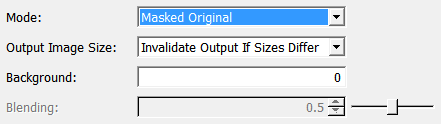
Mode
- name: mode, type: Enum, default: MaskedOriginal, deprecated name: MaskMode
Defines the masking algorithm.
Values:
Title |
Name |
Description |
|---|---|---|
Original |
Original |
The original image from the first input is passed to the output. |
Mask |
Mask |
The original image from the second input is passed to the output. |
Inv Mask |
InvMask |
The image from the second input is inverted and passed to the output. |
Masked Original |
MaskedOriginal |
Original where Mask is non-zero and All voxels from the first input are passed unchanged to the output if non-zero values are found at their positions in the second input image. Otherwise, |
Masked Original On White |
MaskedOriginalOnWhite |
All voxels from the first input are passed unchanged to the output if non-zero values are found at their positions in the second input image. Otherwise, the images’ maximum value is passed to the output. |
Masked Original Inv |
MaskedOriginalInv |
Original where mask values are zero and background value elsewhere. All voxels from the first input are passed unchanged to the output if zero values are found at their positions in the second input image. Otherwise, |
Mask Over Original |
MaskOverOriginal |
All mask voxels are blended with the original image with the given |
Mask In Original |
MaskInOriginal |
All non-zero mask voxels are blended with the original image with the given Original voxels at zero mask positions are not modified. |
Inv Mask In Original |
InvMaskInOriginal |
All voxels from the first input are passed unchanged to the output if non-zero values are found at their positions in the second input image. Otherwise, the voxels from the first input are multiplied with |
Inv Original |
InvOriginal |
All voxels from the input image are subtracted from the image maximum and the image minimum is added. So the values are flipped between image minimum and image maximum value which leads to a visible inversion. |
Output Image Size
- name: outputImageSize, type: Enum, default: InvalidateOutputIfSizesDiffer
Defines how the module reacts if the sizes of the input images differ.
Values:
Title |
Name |
Description |
|---|---|---|
Use Smallest Input |
UseSmallestInput |
The image and the page extent of the smallest input image is used for the output image. |
Invalidate Output If Sizes Differ |
InvalidateOutputIfSizesDiffer |
If the image extents of the input images differ, the output image is invalidated. |
Blending
Background
- name: background, type: Double, default: 0
Sets the background value used in various modes.
Select Type
- name: typeSelect, type: Enum, default: Automatic
Defines how to set the data type of the output image.
Values:
Title |
Name |
Description |
|---|---|---|
Automatic |
Automatic |
The output data type is determined automatically. The smallest possible data type is selected for the actual value range with the least precision loss. If the output image has a range from 0 to 1, float is used for its data type. |
Input Data Type |
Input Data Type |
The input image’s data type is used for the output image. |
UInt8 |
UInt8 |
|
Int8 |
Int8 |
|
UInt16 |
UInt16 |
|
Int16 |
Int16 |
|
UInt32 |
UInt32 |
|
Int32 |
Int32 |
|
Float |
Float |
|
Double |
Double |
|
UInt64 |
UInt64 |
|
Int64 |
Int64 |
Type
- name: outputType, type: String, persistent: no
Shows the data type of the output image.