So3DMarkerEditor
- InventorModule
author
package
dll
definition
see also
keywords
Purpose
The module So3DMarkerEditor displays markers in 3D and allows for interactively editing the markers.
If you do not want to interact with the markers, then the So3DMarkerRenderer provides
a faster alternative.
Usage
Since the module has an Open Inventor output, simply plug it into any kind of viewer. To synchronize the module with any other module that governs an XMarkerList, plug its output into the So3DMarkerEditor’s input.
If there should be interactive placement and editing of the markers, also plug the Open Inventor scene to work on into the corresponding module’s input. A StylePalette module can provide style information for the markers. At last, if there should be voxel position information displayed, make sure to connect a SoMLWorldToVoxel module to the matrix transformation input.
The most of the parameters available on the panel and the overall user interaction were designed to be as conform as possible with the user interface and usage of the well known SoView2DMarkerEditor.
Interaction
The interaction is supposed to be as close as possible to the 2D interaction. While having a 2D input and output device, the interaction in 3D has to be limited in some way. In this approach, we are limited to the surface of objects. However, with the options Edit 3D and Edit 3D vector checked, the markers can be moved in 3D along the x, y, or z axis.
The only draw mode that fully supports interaction is the Geometry mode.
Tips
If you are only interested in rendering many markers as spheres, then have a look at the SoPointSpriteRenderer and its example network.
Windows
Default Panel
Input Fields
stylePalette
- name: stylePalette, type: StylePalette(MLBase), deprecated name: inputStylePalette
Optional style palette for unified rendering styles.
inputNode
- name: inputNode, type: SoNode
Attach the Open Inventor scene on which picking should be performed to this input.
inputMatrixTransform
- name: inputMatrixTransform, type: SoNode
Optional input for a matrix to render the texts at the correct location.
inXMarkerList
- name: inXMarkerList, type: ListBase(MLBase), deprecated name: inputXMarkerList
The XMarkerList to interact with.
Output Fields
self
- name: self, type: SoNode
outXMarkerList
- name: outXMarkerList, type: XMarkerList(MLBase), deprecated name: outputXMarkerList
For accessing this object via scripting, see the Scripting Reference:
MLXMarkerListWrapper.
Parameter Fields
Field Index
Visible Fields
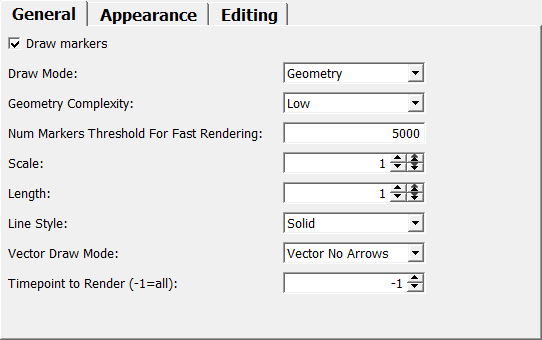
Scale
- name: scaleSize, type: Float, default: 1, minimum: 0, maximum: 10
Sets an overall scale factor for each marker.
Length
- name: scaleLength, type: Float, default: 1, minimum: 0, maximum: 100
Sets an overall scale factor for the vectors’ lengths.
Global Color
- name: color, type: Color, default: 1 1 1
Sets a global color if no
StylePaletteis used.
Ambient Color
- name: ambientColor, type: Color, default: 0 0 0
Sets the ambient color.
Specular Color
- name: specularColor, type: Color, default: 0.300000011920929 0.300000011920929 0.300000011920929
Sets the specular color.
Vector edit mode
- name: enableVector, type: Bool, default: FALSE
If checked, vector markers can be edited.
Click onto a 3D surface to place the first markers and without releasing the mouse button, drag on the surface to define the marker vector’s end point.
Draw markers
- name: drawingOn, type: Bool, default: TRUE
If checked, the markers are rendered in 3D.
Enable editing
- name: editingOn, type: Bool, default: TRUE
If checked, editing is possible.
Enable selection
- name: selectingOn, type: Bool, default: TRUE
If checked, the clicking on a set marker selects it.
Delete on click
- name: deleteOnClick, type: Bool, default: FALSE
If checked, the clicked marker is deleted on click.
Add on click
- name: addOnClick, type: Bool, default: TRUE
If checked, a new marker is added on clicking on a 3D surface.
Edit 3D
- name: edit3DOn, type: Bool, default: FALSE
If checked, the markers offer handles to freely position them in 3D.
Otherwise, a marker can only be placed and moved along a 3D surface.
Edit 3D vector
- name: edit3DVector, type: Bool, default: FALSE
If checked, the vector portion of a marker can be edited in 3D.
Use Managed Interaction mode
- name: useManagedInteraction, type: Bool, default: TRUE
If checked, use Managed Interaction event handling, which, e.g., allows for overriding the mouse button/modifier key combination for this module with
SoInteractionMapping.This mode also allows for setting the cursor shape for this tool through
cursorShape.Edit 3DandEdit 3D vectorare not available in this mode.
Perform pre-hit test
- name: performPreHitTest, type: Bool, default: FALSE
If checked, a hit test is performed while hovering (only if
Use Managed Interaction modeis used).This allows for adapting the cursor while over eligible surfaces or markers and may allow other interactions to use the same button combination (when not over a surface or marker). A slight performance penalty may be introduced by this, though.
Color Mode (colorMode)
- name: colorMode, type: Enum, default: COLOR_BY_TYPE
Defines the color lookup into the
StylePalette.
Values:
Title |
Name |
Description |
|---|---|---|
Index |
COLOR_BY_INDEX |
The index of the marker is used as a lookup. |
Type |
COLOR_BY_TYPE |
The type of the marker is used as a lookup. |
Id |
COLOR_BY_ID |
The ID of the marker is used as a lookup. |
Marker Type For New Markers
- name: markerType, type: Integer, default: 0
Sets the type of the next generated marker.
Color Mode (textColorMode)
- name: textColorMode, type: Enum, default: COLOR_TEXT
Defines the mode of the text color.
Values:
Title |
Name |
Description |
|---|---|---|
Like Marker |
COLOR_LIKE_MARKER |
The text has the same color as the marker itself. |
Text |
COLOR_TEXT |
The text has the color set in |
Mode
- name: textMode, type: Enum, default: TEXT_OFF
Defines which information is displayed as a text besides a marker.
Text is always drawn on top of other elements with the help of
SoAnnotationnodes. This uses the delayed render path, which must be specifically activated when used below aSoViewportRegion(setSoViewportRegion.renderDelayedPaths).
Values:
Title |
Name |
Description |
|---|---|---|
Off |
TEXT_OFF |
No text is displayed. |
Styleindex |
TEXT_STYLEINDEX |
The index into the |
Stylename |
TEXT_STYLENAME |
The name of the used style of the |
Itemname |
TEXT_ITEMNAME |
The name associated with the marker is displayed. |
Itemid |
TEXT_ITEMID |
The ID of the marker is displayed. |
Voxelpos |
TEXT_VOXELPOS |
The voxel position is displayed. |
Worldpos |
TEXT_WORLDPOS |
The world position is displayed. |
Length |
TEXT_LENGTH |
The length of a vector is displayed. |
Markertype |
TEXT_MARKERTYPE |
The type of the marker is displayed. |
Markerlistindex |
TEXT_MARKERLISTINDEX |
The index of the marker is displayed. |
Color
- name: textColor, type: Color, default: 1 1 1
Sets the color of the text.
Shadow
- name: textShadow, type: Bool, default: TRUE
If checked, a shadow is rendered behind the text to enhance readability.
Background
- name: textBackgroundColor, type: Color, default: 0.5 0.5 0.5
Sets the color of the label in the background of the text.
Text Background Alpha
- name: textBackgroundAlpha, type: Float, default: 0.30000001, minimum: 0, maximum: 1
Sets the alpha value of the label in the background of the text.
Font Size
- name: textFontSize, type: Integer, default: 10
Selects the font size in pixels.
Vector Draw Mode
- name: vectorArrow, type: Enum, default: VECTOR_NO_ARROWS
Defines the style of the vectors.
Values:
Title |
Name |
|---|---|
Vector No Arrows |
VECTOR_NO_ARROWS |
Vector End Arrow |
VECTOR_END_ARROW |
Vector Start Arrow |
VECTOR_START_ARROW |
Vector Both Arrows |
VECTOR_BOTH_ARROWS |
Vector Plus Minus |
VECTOR_PLUS_MINUS |
Vector Pm With Arr |
VECTOR_PM_WITH_ARR |
Box Start To End |
BOX_START_TO_END |
Box Plus Minus |
BOX_PLUS_MINUS |
Vector And Sphere |
VECTOR_AND_SPHERE |
Vector And Disc |
VECTOR_AND_DISC |
No Vector |
NO_VECTOR |
Line Style
- name: lineStyle, type: Enum, default: Solid
Defines the line style of the vectors.
Values:
Title |
Name |
|---|---|
None |
None |
Solid |
Solid |
Dashed |
Dashed |
Dotted |
Dotted |
Draw Mode
- name: drawMode, type: Enum, default: DrawModeGeometry
Defines the overall drawing mode.
Values:
Title |
Name |
Deprecated Name |
Description |
|---|---|---|---|
Points |
DrawModePoints |
DrawModeFast |
The markers are rendered as OpenGL points. This is very fast, especially for a large number of markers but style information will get lost. Interaction is currently limited to adding new markers, other interactions are not supported. |
Geometry |
DrawModeGeometry |
DrawModeCorrect |
The markers are rendered as simple Open Inventor scenes. This can produce many polygons, slowing down the rendering but all style information is used for the rendering. This is currently the only mode which supports full interaction with the rendered markers. |
Point Sprites |
DrawModePointSprites |
The markers are rendered as spheres, using the point sprite renderer.
The Interaction is currently limited to adding new markers, other interactions are not yet supported. |
Geometry Complexity
- name: geometryComplexity, type: Enum, default: LOW
Defines the complexity of the rendered geometry.
Values:
Title |
Name |
|---|---|
Very Low |
VERY_LOW |
Low |
LOW |
Medium |
MEDIUM |
High |
HIGH |
Very High |
VERY_HIGH |
Num Markers Threshold For Fast Rendering
- name: numMarkersThresholdForFastRendering, type: Integer, default: 5000
Sets a threshold for the number of markers for deciding the draw mode.
If the field’s value is negative, no automatic adjustment to the draw mode is made.
Otherwise, if the number of markers exceed the threshold value, the module switched automatically from CORRECT mode to FAST mode.
Timepoint to Render (-1=all)
- name: timepointToRender, type: Integer, default: -1
Sets the time point to render; -1 means all time points.
Delete All Markers
- name: deleteAll, type: Trigger
When pressed, all stored markers are being deleted.