SoCSO3DRenderer

InventorModule

genre

SoCSO

author

MeVis Medical Solutions AG

package

MeVisLab/Standard

dll

SoCSO

definition

SoCSO.def

see also

SoView2DCSOExtensibleEditor

keywords

draw, contour

Purpose

The module SoCSO3DRenderer visualizes the CSOs of a CSOList in 3D as an Open Inventor scene.

Usage

Just attach a valid CSOList to this module. The resulting scene can be attached to any appropriate Open Inventor module.

Details

The module generates an internal Open Inventor scene graph on base of the CSOs’ geometry.

The path points are visualized by using SoLineSets and the seed point markers are visualized by either boxes (rectangle) or spheres (circles).

Both, the line width and the markers’ sizes can be scaled to achieve a better visual result. Optionally, a StylePalette can be attached to the module’s inStylePalette field.

Windows

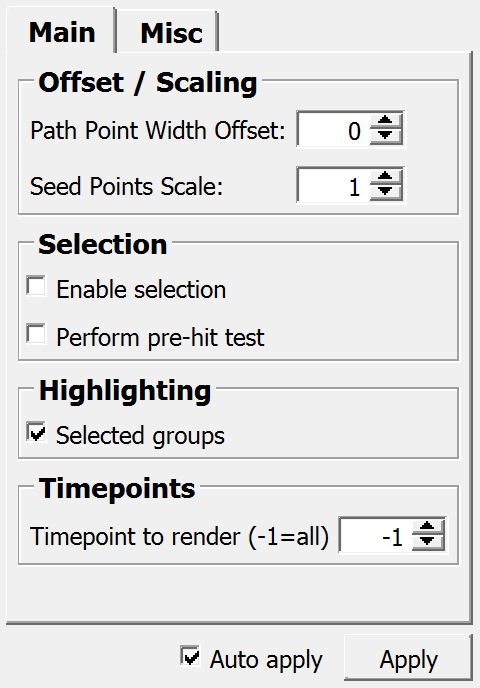
Default Panel

../../../Modules/Inventor/SoCSO/mhelp/Images/Screenshots/SoCSO3DRenderer._default.png

Input Fields

inCSOList

name: inCSOList, type: CSOList(MLBase)

The CSOList that is to be visualized.

For accessing this object via scripting, see the Scripting Reference: MLCSOListWrapper.

inStylePalette

name: inStylePalette, type: StylePalette(MLBase)

An optional style palette defining colors, line widths, and line styles.

inVisualizationSettings

name: inVisualizationSettings, type: CSOVisualizationSettings(MLBase)

Override the default visualization settings by connecting a SoCSOVisualizationSettings module.

inLUT

name: inLUT, type: LUTFunction(MLBase)

Connect a LUT module like SoLUTEditor here to color the CSOs according to an additional double value that can be added to each path point of a CSO.

Note: There are currently no standard modules that set this value, but this can, e.g., be done from scripting.

This input is invisible if Apply LUT to path point values is false.

Output Fields

self

name: self, type: SoNode

The generated Open Inventor scene.

Parameter Fields

Field Index

Apply: Trigger

Path Point Width Offset: Float

Use: Bool

Apply LUT to path point values: Bool

Perform pre-hit test: Bool

Use Index As: Enum

Auto apply: Bool

provideVertexProperties: Bool

Use render time delay: Bool

cursorShape: Enum

Repaint: Bool

Delay in ms: Float

Seed Points Scale: Float

Enable selection: Bool

Selected groups: Bool

Finishing: Bool

Selection changed: Bool

interactionProviderID: String

Timepoint to render (-1=all): Integer

Visible Fields

Auto apply

name: autoApply, type: Bool, default: TRUE

If checked, the module updates the output scene on changing any field or input field.

Apply

name: apply, type: Trigger

When pressed, the module generates a new output scene.

Path Point Width Offset

name: pathPointWidthOffset, type: Float, default: 0, deprecated name: lineWidthOffset

Sets an offset value that is added to the individual line widths of the CSOs.

Seed Points Scale

name: seedPointSizeScaling, type: Float, default: 1, minimum: 0.0001, deprecated name: markerSizeScaling

Sets a scale value that is multiplied to the marker sizes of the individual CSOs.

Selected groups

name: highlightSelectedGroups, type: Bool, default: TRUE

If checked, all the CSOs of a selected CSOGroup are highlighted.

Use render time delay

name: useRenderTimeDelay, type: Bool, default: FALSE

If checked, the module does not generate the output Open Inventor scene anew before the adjusted delay time (Delay in ms) has passed.

Delay in ms

name: timerDelayMilliSeconds, type: Float, default: 100

Sets the delay time in milliseconds for Use render time delay.

Use

name: useStylePalette, type: Bool, default: FALSE

If checked, the attached StylePalette is used to set visual properties.

If no style palette is attached, this field does nothing.

Apply LUT to path point values

name: useLUT, type: Bool, default: FALSE

If a LUT is connected to inLUT, apply the LUT to the scalar value stored alongside the path points of the CSOs and blend the resulting color over the default visualization color for the current CSO.

Use Index As

name: stylePaletteUseIndexAs, type: Enum, default: USE_INDEX_FOR_CSO

Defines how the optional StylePalette is accessed.

Make sure that a style palette is attached and that the option Use is checked.

Values:

Title

Name

Description

Cso

USE_INDEX_FOR_CSO

The index of each individual CSO is used for a look-up of visual properties.

Group

USE_INDEX_FOR_GROUP

The index of the first CSOGroup of a CSO is used for a look-up of visual properties.

Enable selection

name: enableSelection, type: Bool, default: FALSE

If checked, CSOs can be selected in 3D.

Perform pre-hit test

name: performPreHitTest, type: Bool, default: FALSE

If this is checked, a hit test is performed while hovering. This allows for adapting the cursor while over eligible CSOs and may allow other interactions to use the same button combination (when not over a CSO). A slight performance penalty may be induced by this, though.

This option should also be activated if several SoCSO3DRenderer modules in the same scene allow picking at the same time, since otherwise, only the first module will receive the click.

Repaint

name: listenToRepaintNotifications, type: Bool, default: FALSE

If checked and Auto apply is also checked, the module generates a new scene on receiving repaint notifications.

Finishing

name: listenToFinishingNotifications, type: Bool, default: TRUE

If checked and Auto apply is also checked, the module generates a new scene on receiving finished notifications.

Selection changed

name: listenToSelectionChangedNotifications, type: Bool, default: TRUE

If checked and Auto apply is also checked, the module generates a new scene on receiving selection notifications.

Timepoint to render (-1=all)

name: timepointToRender, type: Integer, default: -1

Sets the time point from which CSOs should be rendered. If set to -1, all CSOs are rendered.

Hidden Fields

interactionProviderID

name: interactionProviderID, type: String

cursorShape

name: cursorShape, type: Enum, default: POINTING_HAND_CURSOR

Values:

Title

Name

Undefined Cursor

UNDEFINED_CURSOR

Default Cursor

DEFAULT_CURSOR

Forbidden Cursor

FORBIDDEN_CURSOR

Pointing Hand Cursor

POINTING_HAND_CURSOR

Open Hand Cursor

OPEN_HAND_CURSOR

Closed Hand Cursor

CLOSED_HAND_CURSOR

Move All Cursor

MOVE_ALL_CURSOR

Move Hori Cursor

MOVE_HORI_CURSOR

Move Vert Cursor

MOVE_VERT_CURSOR

Move Fdiag Cursor

MOVE_FDIAG_CURSOR

Move Bdiag Cursor

MOVE_BDIAG_CURSOR

Move Inout Cursor

MOVE_INOUT_CURSOR

Rotate X Cursor

ROTATE_X_CURSOR

Rotate Y Cursor

ROTATE_Y_CURSOR

Rotate Z Cursor

ROTATE_Z_CURSOR

Rotate Xy Cursor

ROTATE_XY_CURSOR

Zoom Cursor

ZOOM_CURSOR

Zoom In Cursor

ZOOM_IN_CURSOR

Zoom Out Cursor

ZOOM_OUT_CURSOR

Cross Cursor

CROSS_CURSOR

Cross Plus Cursor

CROSS_PLUS_CURSOR

Cross Minus Cursor

CROSS_MINUS_CURSOR

Cross Move Cursor

CROSS_MOVE_CURSOR

Cross Rotate Cursor

CROSS_ROTATE_CURSOR

Cross Rect Cursor

CROSS_RECT_CURSOR

Cross Oval Cursor

CROSS_OVAL_CURSOR

Cross Vector Cursor

CROSS_VECTOR_CURSOR

Cross Freeform Cursor

CROSS_FREEFORM_CURSOR

Cross Point Cursor

CROSS_POINT_CURSOR

Cross Line Cursor

CROSS_LINE_CURSOR

Cross Curve Cursor

CROSS_CURVE_CURSOR

Cross Polyline Cursor

CROSS_POLYLINE_CURSOR

Cross Polygon Cursor

CROSS_POLYGON_CURSOR

Cross Fill Cursor

CROSS_FILL_CURSOR

Cross Link Cursor

CROSS_LINK_CURSOR

Cross 0 Cursor

CROSS_0_CURSOR

Cross 1 Cursor

CROSS_1_CURSOR

Cross 2 Cursor

CROSS_2_CURSOR

Cross 3 Cursor

CROSS_3_CURSOR

Cross 4 Cursor

CROSS_4_CURSOR

Cross 5 Cursor

CROSS_5_CURSOR

Cross 6 Cursor

CROSS_6_CURSOR

Cross 7 Cursor

CROSS_7_CURSOR

Cross 8 Cursor

CROSS_8_CURSOR

Cross 9 Cursor

CROSS_9_CURSOR

Lut Cursor

LUT_CURSOR

Lut 1 Cursor

LUT_1_CURSOR

Lut 2 Cursor

LUT_2_CURSOR

Lut 3 Cursor

LUT_3_CURSOR

Slicing Cursor

SLICING_CURSOR

Other Cursor 0

OTHER_CURSOR_0

Other Cursor 1

OTHER_CURSOR_1

Other Cursor 2

OTHER_CURSOR_2

Other Cursor 3

OTHER_CURSOR_3

Other Cursor 4

OTHER_CURSOR_4

Other Cursor 5

OTHER_CURSOR_5

Other Cursor 6

OTHER_CURSOR_6

Other Cursor 7

OTHER_CURSOR_7

Other Cursor 8

OTHER_CURSOR_8

Other Cursor 9

OTHER_CURSOR_9

Other Cursor 10

OTHER_CURSOR_10

Other Cursor 11

OTHER_CURSOR_11

Other Cursor 12

OTHER_CURSOR_12

Other Cursor 13

OTHER_CURSOR_13

Other Cursor 14

OTHER_CURSOR_14

Other Cursor 15

OTHER_CURSOR_15

Other Cursor 16

OTHER_CURSOR_16

Other Cursor 17

OTHER_CURSOR_17

Other Cursor 18

OTHER_CURSOR_18

Other Cursor 19

OTHER_CURSOR_19

Other Cursor 20

OTHER_CURSOR_20

Other Cursor 21

OTHER_CURSOR_21

Other Cursor 22

OTHER_CURSOR_22

Other Cursor 23

OTHER_CURSOR_23

Other Cursor 24

OTHER_CURSOR_24

Other Cursor 25

OTHER_CURSOR_25

Other Cursor 26

OTHER_CURSOR_26

Other Cursor 27

OTHER_CURSOR_27

Other Cursor 28

OTHER_CURSOR_28

Other Cursor 29

OTHER_CURSOR_29

Other Cursor 30

OTHER_CURSOR_30

Other Cursor 31

OTHER_CURSOR_31

Other Cursor 32

OTHER_CURSOR_32

Other Cursor 33

OTHER_CURSOR_33

Other Cursor 34

OTHER_CURSOR_34

Other Cursor 35

OTHER_CURSOR_35

Other Cursor 36

OTHER_CURSOR_36

Other Cursor 37

OTHER_CURSOR_37

Other Cursor 38

OTHER_CURSOR_38

Other Cursor 39

OTHER_CURSOR_39

Other Cursor 40

OTHER_CURSOR_40

Other Cursor 41

OTHER_CURSOR_41

Other Cursor 42

OTHER_CURSOR_42

Other Cursor 43

OTHER_CURSOR_43

Other Cursor 44

OTHER_CURSOR_44

Other Cursor 45

OTHER_CURSOR_45

Other Cursor 46

OTHER_CURSOR_46

Other Cursor 47

OTHER_CURSOR_47

Other Cursor 48

OTHER_CURSOR_48

Other Cursor 49

OTHER_CURSOR_49

Other Cursor 50

OTHER_CURSOR_50

Other Cursor 51

OTHER_CURSOR_51

Other Cursor 52

OTHER_CURSOR_52

Other Cursor 53

OTHER_CURSOR_53

Other Cursor 54

OTHER_CURSOR_54

Other Cursor 55

OTHER_CURSOR_55

Other Cursor 56

OTHER_CURSOR_56

Other Cursor 57

OTHER_CURSOR_57

Other Cursor 58

OTHER_CURSOR_58

Other Cursor 59

OTHER_CURSOR_59

Other Cursor 60

OTHER_CURSOR_60

Other Cursor 61

OTHER_CURSOR_61

Other Cursor 62

OTHER_CURSOR_62

Other Cursor 63

OTHER_CURSOR_63

Other Cursor 64

OTHER_CURSOR_64

Other Cursor 65

OTHER_CURSOR_65

Other Cursor 66

OTHER_CURSOR_66

Other Cursor 67

OTHER_CURSOR_67

Other Cursor 68

OTHER_CURSOR_68

Other Cursor 69

OTHER_CURSOR_69

Blank Cursor

BLANK_CURSOR

provideVertexProperties

name: provideVertexProperties, type: Bool, default: FALSE

If checked, also normals and texture coordinates are provided in vertex properties. These are useful in shader programs. Normals are set to the CSO plane normal. Texture coordinates are set to the (local, total) curve length.