SoMarkerTextRenderer
- InventorModule
author
package
dll
definition
Purpose
The module SoMarkerTextRenderer renders texts for XMarkers in a 2D viewer.
Usage
Attach this module to a SoView2DPointMarkerEditor.
Windows
Default Panel
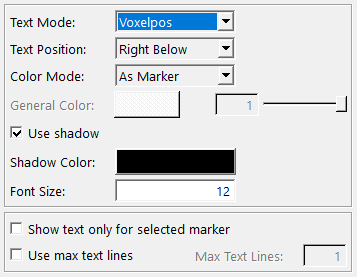
Output Fields
self
- name: self, type: SoNode
Parameter Fields
Field Index
|
|
|
|
|
|
|
|
|
|
|
|
|
Visible Fields
Text Mode
- name: textMode, type: Enum, default: TEXT_ITEMID
Defines the information rendered for an XMarker.
Values:
Title |
Name |
Description |
|---|---|---|
Off |
TEXT_OFF |
No text is rendered. |
Styleindex |
TEXT_STYLEINDEX |
Renders the style index. |
Stylename |
TEXT_STYLENAME |
Renders the style name. This is a name set in a |
Itemname |
TEXT_ITEMNAME |
Renders the name of the XMarker. |
Itemid |
TEXT_ITEMID |
Renders the item ID of the XMarker. |
Voxelpos |
TEXT_VOXELPOS |
Renders the 3D voxel position. |
Worldpos |
TEXT_WORLDPOS |
Renders the 3D world position with a precision of two decimal places. |
Length |
TEXT_LENGTH |
Renders the length of the XMarker’s vector in millimeters. |
Markertype |
TEXT_MARKERTYPE |
Renders the type of the XMarker. The type is an arbitrary integer. |
Markerlistindex |
TEXT_MARKERLISTINDEX |
Renders the list index of the XMarker. |
Text Position
- name: textPosition, type: Enum, default: TEXT_POSITION_RIGHT_BELOW
Defines the text position relative to the position of the XMarker.
Values:
Title |
Name |
|---|---|
Center |
TEXT_POSITION_CENTER |
Above |
TEXT_POSITION_ABOVE |
Right Above |
TEXT_POSITION_RIGHT_ABOVE |
Right |
TEXT_POSITION_RIGHT |
Right Below |
TEXT_POSITION_RIGHT_BELOW |
Below |
TEXT_POSITION_BELOW |
Left Below |
TEXT_POSITION_LEFT_BELOW |
Left |
TEXT_POSITION_LEFT |
Left Above |
TEXT_POSITION_LEFT_ABOVE |
Color Mode
- name: colorMode, type: Enum, default: COLOR_GENERAL
Defines the color mode.
Values:
Title |
Name |
Description |
|---|---|---|
General |
COLOR_GENERAL |
The color and alpha are determined by this module using the fields |
As Marker |
COLOR_AS_MARKER |
The color and alpha match those of the rendered marker. |
General Color
- name: generalColor, type: Color, default: 1 1 1
Sets the general text color.
General Alpha
- name: generalAlpha, type: Float, default: 1, minimum: 0, maximum: 1
Sets the general alpha value for the text.
Use Shadow
- name: useShadow, type: Bool, default: TRUE
If checked, a shadow/halo is rendered for the text.
Shadow Color
- name: shadowColor, type: Color, default: 0 0 0
Sets the color of the text shadow/halo.
Font Size
- name: fontSize, type: Integer, default: 12, minimum: 1
Sets the font size.
Show Text Only For Selected Marker
- name: showTextOnlyForSelectedMarker, type: Bool, default: FALSE
If checked, the text is only rendered for the currently selected XMarker.
Use Max Text Lines
- name: useMaxTextLines, type: Bool, default: FALSE
If checked, the number of text lines is truncated to
Max Text Lines.This is relevant only if the name string set for the XMarker or in the
StylePalettespans multiple lines.
Max Text Lines
- name: maxTextLines, type: Integer, default: 1, minimum: 1
Sets the number of rendered text lines. See
Use Max Text Lines.