SoPicking
- InventorModule
genre
author
package
dll
definition
see also
keywords
Purpose
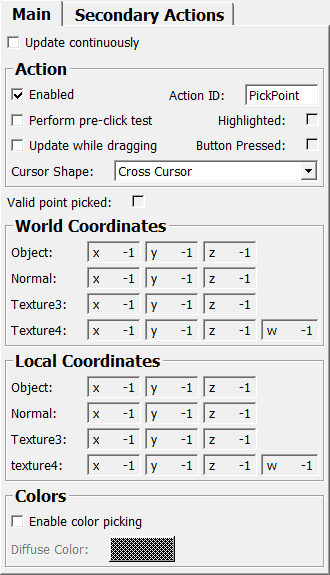
The module SoPicking allows for picking a point on an Open Inventor surface by clicking with the mouse.
Usage
This module uses Managed Interaction, so the button/key binding of this module can be changed with SoInteractionMapping. Clicking a valid surface point will change the coordinate fields.
Details
This module allows for defining more than one interaction on the same scene. Sharing the same scene geometry between multiple SoPicking modules does not work for technical reasons and would anyway result in the geometry being rendered multiple times. Therefore, you can define up to three pointing actions with this module. Only the first action is enabled by default and has a default button mapping, the other button mappings must be set with a SoInteractionMapping module. You might also have to set another mapping for the first action, since the default mapping matches the left mouse button with any modifier key, which might shadow the other actions.
Windows
Default Panel
Input Fields
child
- name: child, type: SoNode
Add that part of the Open Inventor scene as child that should be pickable.
Parameter Fields
Field Index
|
|
|
|
|
|
|
|
|
|
|
|
|
|
|
|
||
|
|
|
|
|
|
|
|
|
|
||
|
||
|
||
|
|
|
Visible Fields
Object (objectLocal)
- name: objectLocal, type: Vector3, persistent: no
Shows the coordinates of the picked point relative to the picked object before any transformations are applied.
Object (objectWorld)
- name: objectWorld, type: Vector3, persistent: no
Shows the coordinates of the picked point in world space.
Normal (normalLocal)
- name: normalLocal, type: Vector3, persistent: no
Shows the normal at the picked position relative to the picked object before any transformations are applied.
Normal (normalWorld)
- name: normalWorld, type: Vector3, persistent: no
Shows the normal at the picked position in world space.
Texture3 (textureLocal3)
- name: textureLocal3, type: Vector3, persistent: no
Shows the texture coordinates of the picked position in the local space of the picked object as a Vector3.
Texture3 (textureWorld3)
- name: textureWorld3, type: Vector3, persistent: no
Shows the texture coordinates of the picked position in world space as a Vector3.
texture4
- name: textureLocal4, type: Vector4, persistent: no
Shows the texture coordinates of the picked position in the local space of the picked object as a Vector4.
Texture4
- name: textureWorld4, type: Vector4, persistent: no
Shows the texture coordinates of the picked position in world space as a Vector4.
Diffuse Color
- name: diffuseColor, type: Color, persistent: no
Sets the diffuse color of the picked point (without interpolation between values if a triangle has multiple colors). Requires
Enable Color Pickingto be enabled.
Valid point picked
- name: pointPicked, type: Bool, persistent: no
Shows whether the last point clicked generated a valid hit. Otherwise, the coordinates stay unchanged.
Enable Color Picking
- name: enableColorPicking, type: Bool, default: FALSE
If checked, the output of the diffuse color at the picked point is enabled, see
Diffuse Color.
Update Continuously
- name: updateContinuously, type: Bool, default: FALSE
If checked, the picking is performed continuously while the mouse cursor is in the viewer.
This is done independent of configured mouse buttons/modifiers keys, the pointing action provided by this node is actually disabled in this mode and the configured
Cursor Shapewill not be applied.Depending on the complexity of the pickable scene, this may feel sluggish.
Enabled (enabled)
- name: enabled, type: Bool, default: TRUE
If checked, the picking is enabled.
Action ID (actionID)
- name: actionID, type: String, default: PickPoint
Sets the ID of the pointing action. This is the name shown by
SoInteractionInfoand relevant forSoInteractionMapping.
Update While Dragging
- name: updateWhileDragging, type: Bool, default: FALSE
If checked, the picked point is continuously updated while the (correct) mouse button is pressed.
Depending on the complexity of the pickable scene, this may feel sluggish.
Perform pre-click test (performPreClickTest)
- name: performPreClickTest, type: Bool, default: FALSE
If checked, a check is performed whether there is a pickable surface under the mouse cursor before the mouse is clicked. The cursor shape is adjusted accordingly.
This will allow for having other actions on the same mouse button if not over the pickable surface.
Depending on the complexity of the pickable scene, this may feel sluggish.
Cursor Shape (cursorShape)
- name: cursorShape, type: Enum, default: CROSS_CURSOR
Defines the cursor shape to show when the matching button/key combination is pressed.
Values:
Title |
Name |
|---|---|
Undefined Cursor |
UNDEFINED_CURSOR |
Default Cursor |
DEFAULT_CURSOR |
Forbidden Cursor |
FORBIDDEN_CURSOR |
Pointing Hand Cursor |
POINTING_HAND_CURSOR |
Open Hand Cursor |
OPEN_HAND_CURSOR |
Closed Hand Cursor |
CLOSED_HAND_CURSOR |
Move All Cursor |
MOVE_ALL_CURSOR |
Move Hori Cursor |
MOVE_HORI_CURSOR |
Move Vert Cursor |
MOVE_VERT_CURSOR |
Move Fdiag Cursor |
MOVE_FDIAG_CURSOR |
Move Bdiag Cursor |
MOVE_BDIAG_CURSOR |
Move Inout Cursor |
MOVE_INOUT_CURSOR |
Rotate X Cursor |
ROTATE_X_CURSOR |
Rotate Y Cursor |
ROTATE_Y_CURSOR |
Rotate Z Cursor |
ROTATE_Z_CURSOR |
Rotate Xy Cursor |
ROTATE_XY_CURSOR |
Zoom Cursor |
ZOOM_CURSOR |
Zoom In Cursor |
ZOOM_IN_CURSOR |
Zoom Out Cursor |
ZOOM_OUT_CURSOR |
Cross Cursor |
CROSS_CURSOR |
Cross Plus Cursor |
CROSS_PLUS_CURSOR |
Cross Minus Cursor |
CROSS_MINUS_CURSOR |
Cross Move Cursor |
CROSS_MOVE_CURSOR |
Cross Rotate Cursor |
CROSS_ROTATE_CURSOR |
Cross Rect Cursor |
CROSS_RECT_CURSOR |
Cross Oval Cursor |
CROSS_OVAL_CURSOR |
Cross Vector Cursor |
CROSS_VECTOR_CURSOR |
Cross Freeform Cursor |
CROSS_FREEFORM_CURSOR |
Cross Point Cursor |
CROSS_POINT_CURSOR |
Cross Line Cursor |
CROSS_LINE_CURSOR |
Cross Curve Cursor |
CROSS_CURVE_CURSOR |
Cross Polyline Cursor |
CROSS_POLYLINE_CURSOR |
Cross Polygon Cursor |
CROSS_POLYGON_CURSOR |
Cross Fill Cursor |
CROSS_FILL_CURSOR |
Cross Link Cursor |
CROSS_LINK_CURSOR |
Cross 0 Cursor |
CROSS_0_CURSOR |
Cross 1 Cursor |
CROSS_1_CURSOR |
Cross 2 Cursor |
CROSS_2_CURSOR |
Cross 3 Cursor |
CROSS_3_CURSOR |
Cross 4 Cursor |
CROSS_4_CURSOR |
Cross 5 Cursor |
CROSS_5_CURSOR |
Cross 6 Cursor |
CROSS_6_CURSOR |
Cross 7 Cursor |
CROSS_7_CURSOR |
Cross 8 Cursor |
CROSS_8_CURSOR |
Cross 9 Cursor |
CROSS_9_CURSOR |
Lut Cursor |
LUT_CURSOR |
Lut 1 Cursor |
LUT_1_CURSOR |
Lut 2 Cursor |
LUT_2_CURSOR |
Lut 3 Cursor |
LUT_3_CURSOR |
Slicing Cursor |
SLICING_CURSOR |
Other Cursor 0 |
OTHER_CURSOR_0 |
Other Cursor 1 |
OTHER_CURSOR_1 |
Other Cursor 2 |
OTHER_CURSOR_2 |
Other Cursor 3 |
OTHER_CURSOR_3 |
Other Cursor 4 |
OTHER_CURSOR_4 |
Other Cursor 5 |
OTHER_CURSOR_5 |
Other Cursor 6 |
OTHER_CURSOR_6 |
Other Cursor 7 |
OTHER_CURSOR_7 |
Other Cursor 8 |
OTHER_CURSOR_8 |
Other Cursor 9 |
OTHER_CURSOR_9 |
Other Cursor 10 |
OTHER_CURSOR_10 |
Other Cursor 11 |
OTHER_CURSOR_11 |
Other Cursor 12 |
OTHER_CURSOR_12 |
Other Cursor 13 |
OTHER_CURSOR_13 |
Other Cursor 14 |
OTHER_CURSOR_14 |
Other Cursor 15 |
OTHER_CURSOR_15 |
Other Cursor 16 |
OTHER_CURSOR_16 |
Other Cursor 17 |
OTHER_CURSOR_17 |
Other Cursor 18 |
OTHER_CURSOR_18 |
Other Cursor 19 |
OTHER_CURSOR_19 |
Other Cursor 20 |
OTHER_CURSOR_20 |
Other Cursor 21 |
OTHER_CURSOR_21 |
Other Cursor 22 |
OTHER_CURSOR_22 |
Other Cursor 23 |
OTHER_CURSOR_23 |
Other Cursor 24 |
OTHER_CURSOR_24 |
Other Cursor 25 |
OTHER_CURSOR_25 |
Other Cursor 26 |
OTHER_CURSOR_26 |
Other Cursor 27 |
OTHER_CURSOR_27 |
Other Cursor 28 |
OTHER_CURSOR_28 |
Other Cursor 29 |
OTHER_CURSOR_29 |
Other Cursor 30 |
OTHER_CURSOR_30 |
Other Cursor 31 |
OTHER_CURSOR_31 |
Other Cursor 32 |
OTHER_CURSOR_32 |
Other Cursor 33 |
OTHER_CURSOR_33 |
Other Cursor 34 |
OTHER_CURSOR_34 |
Other Cursor 35 |
OTHER_CURSOR_35 |
Other Cursor 36 |
OTHER_CURSOR_36 |
Other Cursor 37 |
OTHER_CURSOR_37 |
Other Cursor 38 |
OTHER_CURSOR_38 |
Other Cursor 39 |
OTHER_CURSOR_39 |
Other Cursor 40 |
OTHER_CURSOR_40 |
Other Cursor 41 |
OTHER_CURSOR_41 |
Other Cursor 42 |
OTHER_CURSOR_42 |
Other Cursor 43 |
OTHER_CURSOR_43 |
Other Cursor 44 |
OTHER_CURSOR_44 |
Other Cursor 45 |
OTHER_CURSOR_45 |
Other Cursor 46 |
OTHER_CURSOR_46 |
Other Cursor 47 |
OTHER_CURSOR_47 |
Other Cursor 48 |
OTHER_CURSOR_48 |
Other Cursor 49 |
OTHER_CURSOR_49 |
Other Cursor 50 |
OTHER_CURSOR_50 |
Other Cursor 51 |
OTHER_CURSOR_51 |
Other Cursor 52 |
OTHER_CURSOR_52 |
Other Cursor 53 |
OTHER_CURSOR_53 |
Other Cursor 54 |
OTHER_CURSOR_54 |
Other Cursor 55 |
OTHER_CURSOR_55 |
Other Cursor 56 |
OTHER_CURSOR_56 |
Other Cursor 57 |
OTHER_CURSOR_57 |
Other Cursor 58 |
OTHER_CURSOR_58 |
Other Cursor 59 |
OTHER_CURSOR_59 |
Other Cursor 60 |
OTHER_CURSOR_60 |
Other Cursor 61 |
OTHER_CURSOR_61 |
Other Cursor 62 |
OTHER_CURSOR_62 |
Other Cursor 63 |
OTHER_CURSOR_63 |
Other Cursor 64 |
OTHER_CURSOR_64 |
Other Cursor 65 |
OTHER_CURSOR_65 |
Other Cursor 66 |
OTHER_CURSOR_66 |
Other Cursor 67 |
OTHER_CURSOR_67 |
Other Cursor 68 |
OTHER_CURSOR_68 |
Other Cursor 69 |
OTHER_CURSOR_69 |
Blank Cursor |
BLANK_CURSOR |
Highlighted (highlighted)
- name: highlighted, type: Bool, persistent: no
Shows whether the mouse hovers over a shape in the scene that is attached to this module, the modifier keys match the current mapping of the Managed Pointing Action of this module, and the
Perform pre\-click testoption is set .Basically, this is set as long as the specified
Cursor Shapeis shown.
Enabled (enabled2)
- name: enabled2, type: Bool, default: FALSE
If checked, the second pointing action is enabled.
Action ID (actionID2)
Update while dragging (updateWhileDragging2)
- name: updateWhileDragging2, type: Bool, default: FALSE
Perform pre-click test (performPreClickTest2)
- name: performPreClickTest2, type: Bool, default: FALSE
Cursor Shape (cursorShape2)
- name: cursorShape2, type: Enum, default: CROSS_CURSOR
Defines the cursor shape for second action. See
Cursor Shape.
Values:
Title |
Name |
|---|---|
Undefined Cursor |
UNDEFINED_CURSOR |
Default Cursor |
DEFAULT_CURSOR |
Forbidden Cursor |
FORBIDDEN_CURSOR |
Pointing Hand Cursor |
POINTING_HAND_CURSOR |
Open Hand Cursor |
OPEN_HAND_CURSOR |
Closed Hand Cursor |
CLOSED_HAND_CURSOR |
Move All Cursor |
MOVE_ALL_CURSOR |
Move Hori Cursor |
MOVE_HORI_CURSOR |
Move Vert Cursor |
MOVE_VERT_CURSOR |
Move Fdiag Cursor |
MOVE_FDIAG_CURSOR |
Move Bdiag Cursor |
MOVE_BDIAG_CURSOR |
Move Inout Cursor |
MOVE_INOUT_CURSOR |
Rotate X Cursor |
ROTATE_X_CURSOR |
Rotate Y Cursor |
ROTATE_Y_CURSOR |
Rotate Z Cursor |
ROTATE_Z_CURSOR |
Rotate Xy Cursor |
ROTATE_XY_CURSOR |
Zoom Cursor |
ZOOM_CURSOR |
Zoom In Cursor |
ZOOM_IN_CURSOR |
Zoom Out Cursor |
ZOOM_OUT_CURSOR |
Cross Cursor |
CROSS_CURSOR |
Cross Plus Cursor |
CROSS_PLUS_CURSOR |
Cross Minus Cursor |
CROSS_MINUS_CURSOR |
Cross Move Cursor |
CROSS_MOVE_CURSOR |
Cross Rotate Cursor |
CROSS_ROTATE_CURSOR |
Cross Rect Cursor |
CROSS_RECT_CURSOR |
Cross Oval Cursor |
CROSS_OVAL_CURSOR |
Cross Vector Cursor |
CROSS_VECTOR_CURSOR |
Cross Freeform Cursor |
CROSS_FREEFORM_CURSOR |
Cross Point Cursor |
CROSS_POINT_CURSOR |
Cross Line Cursor |
CROSS_LINE_CURSOR |
Cross Curve Cursor |
CROSS_CURVE_CURSOR |
Cross Polyline Cursor |
CROSS_POLYLINE_CURSOR |
Cross Polygon Cursor |
CROSS_POLYGON_CURSOR |
Cross Fill Cursor |
CROSS_FILL_CURSOR |
Cross Link Cursor |
CROSS_LINK_CURSOR |
Cross 0 Cursor |
CROSS_0_CURSOR |
Cross 1 Cursor |
CROSS_1_CURSOR |
Cross 2 Cursor |
CROSS_2_CURSOR |
Cross 3 Cursor |
CROSS_3_CURSOR |
Cross 4 Cursor |
CROSS_4_CURSOR |
Cross 5 Cursor |
CROSS_5_CURSOR |
Cross 6 Cursor |
CROSS_6_CURSOR |
Cross 7 Cursor |
CROSS_7_CURSOR |
Cross 8 Cursor |
CROSS_8_CURSOR |
Cross 9 Cursor |
CROSS_9_CURSOR |
Lut Cursor |
LUT_CURSOR |
Lut 1 Cursor |
LUT_1_CURSOR |
Lut 2 Cursor |
LUT_2_CURSOR |
Lut 3 Cursor |
LUT_3_CURSOR |
Slicing Cursor |
SLICING_CURSOR |
Blank Cursor |
BLANK_CURSOR |
Other Cursor 0 |
OTHER_CURSOR_0 |
Other Cursor 1 |
OTHER_CURSOR_1 |
Other Cursor 2 |
OTHER_CURSOR_2 |
Other Cursor 3 |
OTHER_CURSOR_3 |
Other Cursor 4 |
OTHER_CURSOR_4 |
Other Cursor 5 |
OTHER_CURSOR_5 |
Other Cursor 6 |
OTHER_CURSOR_6 |
Other Cursor 7 |
OTHER_CURSOR_7 |
Other Cursor 8 |
OTHER_CURSOR_8 |
Other Cursor 9 |
OTHER_CURSOR_9 |
Other Cursor 10 |
OTHER_CURSOR_10 |
Other Cursor 11 |
OTHER_CURSOR_11 |
Other Cursor 12 |
OTHER_CURSOR_12 |
Other Cursor 13 |
OTHER_CURSOR_13 |
Other Cursor 14 |
OTHER_CURSOR_14 |
Other Cursor 15 |
OTHER_CURSOR_15 |
Other Cursor 16 |
OTHER_CURSOR_16 |
Other Cursor 17 |
OTHER_CURSOR_17 |
Other Cursor 18 |
OTHER_CURSOR_18 |
Other Cursor 19 |
OTHER_CURSOR_19 |
Other Cursor 20 |
OTHER_CURSOR_20 |
Other Cursor 21 |
OTHER_CURSOR_21 |
Other Cursor 22 |
OTHER_CURSOR_22 |
Other Cursor 23 |
OTHER_CURSOR_23 |
Other Cursor 24 |
OTHER_CURSOR_24 |
Other Cursor 25 |
OTHER_CURSOR_25 |
Other Cursor 26 |
OTHER_CURSOR_26 |
Other Cursor 27 |
OTHER_CURSOR_27 |
Other Cursor 28 |
OTHER_CURSOR_28 |
Other Cursor 29 |
OTHER_CURSOR_29 |
Other Cursor 30 |
OTHER_CURSOR_30 |
Other Cursor 31 |
OTHER_CURSOR_31 |
Other Cursor 32 |
OTHER_CURSOR_32 |
Other Cursor 33 |
OTHER_CURSOR_33 |
Other Cursor 34 |
OTHER_CURSOR_34 |
Other Cursor 35 |
OTHER_CURSOR_35 |
Other Cursor 36 |
OTHER_CURSOR_36 |
Other Cursor 37 |
OTHER_CURSOR_37 |
Other Cursor 38 |
OTHER_CURSOR_38 |
Other Cursor 39 |
OTHER_CURSOR_39 |
Other Cursor 40 |
OTHER_CURSOR_40 |
Other Cursor 41 |
OTHER_CURSOR_41 |
Other Cursor 42 |
OTHER_CURSOR_42 |
Other Cursor 43 |
OTHER_CURSOR_43 |
Other Cursor 44 |
OTHER_CURSOR_44 |
Other Cursor 45 |
OTHER_CURSOR_45 |
Other Cursor 46 |
OTHER_CURSOR_46 |
Other Cursor 47 |
OTHER_CURSOR_47 |
Other Cursor 48 |
OTHER_CURSOR_48 |
Other Cursor 49 |
OTHER_CURSOR_49 |
Other Cursor 50 |
OTHER_CURSOR_50 |
Other Cursor 51 |
OTHER_CURSOR_51 |
Other Cursor 52 |
OTHER_CURSOR_52 |
Other Cursor 53 |
OTHER_CURSOR_53 |
Other Cursor 54 |
OTHER_CURSOR_54 |
Other Cursor 55 |
OTHER_CURSOR_55 |
Other Cursor 56 |
OTHER_CURSOR_56 |
Other Cursor 57 |
OTHER_CURSOR_57 |
Other Cursor 58 |
OTHER_CURSOR_58 |
Other Cursor 59 |
OTHER_CURSOR_59 |
Other Cursor 60 |
OTHER_CURSOR_60 |
Other Cursor 61 |
OTHER_CURSOR_61 |
Other Cursor 62 |
OTHER_CURSOR_62 |
Other Cursor 63 |
OTHER_CURSOR_63 |
Other Cursor 64 |
OTHER_CURSOR_64 |
Other Cursor 65 |
OTHER_CURSOR_65 |
Other Cursor 66 |
OTHER_CURSOR_66 |
Other Cursor 67 |
OTHER_CURSOR_67 |
Other Cursor 68 |
OTHER_CURSOR_68 |
Other Cursor 69 |
OTHER_CURSOR_69 |
Highlighted (highlighted2)
- name: highlighted2, type: Bool, persistent: no
See
Highlighted.
Enabled (enabled3)
- name: enabled3, type: Bool, default: FALSE
If checked, the third pointing action is enabled.
Action ID (actionID3)
Update while dragging (updateWhileDragging3)
- name: updateWhileDragging3, type: Bool, default: FALSE
Perform pre-click test (performPreClickTest3)
- name: performPreClickTest3, type: Bool, default: FALSE
Cursor Shape (cursorShape3)
- name: cursorShape3, type: Enum, default: CROSS_CURSOR
Defines the cursor shape for second action. See
Cursor Shape.
Values:
Title |
Name |
|---|---|
Undefined Cursor |
UNDEFINED_CURSOR |
Default Cursor |
DEFAULT_CURSOR |
Forbidden Cursor |
FORBIDDEN_CURSOR |
Pointing Hand Cursor |
POINTING_HAND_CURSOR |
Open Hand Cursor |
OPEN_HAND_CURSOR |
Closed Hand Cursor |
CLOSED_HAND_CURSOR |
Move All Cursor |
MOVE_ALL_CURSOR |
Move Hori Cursor |
MOVE_HORI_CURSOR |
Move Vert Cursor |
MOVE_VERT_CURSOR |
Move Fdiag Cursor |
MOVE_FDIAG_CURSOR |
Move Bdiag Cursor |
MOVE_BDIAG_CURSOR |
Move Inout Cursor |
MOVE_INOUT_CURSOR |
Rotate X Cursor |
ROTATE_X_CURSOR |
Rotate Y Cursor |
ROTATE_Y_CURSOR |
Rotate Z Cursor |
ROTATE_Z_CURSOR |
Rotate Xy Cursor |
ROTATE_XY_CURSOR |
Zoom Cursor |
ZOOM_CURSOR |
Zoom In Cursor |
ZOOM_IN_CURSOR |
Zoom Out Cursor |
ZOOM_OUT_CURSOR |
Cross Cursor |
CROSS_CURSOR |
Cross Plus Cursor |
CROSS_PLUS_CURSOR |
Cross Minus Cursor |
CROSS_MINUS_CURSOR |
Cross Move Cursor |
CROSS_MOVE_CURSOR |
Cross Rotate Cursor |
CROSS_ROTATE_CURSOR |
Cross Rect Cursor |
CROSS_RECT_CURSOR |
Cross Oval Cursor |
CROSS_OVAL_CURSOR |
Cross Vector Cursor |
CROSS_VECTOR_CURSOR |
Cross Freeform Cursor |
CROSS_FREEFORM_CURSOR |
Cross Point Cursor |
CROSS_POINT_CURSOR |
Cross Line Cursor |
CROSS_LINE_CURSOR |
Cross Curve Cursor |
CROSS_CURVE_CURSOR |
Cross Polyline Cursor |
CROSS_POLYLINE_CURSOR |
Cross Polygon Cursor |
CROSS_POLYGON_CURSOR |
Cross Fill Cursor |
CROSS_FILL_CURSOR |
Cross Link Cursor |
CROSS_LINK_CURSOR |
Cross 0 Cursor |
CROSS_0_CURSOR |
Cross 1 Cursor |
CROSS_1_CURSOR |
Cross 2 Cursor |
CROSS_2_CURSOR |
Cross 3 Cursor |
CROSS_3_CURSOR |
Cross 4 Cursor |
CROSS_4_CURSOR |
Cross 5 Cursor |
CROSS_5_CURSOR |
Cross 6 Cursor |
CROSS_6_CURSOR |
Cross 7 Cursor |
CROSS_7_CURSOR |
Cross 8 Cursor |
CROSS_8_CURSOR |
Cross 9 Cursor |
CROSS_9_CURSOR |
Lut Cursor |
LUT_CURSOR |
Lut 1 Cursor |
LUT_1_CURSOR |
Lut 2 Cursor |
LUT_2_CURSOR |
Lut 3 Cursor |
LUT_3_CURSOR |
Slicing Cursor |
SLICING_CURSOR |
Blank Cursor |
BLANK_CURSOR |
Other Cursor 0 |
OTHER_CURSOR_0 |
Other Cursor 1 |
OTHER_CURSOR_1 |
Other Cursor 2 |
OTHER_CURSOR_2 |
Other Cursor 3 |
OTHER_CURSOR_3 |
Other Cursor 4 |
OTHER_CURSOR_4 |
Other Cursor 5 |
OTHER_CURSOR_5 |
Other Cursor 6 |
OTHER_CURSOR_6 |
Other Cursor 7 |
OTHER_CURSOR_7 |
Other Cursor 8 |
OTHER_CURSOR_8 |
Other Cursor 9 |
OTHER_CURSOR_9 |
Other Cursor 10 |
OTHER_CURSOR_10 |
Other Cursor 11 |
OTHER_CURSOR_11 |
Other Cursor 12 |
OTHER_CURSOR_12 |
Other Cursor 13 |
OTHER_CURSOR_13 |
Other Cursor 14 |
OTHER_CURSOR_14 |
Other Cursor 15 |
OTHER_CURSOR_15 |
Other Cursor 16 |
OTHER_CURSOR_16 |
Other Cursor 17 |
OTHER_CURSOR_17 |
Other Cursor 18 |
OTHER_CURSOR_18 |
Other Cursor 19 |
OTHER_CURSOR_19 |
Other Cursor 20 |
OTHER_CURSOR_20 |
Other Cursor 21 |
OTHER_CURSOR_21 |
Other Cursor 22 |
OTHER_CURSOR_22 |
Other Cursor 23 |
OTHER_CURSOR_23 |
Other Cursor 24 |
OTHER_CURSOR_24 |
Other Cursor 25 |
OTHER_CURSOR_25 |
Other Cursor 26 |
OTHER_CURSOR_26 |
Other Cursor 27 |
OTHER_CURSOR_27 |
Other Cursor 28 |
OTHER_CURSOR_28 |
Other Cursor 29 |
OTHER_CURSOR_29 |
Other Cursor 30 |
OTHER_CURSOR_30 |
Other Cursor 31 |
OTHER_CURSOR_31 |
Other Cursor 32 |
OTHER_CURSOR_32 |
Other Cursor 33 |
OTHER_CURSOR_33 |
Other Cursor 34 |
OTHER_CURSOR_34 |
Other Cursor 35 |
OTHER_CURSOR_35 |
Other Cursor 36 |
OTHER_CURSOR_36 |
Other Cursor 37 |
OTHER_CURSOR_37 |
Other Cursor 38 |
OTHER_CURSOR_38 |
Other Cursor 39 |
OTHER_CURSOR_39 |
Other Cursor 40 |
OTHER_CURSOR_40 |
Other Cursor 41 |
OTHER_CURSOR_41 |
Other Cursor 42 |
OTHER_CURSOR_42 |
Other Cursor 43 |
OTHER_CURSOR_43 |
Other Cursor 44 |
OTHER_CURSOR_44 |
Other Cursor 45 |
OTHER_CURSOR_45 |
Other Cursor 46 |
OTHER_CURSOR_46 |
Other Cursor 47 |
OTHER_CURSOR_47 |
Other Cursor 48 |
OTHER_CURSOR_48 |
Other Cursor 49 |
OTHER_CURSOR_49 |
Other Cursor 50 |
OTHER_CURSOR_50 |
Other Cursor 51 |
OTHER_CURSOR_51 |
Other Cursor 52 |
OTHER_CURSOR_52 |
Other Cursor 53 |
OTHER_CURSOR_53 |
Other Cursor 54 |
OTHER_CURSOR_54 |
Other Cursor 55 |
OTHER_CURSOR_55 |
Other Cursor 56 |
OTHER_CURSOR_56 |
Other Cursor 57 |
OTHER_CURSOR_57 |
Other Cursor 58 |
OTHER_CURSOR_58 |
Other Cursor 59 |
OTHER_CURSOR_59 |
Other Cursor 60 |
OTHER_CURSOR_60 |
Other Cursor 61 |
OTHER_CURSOR_61 |
Other Cursor 62 |
OTHER_CURSOR_62 |
Other Cursor 63 |
OTHER_CURSOR_63 |
Other Cursor 64 |
OTHER_CURSOR_64 |
Other Cursor 65 |
OTHER_CURSOR_65 |
Other Cursor 66 |
OTHER_CURSOR_66 |
Other Cursor 67 |
OTHER_CURSOR_67 |
Other Cursor 68 |
OTHER_CURSOR_68 |
Other Cursor 69 |
OTHER_CURSOR_69 |
Highlighted (highlighted3)
- name: highlighted3, type: Bool, persistent: no
See
Highlighted.