SoWEMRenderer
- InventorModule
genre
author
package
dll
definition
see also
keywords
Purpose
The SoWEMRenderer renders the faces of a WEM as an Open Inventor scene.
Usage
Just plug in a WEM into the input, and the module’s output into an Open Inventor viewer.
Details
A WEM can consist of multiple WEMPatches. By default, all patches are rendered.
The module SoWEMRenderer can also render either single patches or multiple patches. This is controlled by Render Patch Selection Mode.
A LUT can be attached to this module to color the nodes of the rendered WEM(Patches). For this, the value stored in a Primitive Value List (PVL) is used as a lookup into the LUT. Typically, the attached LUT is a 1D LUT, but a 2D or 3D LUT can also be attached. Depending on Use only first LUT entry of a 2D/3D LUT, either the first 1D LUT is used for coloring all nodes of all rendered WEMPatches, or the index of a rendered WEMPatch is used as a row lookup into a 2D LUT. If a 3D LUT is attached, only the first layer is used. This way, it is possible to provide an individual LUT for each WEMPatch.
Interaction
A rendered WEM can be selected in the viewer. On the module’s GUI, some information on the clicked position, the ID of the hit WEMPatch, as well as some additional information on the local configuration of the hit position is displayed.
Windows
Default Panel
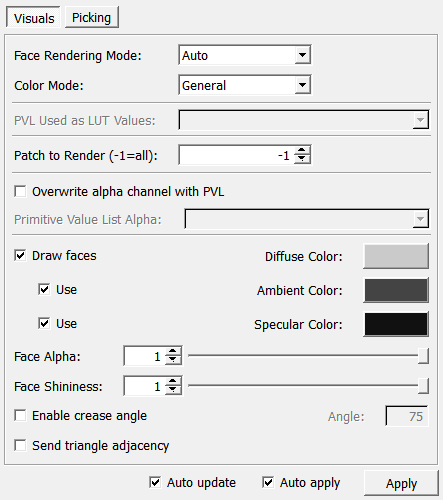
Input Fields
The input is the WEM to be rendered and an option LUT for coloring the WEM (only meaningful if the WEM has values stored in at least one PVL).
inWEM
- name: inWEM, type: WEM(MLBase)
For accessing this object via scripting, see the Scripting Reference:
MLWEMWrapper.
inLUT
- name: inLUT, type: LUTFunction(MLBase)
inExtensions
- name: inExtensions, type: SoNode
Allows for adding extension modules to the
SoWEMRenderer.
Output Fields
The WEM as an Open Inventor scene.
self
- name: self, type: SoNode
Parameter Fields
Field Index
|
|
|
|
|
|
|
|
|
|
|
|
|
|
|
|
|
|
|
|
|
|
|
|
|
|
|
|
|
|
|
|
Visible Fields
Auto Apply
- name: autoApply, type: Bool, default: TRUE
If checked, all parameter changes lead to a new generation of the output scene.
Auto Update
- name: autoUpdate, type: Bool, default: TRUE
If checked, all input changes lead to a new generation of the output scene.
Apply
- name: apply, type: Trigger
When pressed, the module generates a new Open Inventor scene.
Enable Crease Angle
Angle
- name: creaseAngle, type: Float, default: 75, minimum: 0, maximum: 175
Sets the angle between neighboring triangles which is used to detect sharp/creasing edges.
Highlight selected patch
- name: useHighlightSelected, type: Bool, default: FALSE
If checked, the selected WEMPatch is highlighted by a blinking silhouette.
This costs a lot of performance, so handle with care.
Color
- name: highlightColor, type: Color, default: 1 0 0
Sets the highlight color of the selected WEM.
Intensity
- name: highlightIntensity, type: Float, default: 0.5, minimum: 0, maximum: 1
Sets the intensity of the highlight.
Face Rendering Mode
- name: faceRenderingMode, type: Enum, default: WEM_FACE_RENDERING_MODE_AUTO
Defines the rendering mode of faces.
Values:
Title |
Name |
Description |
|---|---|---|
Auto |
WEM_FACE_RENDERING_MODE_AUTO |
The rendering mode is determined automatically. It will be DOUBLE_SIDE if the WEMPatch to be rendered has transparencies or holes, so that the backsides of faces are correctly rendered. Otherwise, the render mode is SINGLE_SIDE. However, the module cannot detect if a WEM is cut by a clipping plane. |
Single Side |
WEM_FACE_RENDERING_MODE_SINGLE_SIDE |
Only the front faces are rendered. This leads to a faster rendering as there are only half the amount of primitives to be processed. However, transparencies, open WEMs (holes or clipping planes) are not rendered correctly. |
Double Side |
WEM_FACE_RENDERING_MODE_DOUBLE_SIDE |
Both, the front and the back side of polygons are rendered. This mode always renders correctly, but always slow. |
Hit Patch
- name: hitPatchIndex, type: Integer, persistent: no
Shows the index of the hit (picked) WEMPatch.
Hit Face
- name: hitFaceIndex, type: Integer, persistent: no
Shows the index of the hit (picked) face.
Nearest Node
- name: hitNearestNodeIndex, type: Integer, persistent: no
Shows the index of the nearest node to the hit position.
Nearest Value
- name: hitNearestNodeValue, type: Float, persistent: no
Shows the value of the node nearest to the hit position.
Hit Position
- name: hitPosition, type: Vector3, persistent: no
Shows the position where the picking ray first hit the surface.
Hit information valid
- name: isHitInformationValid, type: Bool, persistent: no
Shows whether the hit information on the GUI is valid.
Allow Hits
- name: allowHits, type: Bool, default: FALSE
If checked, the module evaluates picking information.
Perform pre-hit test
- name: performPreHitTest, type: Bool, default: FALSE
If checked, a hit test is performed while hovering. This allows for adapting the cursor while over eligible WEMs and may allow other interactions to use the same button combination (when not over a WEM). A slight performance penalty may be induced by this, though.
This option should also be activated if several SoWEMRenderer modules in the same scene allow picking at the same time, since otherwise only the first module will get the click. Note though that the
Hit information validfield will never get unset in this mode.
Color Mode
- name: colorMode, type: Enum, default: WEM_COLOR_GENERAL
Defines how the WEM (faces) should be colored.
Values:
Title |
Name |
Description |
|---|---|---|
General |
WEM_COLOR_GENERAL |
The WEM is colored according to the module’s own color settings. |
Node Colors |
WEM_COLOR_NODE_COLORS |
The WEM is colored with the nodes’ color. |
Lut Values |
WEM_COLOR_LUT_VALUES |
The WEM is colored with a LUT using the selected PVL. |
Lut Values Integer |
WEM_COLOR_LUT_VALUES_INTEGER |
The WEM is colored with a LUT using the selected PVL rounded to integers. |
Textured |
WEM_COLOR_TEXTURED |
The WEM is textured. |
None |
WEM_COLOR_NONE |
The WEM is not colored and a SoMaterial node can be used to set the color. |
Use only first LUT entry of a 2D/3D LUT
- name: useOnlyFirstLUT, type: Bool, default: TRUE
If checked, only the first row and layer of a 2D/3D LUT is used as a LUT. Otherwise, the index of a rendered WEMPatch is used as a row lookup into a multidimensional LUT (in the first layer, in the case it is a 3D LUT).
Render Patch Selection Mode
- name: renderPatchSelectionMode, type: Enum, default: WEM_RENDER_PATCH_SELECT_SINGLE
Defines the patch index selection mode for rendering WEMPatches.
Values:
Title |
Name |
Description |
|---|---|---|
All |
WEM_RENDER_PATCH_SELECT_ALL |
All WEMPatches are rendered. |
Single |
WEM_RENDER_PATCH_SELECT_SINGLE |
The geometry of all WEMPatches is generated, but only the WEMPatch at the specified index is rendered. The geometry of all WEMPatches is generated to cache it; changing the index updates only the rendering without regenerating the geometry, thus allowing fast changes (e.g., for animations). A value of -1 means that all WEMPatches are rendered; this is for backward compatibility. |
Multiple |
WEM_RENDER_PATCH_SELECT_MULTIPLE |
The WEMPatches with the specified space-separated indices are rendered. The indices must be unsigned integers and may include duplicate entries. The number of spaces between entries does not matter, and any negative integers are ignored. |
Patch Index
- name: renderPatchSelectionIndex, type: Integer, default: -1, minimum: -1, maximum: :field:`maxWEMPatchIndex`, deprecated name: wemPatchToRender
Sets the index of the WEMPatch to render.
A value of -1 means that all WEMPatches are rendered; this is only for backward compatibility.
Patch Indices
- name: renderPatchSelectionIndices, type: String
Sets a space-separated list of unordered indices of WEMPatches to render.
Send triangle adjacency
- name: sendAdjacency, type: Bool, default: FALSE
If checked, the WEM renderer sends triangle adjacency information when drawing (using GL_TRIANGLES_ADJACENCY).
This allows for accessing the three adjacent triangles of each triangle in a geometry shader.