Threshold
- MLModule
genre
author
package
dll
definition
see also
keywords
Purpose
The module Threshold applies a relative or absolute threshold to a voxel image. It can be defined what should be written to those voxels that pass or fail the adjustable comparison.
Details
The module may change the min/max value and the data type of the output image.
If any value to be written is of floating-point type and the input image is of integer type, the output image will be of floating-point type.
If any value to be written exceeds the min/max values of the input image, the output image’s min/max values are adjusted so that all written values fall within the min/max range.
If the new min/max range of the output image exceeds the data type’s range, the data type is adjusted to the smallest type that can accommodate the new min/max range.
Windows
Default Panel
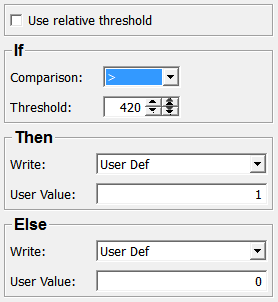
Input Fields
input0
- name: input0, type: Image
Output Fields
output0
- name: output0, type: Image
Parameter Fields
Field Index
|
|
|
Visible Fields
Threshold
- name: threshold, type: Double, default: 0, deprecated name: Threshold
Sets a threshold value, either as an absolute gray value or a relative value.
Use relative threshold
- name: relativeThreshold, type: Bool, default: FALSE, deprecated name: RelativeThreshold
If checked, the threshold is interpreted as a value relative to the min/max range of the image.
Comparison
- name: comparisonOperator, type: Enum, default: Greater
Defines the comparison operator that is applied to test each input voxel value against the
Threshold.
Values:
Title |
Name |
|---|---|
< |
Less |
<= |
LessEqual |
== |
Equal |
!= |
NotEqual |
> |
Greater |
>= |
GreaterEqual |
Write (conditionTrueWriteValue)
- name: conditionTrueWriteValue, type: Enum, default: UserDef
Defines which value is written to the output image for input voxels that pass the comparison.
Values:
Title |
Name |
Description |
|---|---|---|
Img Min |
ImgMin |
The input image’s minimum value is written. |
Img Max |
ImgMax |
The input image’s maximum value is written. |
Img Orig |
ImgOrig |
The input image’s original voxel value is written. |
Img Max Minus Img Orig |
ImgMaxMinusImgOrig |
The input image’s maximum value minus the original value is written. |
User Def |
UserDef |
The user defined value set in |
Threshold |
Threshold |
The |
User Value (userConditionTrueValue)
Write (conditionFalseWriteValue)
- name: conditionFalseWriteValue, type: Enum, default: UserDef
Defines which value is written to the output image for input voxels that fail the comparison.
Values:
Title |
Name |
Description |
|---|---|---|
Img Min |
ImgMin |
The input image’s minimum value is written. |
Img Max |
ImgMax |
The input image’s maximum value is written. |
Img Orig |
ImgOrig |
The input image’s original voxel value is written. |
Img Max Minus Img Orig |
ImgMaxMinusImgOrig |
The input image’s maximum value minus the original value is written. |
User Def |
UserDef |
The user defined value set in |
Threshold |
Threshold |
The |