Thumbnail
- MacroModule
genre
author
package
definition
keywords
Purpose
The module Thumbnail generates a thumbnail image with standardized size, appearance, and contrast.
Usage
Connect an input image and press Update to generate a thumbnail.
Details
For the default resolution, a border is available to be included in the thumbnail.
Windows
Default Panel
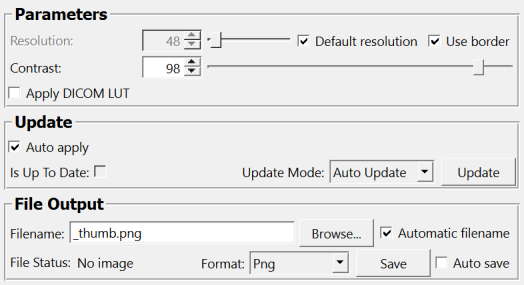
Input Fields
inImage
- name: inImage, type: Image
The input image
Output Fields
outThumbnail
- name: outThumbnail, type: Image
The generated thumbnail as ML image
Parameter Fields
Field Index
|
|
|
|
|
|
|
|
|
|
|
|
|
|
|
Visible Fields
Resolution
- name: resolution, type: Integer, default: 48, minimum: 8, maximum: 1024
Sets the output size (square, i.e., equal x and y size).
Default resolution
- name: autoResolution, type: Bool, default: TRUE
If checked, the default resolution is used.
Contrast
- name: contrast, type: Double, default: 98, minimum: 80, maximum: 100
Sets the upper quantile of gray values mapped to the output range of 0…255.
Thus, a value of 100 keeps the original gray value range, and lower values increase the contrast.
Apply DICOM LUT
- name: applyDicomLUT, type: Bool, default: FALSE
If enabled, the Modality and VOI LUT as stored in the DICOM tags will be applied to the image data for thumbnail generation.
Filename
- name: filename, type: String, default: _thumb.png
Sets the output filename for the internal save method.
Automatic filename
- name: autoFilename, type: Bool, default: TRUE
If checked, an output file name is automatically generated from the input file name.
Format
- name: format, type: Enum, default: PNG
Defines the format for the internal save method.
Values:
Title |
Name |
Deprecated Name |
|---|---|---|
Tiff |
TIFF |
|
Raw |
RAW |
|
Quocmesh |
QUOCMESH |
|
Pnm |
PNM |
|
Png |
PNG |
|
Jpg |
JPG |
|
Dicom |
DICOM |
|
Bmp |
BMP |
|
Analyze |
Analyze |
|
DICOM/TIFF |
DICOMTIFF |
DICOM/TIFF |
Save
- name: save, type: Trigger
When pressed, the thumbnail image is saved.
Auto save
- name: autoSave, type: Bool, default: FALSE
If checked, the thumbnail image is automatically saved when the thumbnail is updated.
File Status
- name: status, type: String, persistent: no
Shows status information about the module.
Update
- name: update, type: Trigger
When pressed, the thumbnail image is updated according to the current parameters.
Auto Apply
- name: autoApply, type: Bool, default: TRUE, deprecated name: autoUpdate
If checked, the module automatically updates the thumbnail image on changing parameters.
Use Border
- name: useBorder, type: Bool, default: TRUE
If checked, a border is generated; only available in combination with
Default resolution.
Is Up To Date
- name: isUpToDate, type: Bool, persistent: no
Shows whether the current output is up-to-date.
Update Mode
- name: updateMode, type: Enum, default: AutoUpdate
Defines the update mode if input image is changed
Values:
Title |
Name |
Description |
|---|---|---|
Off |
Off |
Changing the input image does not update the thumbnail. |
Auto Update |
AutoUpdate |
Changing the input image automatically updates the thumbnail. |
Auto Clear |
AutoClear |
Changing the input image clears the thumbnail. |