View2D
- MacroModule
genre
author
package
definition
see also
keywords
Purpose
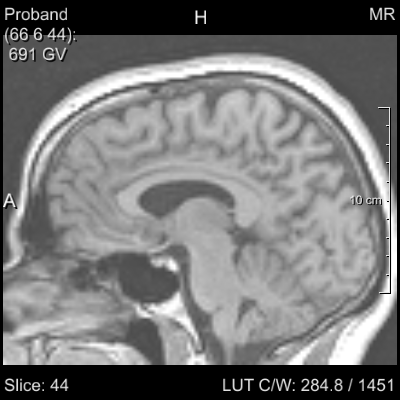
The module View2D provides a two-dimensional viewer with the ability to scroll through the slices in 3D.
Different annotations are displayed, like the current voxel value and its position, the current slice, and some medical information.
Also, the macro offers changing the LUT of the displayed image by dragging the mouse with the right mouse-button held down.
Attention: This macro is not intended to be used in applications. Additional features may be added at any time (e.g., introducing keyboard shortcuts, new dependencies), in order to aid quick prototyping or image viewing. Applications should select only the necessary modules for the features they intend to support.
Details
The View2D has the following standard key binding:
Key |
Function |
|---|---|
1-9 |
Switch the number of shown slices. |
NUM 5 |
Reset zooming. |
NUM * |
Toggle interpolation. |
NUM 0 |
Step through LUT modes. |
NUM 4,6,8,2 |
Scroll inside a slice. |
NUM +, - |
Zoom in/out slice center. |
PAGE UP/DOWN |
Next/previous slice. |
CURSOR UP/DOWN |
Next/previous slice. |
CURSOR LEFT/RIGHT |
Next/previous time point. |
CTRL LEFT/RIGHT |
Next/previous user index |
SHIFT MIDDLE MOUSE |
Scroll inside of slice. |
CTRL MIDDLE MOUSE |
Mouse up/down zooms/unzooms. |
A |
Toggle annotations. |
I |
Toggle information overlay. |
Tips
The cinematic function automatically slices through an image. To record a movie, enable the Open Inventor output, attach a SoExaminerViewer, and use the movie recording abilities of that module.
Windows
Viewer
Settings
Input Fields
inImage
- name: inImage, type: Image
inInvPreLUT
- name: inInvPreLUT, type: SoNode
Before LUT and viewer Open Inventor input, e.g., for overlays independent of LUT settings
inInvPostLUT
- name: inInvPostLUT, type: SoNode
Between LUT and viewer Open Inventor input
inInvPostViewer
- name: inInvPostViewer, type: SoNode
Behind viewer Open Inventor input, e.g., for diagram overlays
Output Fields
Parameter Fields
Field Index
|
|
|
|
|
|
|
|
|
|
|
|
|
|
|
|
|
|
|
|
|
|
|
|
|
|
|
|
|
|
|
|
|
|
||
|
|
|
|
|
|
|
|
|
|
||
|
|
|
Visible Fields
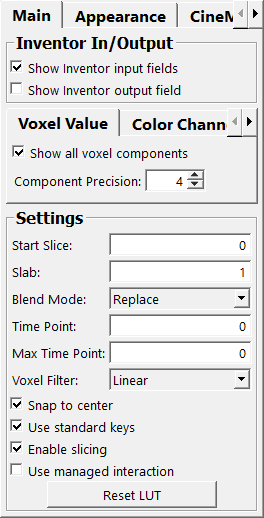
Show Inventor input fields
- name: inventorInputOn, type: Bool, default: TRUE
If checked, the additional Open Inventor inputs are active at the module.
Show Inventor output field
- name: inventorOutputOn, type: Bool, default: FALSE
If checked, an Open Inventor output with the scene is active at the module.
Use internal View2DExtensions
- name: view2DExtensionsOn, type: Bool, default: TRUE
If checked, the internal View2D extensions are active.
Start Slice
- name: startSlice, type: Integer, default: 0, minimum: 0, maximum: view.maxSlice
Shows and sets the start slice (current slice).
Slab
- name: slab, type: Integer, default: 1, minimum: 0
Sets the slab thickness; this is the number of simultaneously shown slices.
Blend Mode
- name: blendMode, type: Enum, default: BLEND_REPLACE
Defines the blend mode.
Values:
Title |
Name |
|---|---|
Replace |
BLEND_REPLACE |
Add |
BLEND_ADD |
Blend |
BLEND_BLEND |
Maximum |
BLEND_MAXIMUM |
Minimum |
BLEND_MINIMUM |
Reverse Subtract |
BLEND_REVERSE_SUBTRACT |
Subtract |
BLEND_SUBTRACT |
Screen |
BLEND_SCREEN |
Premultiplied Blend |
BLEND_PREMULTIPLIED_BLEND |
Time Point
- name: timePoint, type: Integer, default: 0, minimum: 0, maximum: view.maxTimePoint
Sets and shows the current time point.
Max Time Point
- name: maxTimePoint, type: Integer, default: 0, minimum: 0
Sets the maximum time point.
Set it to -1 to have unlimited time points.
Voxel Filter
- name: filterMode, type: Enum, default: FILTER_LINEAR
Sets the interpolation mode for mapping voxels to screen pixels. See
SoView2D.filterModefor details.
Values:
Title |
Name |
|---|---|
Nearest |
FILTER_NEAREST |
Linear |
FILTER_LINEAR |
Linear Postclass |
FILTER_LINEAR_POSTCLASS |
Cubic Postclass |
FILTER_CUBIC_POSTCLASS |
Use standard keys
- name: standardKeys, type: Bool, default: TRUE
If checked, the standard keys can be used.
Start Cine
- name: startCine, type: Trigger
When pressed, the cinematic slicing is started.
Stop Cine
- name: stopCine, type: Trigger
When pressed, the cinematic slicing is stopped.
Cine Mode
- name: cineMode, type: Enum, default: CINE_ZT
Defines the direction of automatic slicing for the cinematic mode.
Values:
Title |
Name |
|---|---|
Z |
CINE_Z |
T |
CINE_T |
ZT |
CINE_ZT |
TZ |
CINE_TZ |
Cine Direction
- name: cineDirection, type: Enum, default: CINE_FORWARD
Defines the slicing direction for the cinematic mode.
Values:
Title |
Name |
|---|---|
Forward |
CINE_FORWARD |
Pingpong |
CINE_PINGPONG |
Cine Repeat
- name: cineRepeat, type: Enum, default: CINE_ONCE
Defines the repeat mode for the cinematic function.
Values:
Title |
Name |
|---|---|
Once |
CINE_ONCE |
Repeat |
CINE_REPEAT |
Cine Speed
- name: cineSpeed, type: Float, default: 0.1, minimum: 0.0001
Sets the speed of the cinematic function by setting the waiting time in seconds between showing consecutive slices.
Snap To Center
- name: snapToCenter, type: Bool, default: TRUE
If checked, the center slice is shown on touching the input image.
Use Managed Interaction
- name: useManagedInteraction, type: Bool, default: FALSE
If checked,
Managed Interactionis used for the mouse interaction.This is useful if the rest of the interaction in the scene also uses Managed Interaction, since otherwise, there might be overlapping interactions.
Reset LUT
- name: resetLUT, type: Trigger
When pressed, the LUT is computed anew on base of the current input image.
This newly computed default LUT has its center set to (imageMax - imageMin) / 2 and its range set to (imageMax - imageMin).
Annotation
- name: annotationOn, type: Bool, default: TRUE
If checked, annotations showing image and patient information are rendered over the image.
Annotation Col
- name: annotationCol, type: Color, default: 0.899999976158142 0.899999976158142 0.899999976158142
Sets the color of the annotations.
Current Pos. in
- name: annoCoords, type: Enum, default: Voxel
Defines the mode of showing the current mouse position.
Values:
Title |
Name |
|---|---|
Voxel |
Voxel |
World |
World |
CT Voxel Value
- name: annoCTValue, type: Enum, default: AsIs
Defines the mode in which the voxel value under the mouse cursor is shown.
Values:
Title |
Name |
Deprecated Name |
|---|---|---|
As Is |
AsIs |
As Is |
To Hounsfield |
ToHounsfield |
To Hounsfield |
Show border
- name: borderOn, type: Bool, default: FALSE
If checked, a border is rendered around the viewer.
Border Color
- name: borderColor, type: Color, default: 0.899999976158142 0.899999976158142 0.899999976158142
Sets the color of the border around the viewer.
Display value with high precision
- name: valueHighPrecision, type: Bool, default: TRUE
If checked, voxel values under the mouse cursor are displayed with a high precision.
This includes the display of all components of non-scalar values and, if enabled, the display of all color channel values.
Component Precision
- name: maxPrecision, type: Integer, default: 4
Sets the number of digits after the comma if
Display value with high precisionis checked; the maximum precision is used if this is less than 0.
Enable Slicing
- name: enableSlicing, type: Bool, default: TRUE
If checked, interactive slicing is enabled.
Show Color Channel Values
- name: showColorChannelValues, type: Bool, default: FALSE
If checked, the display of voxel values from all color channels is enabled; otherwise, only the value of the first channel is shown.
Color Channel Separator
- name: colorChannelSeparator, type: String, default: /
Sets the string used to separate color channel components in the voxel value display; other separators than a space are recommended to distinguish it from the space that is used between non-scalar voxel values.
Scale current LUT to new image
- name: scaleLUTForNewImage, type: Bool, default: TRUE, deprecated name: useRelativeLUTIfNoInputImage
If checked, the scale of the current LUT is applied to any newly connected image.
In other words, if the LUT is defined using absolute values, its relative appearance remains unchanged when the input image changes.
If the input image is disconnected temporarily, the previous scaling is stored and reapplied once a new image is connected.
Keep this option unchecked if you want to use the same absolute LUT for different images. Otherwise, on disconnecting the input image, a relative LUT is computed and on connecting a different image, this relative LUT is used to compute the next absolute LUT. This results in having always the same appearance for images with a different image value range.
Compute LUT on image change
- name: computeLUTOnImageChange, type: Bool, default: TRUE
If checked, the module computes a default LUT on each update of the input image.