GenericPointingAction
- MLModule
genre
author
package
dll
definition
see also
SoInteractionInfo,SoInteractionMapping,GenericSoView2DPointingActionkeywords
Purpose
The module GenericPointingAction serves the same purpose as SoMouseGrabber, but for the Managed Interaction scheme, which abstracts from single mouse events and instead works with pointing action objects.
Usage
Usage of this module in most cases requires the use of FieldListeners attached to at least one of Relative Position or Absolute Position and Dragging:
Dragging signals the start and end of a drag operation, while Relative Position or Absolute Position signal changes of the mouse position before and during the drag.
Windows
Default Panel
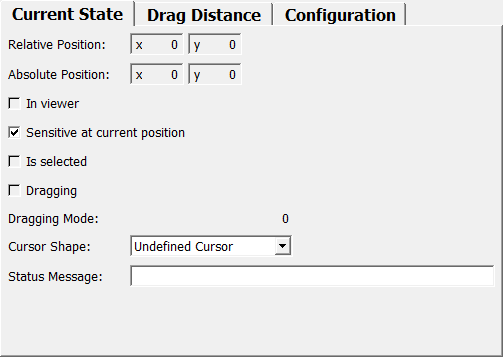
The Current State tab shows all the variable state of the pointing action.
The Drag Distance tab shows the value and configuration of the accumulated drag distance.
The Configuration tab shows the static state of the pointing action.
Output Fields
output
- name: output, type: SoNode
Simply connect the output of this module into an Open Inventor scene.
Parameter Fields
Field Index
|
|
|
|
|
|
|
|
|
|
|
|
|
|
|
|
|
|
|
|
|
|
|
|
|
|
|
|
|
|
|
|
|
|
|
|
|
|
Visible Fields
Enabled
- name: enabled, type: Bool, default: TRUE
If checked, the action provided by this module is enabled in the scene.
Provider ID
- name: providerID, type: String, default: GenericPointingAction
Sets the provider ID of the action.
Normally, this would be the instanceName of the module, but it might be useful to assign the same name to several actions in the same macro module.
Action ID
- name: actionID, type: String, default: default
Sets the ID for the action.
This ID can be used to override, e.g., the mouse button binding of this action from the outside. It should be a unique name that clearly identifies this action.
User Name
- name: userName, type: String
Sets a name that is presented to the user in appropriate places (e.g., menus).
How this value is really used depends on the software environment and may be overridden.
Description
- name: description, type: String
Sets a description of the action.
How this value is really used depends on the software environment and may be overridden.
Icon File
- name: iconFile, type: String
Sets a the path to an image file usable as an icon representing this action.
How this value is really used depends on the software environment and may be overridden.
Shift
Values:
Title |
Name |
|---|---|
Ignored |
IGNORED |
Pressed |
PRESSED |
Released |
RELEASED |
Ctrl
Values:
Title |
Name |
|---|---|
Ignored |
IGNORED |
Pressed |
PRESSED |
Released |
RELEASED |
Alt
Values:
Title |
Name |
|---|---|
Ignored |
IGNORED |
Pressed |
PRESSED |
Released |
RELEASED |
Relative Position
Absolute Position
In Viewer
- name: inViewer, type: Bool, persistent: no
Shows whether the mouse pointer is over the/any viewer.
Value (offsetX)
- name: offsetX, type: Double, default: 0.5
Sets and shows the horizontal component of the accumulated drag distance
Value (offsetY)
- name: offsetY, type: Double, default: 0.5
Sets and shows the vertical component of the accumulated drag distance
Sensitivity (sensitivityX)
- name: sensitivityX, type: Double, default: 1
Sets the sensitivity with which to accumulate horizontal drag distance.
1 means that a drag by 400 pixels will amount to an offset of the current range (maxX - minX). Use a negative value to invert the offset.
Sensitivity (sensitivityY)
- name: sensitivityY, type: Double, default: 1
Same as
Sensitivityfor vertical drag distance.
Min (minX)
- name: minX, type: Double, default: 0
Sets the minimum value for clamping of the horizontal drag distance.
See also
Clamp To Min X.
Max (maxX)
- name: maxX, type: Double, default: 1
Sets the maximum value for clamping of the horizontal drag distance.
See also
Clamp To Max X.
Min (minY)
- name: minY, type: Double, default: 0
Sets the minimum value for clamping of the vertical drag distance.
See also
Clamp To Min Y.
Max (maxY)
- name: maxY, type: Double, default: 1
Sets the maximum value for clamping of the vertical drag distance.
See also
Clamp To Max Y.
Clamp To Min X
Clamp To Max X
Clamp To Min Y
Clamp To Max Y
Position Sensitive
- name: positionSensitive, type: Bool, default: TRUE
If checked, the action is position sensitive.
In this case
Sensitive At Current Positionis checked at each pixel position to see if this action is applicable at the current position - if the action is not position sensitive, it is assumed to be applicable everywhere andSensitive At Current Positionis not checked. If the action is not applicable, another action may be triggered for the current position.Being position sensitive additionally means this action won’t simply switch to another action if the button/modifier combination changes; all mouse buttons have to be released first.
Sensitive At Current Position
- name: sensitiveAtCurrentPosition, type: Bool, default: TRUE
If not checked, and if
Position Sensitiveis true, this action is not applicable at the current pointer position.You can attach a FieldListener to the
checkPositionfield to update this field, since that field is notified immediately beforeSensitive At Current Positionis evaluated.
Is Selected
- name: isSelected, type: Bool, persistent: no
Shows whether this action is selected for immediate execution on left mouse button click and during dragging.
Use this field if you want to highlight some structures under the mouse pointer.
Number of Modes
- name: numberOfModes, type: Integer, default: 1
If during dragging different drag modes are needed (e.g., for different alignment modes), set the number of needed modes in this field.
The different modes can then be selected during dragging by pressing/releasing modifiers keys. Which keys these are is selected by the interaction controller.
Dragging Mode
- name: draggingMode, type: Integer, persistent: no
Contains the currently selected dragging mode during dragging operations.
See also
Number of Modes.
Dragging
- name: dragging, type: Bool, persistent: no
Shows whether a drag operation is started (and set to false when the operation ends).
Normally you would attach a FieldListener to this field.
Cursor Shape
- name: cursorShape, type: Enum, default: UNDEFINED_CURSOR
Defines the cursor shape that should be used for this action.
The shape will only be used if
Is Selectedis true.
Values:
Title |
Name |
|---|---|
Undefined Cursor |
UNDEFINED_CURSOR |
Default Cursor |
DEFAULT_CURSOR |
Forbidden Cursor |
FORBIDDEN_CURSOR |
Pointing Hand Cursor |
POINTING_HAND_CURSOR |
Open Hand Cursor |
OPEN_HAND_CURSOR |
Closed Hand Cursor |
CLOSED_HAND_CURSOR |
Move All Cursor |
MOVE_ALL_CURSOR |
Move Hori Cursor |
MOVE_HORI_CURSOR |
Move Vert Cursor |
MOVE_VERT_CURSOR |
Move Fdiag Cursor |
MOVE_FDIAG_CURSOR |
Move Bdiag Cursor |
MOVE_BDIAG_CURSOR |
Move Inout Cursor |
MOVE_INOUT_CURSOR |
Rotate X Cursor |
ROTATE_X_CURSOR |
Rotate Y Cursor |
ROTATE_Y_CURSOR |
Rotate Z Cursor |
ROTATE_Z_CURSOR |
Rotate Xy Cursor |
ROTATE_XY_CURSOR |
Zoom Cursor |
ZOOM_CURSOR |
Zoom In Cursor |
ZOOM_IN_CURSOR |
Zoom Out Cursor |
ZOOM_OUT_CURSOR |
Cross Cursor |
CROSS_CURSOR |
Cross Plus Cursor |
CROSS_PLUS_CURSOR |
Cross Minus Cursor |
CROSS_MINUS_CURSOR |
Cross Move Cursor |
CROSS_MOVE_CURSOR |
Cross Rotate Cursor |
CROSS_ROTATE_CURSOR |
Cross Rect Cursor |
CROSS_RECT_CURSOR |
Cross Oval Cursor |
CROSS_OVAL_CURSOR |
Cross Vector Cursor |
CROSS_VECTOR_CURSOR |
Cross Freeform Cursor |
CROSS_FREEFORM_CURSOR |
Cross Point Cursor |
CROSS_POINT_CURSOR |
Cross Line Cursor |
CROSS_LINE_CURSOR |
Cross Curve Cursor |
CROSS_CURVE_CURSOR |
Cross Polyline Cursor |
CROSS_POLYLINE_CURSOR |
Cross Polygon Cursor |
CROSS_POLYGON_CURSOR |
Cross Fill Cursor |
CROSS_FILL_CURSOR |
Cross Link Cursor |
CROSS_LINK_CURSOR |
Cross 0 Cursor |
CROSS_0_CURSOR |
Cross 1 Cursor |
CROSS_1_CURSOR |
Cross 2 Cursor |
CROSS_2_CURSOR |
Cross 3 Cursor |
CROSS_3_CURSOR |
Lut Cursor |
LUT_CURSOR |
Slicing Cursor |
SLICING_CURSOR |
Cross 4 Cursor |
CROSS_4_CURSOR |
Cross 5 Cursor |
CROSS_5_CURSOR |
Cross 6 Cursor |
CROSS_6_CURSOR |
Cross 7 Cursor |
CROSS_7_CURSOR |
Cross 8 Cursor |
CROSS_8_CURSOR |
Cross 9 Cursor |
CROSS_9_CURSOR |
Lut 1 Cursor |
LUT_1_CURSOR |
Lut 2 Cursor |
LUT_2_CURSOR |
Lut 3 Cursor |
LUT_3_CURSOR |
Other Cursor 0 |
OTHER_CURSOR_0 |
Other Cursor 1 |
OTHER_CURSOR_1 |
Other Cursor 2 |
OTHER_CURSOR_2 |
Other Cursor 3 |
OTHER_CURSOR_3 |
Other Cursor 4 |
OTHER_CURSOR_4 |
Other Cursor 5 |
OTHER_CURSOR_5 |
Other Cursor 6 |
OTHER_CURSOR_6 |
Other Cursor 7 |
OTHER_CURSOR_7 |
Other Cursor 8 |
OTHER_CURSOR_8 |
Other Cursor 9 |
OTHER_CURSOR_9 |
Other Cursor 10 |
OTHER_CURSOR_10 |
Other Cursor 11 |
OTHER_CURSOR_11 |
Other Cursor 12 |
OTHER_CURSOR_12 |
Other Cursor 13 |
OTHER_CURSOR_13 |
Other Cursor 14 |
OTHER_CURSOR_14 |
Other Cursor 15 |
OTHER_CURSOR_15 |
Other Cursor 16 |
OTHER_CURSOR_16 |
Other Cursor 17 |
OTHER_CURSOR_17 |
Other Cursor 18 |
OTHER_CURSOR_18 |
Other Cursor 19 |
OTHER_CURSOR_19 |
Other Cursor 20 |
OTHER_CURSOR_20 |
Other Cursor 21 |
OTHER_CURSOR_21 |
Other Cursor 22 |
OTHER_CURSOR_22 |
Other Cursor 23 |
OTHER_CURSOR_23 |
Other Cursor 24 |
OTHER_CURSOR_24 |
Other Cursor 25 |
OTHER_CURSOR_25 |
Other Cursor 26 |
OTHER_CURSOR_26 |
Other Cursor 27 |
OTHER_CURSOR_27 |
Other Cursor 28 |
OTHER_CURSOR_28 |
Other Cursor 29 |
OTHER_CURSOR_29 |
Other Cursor 30 |
OTHER_CURSOR_30 |
Other Cursor 31 |
OTHER_CURSOR_31 |
Other Cursor 32 |
OTHER_CURSOR_32 |
Other Cursor 33 |
OTHER_CURSOR_33 |
Other Cursor 34 |
OTHER_CURSOR_34 |
Other Cursor 35 |
OTHER_CURSOR_35 |
Other Cursor 36 |
OTHER_CURSOR_36 |
Other Cursor 37 |
OTHER_CURSOR_37 |
Other Cursor 38 |
OTHER_CURSOR_38 |
Other Cursor 39 |
OTHER_CURSOR_39 |
Other Cursor 40 |
OTHER_CURSOR_40 |
Other Cursor 41 |
OTHER_CURSOR_41 |
Other Cursor 42 |
OTHER_CURSOR_42 |
Other Cursor 43 |
OTHER_CURSOR_43 |
Other Cursor 44 |
OTHER_CURSOR_44 |
Other Cursor 45 |
OTHER_CURSOR_45 |
Other Cursor 46 |
OTHER_CURSOR_46 |
Other Cursor 47 |
OTHER_CURSOR_47 |
Other Cursor 48 |
OTHER_CURSOR_48 |
Other Cursor 49 |
OTHER_CURSOR_49 |
Other Cursor 50 |
OTHER_CURSOR_50 |
Other Cursor 51 |
OTHER_CURSOR_51 |
Other Cursor 52 |
OTHER_CURSOR_52 |
Other Cursor 53 |
OTHER_CURSOR_53 |
Other Cursor 54 |
OTHER_CURSOR_54 |
Other Cursor 55 |
OTHER_CURSOR_55 |
Other Cursor 56 |
OTHER_CURSOR_56 |
Other Cursor 57 |
OTHER_CURSOR_57 |
Other Cursor 58 |
OTHER_CURSOR_58 |
Other Cursor 59 |
OTHER_CURSOR_59 |
Other Cursor 60 |
OTHER_CURSOR_60 |
Other Cursor 61 |
OTHER_CURSOR_61 |
Other Cursor 62 |
OTHER_CURSOR_62 |
Other Cursor 63 |
OTHER_CURSOR_63 |
Other Cursor 64 |
OTHER_CURSOR_64 |
Other Cursor 65 |
OTHER_CURSOR_65 |
Other Cursor 66 |
OTHER_CURSOR_66 |
Other Cursor 67 |
OTHER_CURSOR_67 |
Other Cursor 68 |
OTHER_CURSOR_68 |
Other Cursor 69 |
OTHER_CURSOR_69 |
Blank Cursor |
BLANK_CURSOR |
Status Message
- name: statusMessage, type: String
Sets a status message that should be displayed for this action, e.g., the name of an object the mouse pointer currently hovers over or some indication about the state of the dragging.
The message will only be used if
Is Selectedis true. Where this message appears is up to the interaction controller.