SoMouseGrabber

InventorModule

genre

Interaction

author

MeVis Medical Solutions AG

package

MeVisLab/Standard

dll

SoUtils

definition

utils.def

see also

SoKeyGrabber

keywords

iv, event, interaction

Purpose

The module SoMouseGrabber grabs mouse events in an Open Inventor scene and converts them to float fields.

Details

The mouse coordinates received from a connected display can be filtered and scaled before the fields X and Y are set.

Windows

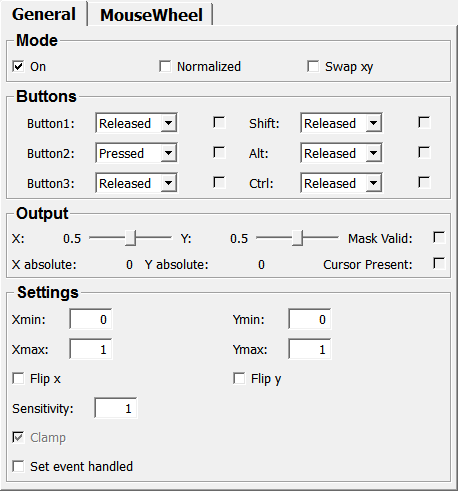
Default Panel

../../../Modules/Inventor/SoUtils/mhelp/Images/Screenshots/SoMouseGrabber._default.png

Output Fields

self

name: self, type: SoNode

Parameter Fields

Field Index

Alt: Enum

cursorShape: Enum

Wheel: Float

Alt Pressed: Bool

Flip X: Bool

Wheel Max: Float

Button1: Enum

Flip Y: Bool

Wheel Min: Float

button1DoubleClicked: Trigger

interactionProviderID: String

Wheel Overflow: Bool

Button1Pressed: Bool

Mask Valid: Bool

Wheel Step: Float

Button2: Enum

Normalized: Bool

wheelDown: Trigger

button2DoubleClicked: Trigger

On: Bool

wheelUp: Trigger

Button2Pressed: Bool

released: Trigger

X: Float

Button3: Enum

Sensitivity: Float

X absolute: Float

button3DoubleClicked: Trigger

Set Event Handled: Bool

Xmax: Float

Button3Pressed: Bool

Set Wheel Event Handled: Bool

Xmin: Float

Clamp: Bool

Shift: Enum

Y: Float

Ctrl: Enum

Shift Pressed: Bool

Y absolute: Float

Ctrl Pressed: Bool

Swap XY: Bool

Ymax: Float

Cursor Present: Bool

useManagedInteraction: Bool

Ymin: Float

Visible Fields

On

name: on, type: Bool, default: TRUE

If checked, the module grabs mouse events.

Normalized

name: normalized, type: Bool, default: FALSE

If checked, the x and y values are generated to be between xmin/xmax and ymin/ymax regarding the current viewport.

Clamp

name: clamp, type: Bool, default: TRUE

If checked, values are clamped to [xmin,xmax] and [ymin, ymax] in normalized-mode.

Otherwise, values out of this range are possible if the mouse is moved outside the viewport.

Button1

name: button1, type: Enum, default: RELEASED

Defines a filter for mouse button 1.

Values:

Title

Name

Pressed

PRESSED

Released

RELEASED

Ignored

IGNORED

Button2

name: button2, type: Enum, default: PRESSED

Defines a filter for mouse button 2.

Values:

Title

Name

Pressed

PRESSED

Released

RELEASED

Ignored

IGNORED

Button3

name: button3, type: Enum, default: RELEASED

Defines a filter for mouse button 3.

Values:

Title

Name

Pressed

PRESSED

Released

RELEASED

Ignored

IGNORED

Button1Pressed

name: button1Pressed, type: Bool, persistent: no

Shows whether mouse button 1 is pressed.

Button2Pressed

name: button2Pressed, type: Bool, persistent: no

Shows whether mouse button 2 is pressed.

Button3Pressed

name: button3Pressed, type: Bool, persistent: no

Shows whether mouse button 3 is pressed.

Shift

name: shift, type: Enum, default: RELEASED

Sets a filter for the SHIFT key.

Values:

Title

Name

Pressed

PRESSED

Released

RELEASED

Ignored

IGNORED

Ctrl

name: ctrl, type: Enum, default: RELEASED

Sets a filter for the CTRL key.

Values:

Title

Name

Pressed

PRESSED

Released

RELEASED

Ignored

IGNORED

Alt

name: alt, type: Enum, default: RELEASED

Sets a filter for the ALT key.

Values:

Title

Name

Pressed

PRESSED

Released

RELEASED

Ignored

IGNORED

Shift Pressed

name: shiftPressed, type: Bool, persistent: no

Shows whether SHIFT is pressed.

Ctrl Pressed

name: ctrlPressed, type: Bool, persistent: no

Shows whether CTRL is pressed.

Alt Pressed

name: altPressed, type: Bool, persistent: no

Shows whether ALT is pressed.

X absolute

name: absX, type: Float, persistent: no

Shows the absolute x-position of the mouse cursor in pixels from the left border of the viewer.

Y absolute

name: absY, type: Float, persistent: no

Shows the absolute y-position of the mouse cursor in pixels from the lower border of the viewer.

X

name: x, type: Float, minimum: :field:`xmin`, maximum: :field:`xmax`, persistent: no

Shows the x-position of the mouse cursor.

Y

name: y, type: Float, minimum: :field:`ymin`, maximum: :field:`ymax`, persistent: no

Shows the y-position of the mouse cursor.

Xmin

name: xmin, type: Float, default: 0

Sets a minimum value for the x-position for clamping and normalizing.

Xmax

name: xmax, type: Float, default: 1

Sets a maximum value for the x-position for clamping and normalizing.

Ymin

name: ymin, type: Float, default: 0

Sets a minimum value for the y-position for clamping and normalizing.

Ymax

name: ymax, type: Float, default: 1

Sets a maximum value for the y-position for clamping and normalizing.

Cursor Present

name: cursorPresent, type: Bool, persistent: no

Shows whether the mouse cursor is within the viewing area.

This will remain set as long as the mouse buttons are pressed, as an automatic mouse grab is in effect. This flag is completely independent of any modifiers/buttons.

Mask Valid

name: maskValid, type: Bool, persistent: no

Shows whether the conditions set by the mask filters are met.

Set Event Handled

name: setEventHandled, type: Bool, default: FALSE

If checked, button and move events are set handled if the mask is valid.

The event is therefore consumed and not evaluated by any further nodes! This can be of use if you want to coordinate several SoMouseGrabbers. It is also compatible with the event consumption mechanism of the SoView2D framework (see SoView2DExtensions for details).

Set Wheel Event Handled

name: setWheelEventHandled, type: Bool, default: FALSE

If checked, wheel events are set handled.

The event is therefore consumed and not evaluated by any further nodes! This can be of use if you want to coordinate several SoMouseGrabbers. It is also compatible with the event consumption mechanism of the SoView2D framework (see SoView2DExtensions for details).

Flip X

name: flipX, type: Bool, default: FALSE

If checked, the x-axis is flipped.

Flip Y

name: flipY, type: Bool, default: FALSE

If checked, the y-axis is flipped.

Swap XY

name: swapXY, type: Bool, default: FALSE

If checked, the x-axis and the y-axis are swapped.

Sensitivity

name: sensitivity, type: Float, default: 1, minimum: 0.01, maximum: 10

Sets the sensitivity for mouse movement.

Wheel Overflow

name: wheelOverflow, type: Bool, default: FALSE

If checked, the value of the field Wheel wraps around.

For example, if the value is incremented beyond the maximum value, it is set to the minimum value, and vice versa.

Wheel

name: wheel, type: Float, default: 0

Shows the current value of the mouse wheel.

Wheel Step

name: wheelStep, type: Float, default: 1

Sets the step of mouse wheel increment and decrement.

Wheel Min

name: wheelMin, type: Float, default: 0

Sets a minimum value for the mouse wheel interval.

Wheel Max

name: wheelMax, type: Float, default: 100

Sets a maximum value for the mouse wheel interval.

Hidden Fields

interactionProviderID

name: interactionProviderID, type: String

useManagedInteraction

name: useManagedInteraction, type: Bool, default: FALSE

If checked, the mouse interaction is tracked with Managed Interaction instead of classic event handling, for better compatibility with other Managed Interactions.

This does not include the mouse wheel handling, which always uses classic event handling.

For more options regarding Managed Interaction, you should use GenericPointingAction or GenericSoView2DPointingAction instead.

button1DoubleClicked

name: button1DoubleClicked, type: Trigger, persistent: no

button2DoubleClicked

name: button2DoubleClicked, type: Trigger, persistent: no

button3DoubleClicked

name: button3DoubleClicked, type: Trigger, persistent: no

cursorShape

name: cursorShape, type: Enum, default: UNDEFINED_CURSOR

Values:

Title

Name

Undefined Cursor

UNDEFINED_CURSOR

Default Cursor

DEFAULT_CURSOR

Forbidden Cursor

FORBIDDEN_CURSOR

Pointing Hand Cursor

POINTING_HAND_CURSOR

Open Hand Cursor

OPEN_HAND_CURSOR

Closed Hand Cursor

CLOSED_HAND_CURSOR

Move All Cursor

MOVE_ALL_CURSOR

Move Hori Cursor

MOVE_HORI_CURSOR

Move Vert Cursor

MOVE_VERT_CURSOR

Move Fdiag Cursor

MOVE_FDIAG_CURSOR

Move Bdiag Cursor

MOVE_BDIAG_CURSOR

Move Inout Cursor

MOVE_INOUT_CURSOR

Rotate X Cursor

ROTATE_X_CURSOR

Rotate Y Cursor

ROTATE_Y_CURSOR

Rotate Z Cursor

ROTATE_Z_CURSOR

Rotate Xy Cursor

ROTATE_XY_CURSOR

Zoom Cursor

ZOOM_CURSOR

Zoom In Cursor

ZOOM_IN_CURSOR

Zoom Out Cursor

ZOOM_OUT_CURSOR

Cross Cursor

CROSS_CURSOR

Cross Plus Cursor

CROSS_PLUS_CURSOR

Cross Minus Cursor

CROSS_MINUS_CURSOR

Cross Move Cursor

CROSS_MOVE_CURSOR

Cross Rotate Cursor

CROSS_ROTATE_CURSOR

Cross Rect Cursor

CROSS_RECT_CURSOR

Cross Oval Cursor

CROSS_OVAL_CURSOR

Cross Vector Cursor

CROSS_VECTOR_CURSOR

Cross Freeform Cursor

CROSS_FREEFORM_CURSOR

Cross Point Cursor

CROSS_POINT_CURSOR

Cross Line Cursor

CROSS_LINE_CURSOR

Cross Curve Cursor

CROSS_CURVE_CURSOR

Cross Polyline Cursor

CROSS_POLYLINE_CURSOR

Cross Polygon Cursor

CROSS_POLYGON_CURSOR

Cross Fill Cursor

CROSS_FILL_CURSOR

Cross Link Cursor

CROSS_LINK_CURSOR

Cross 0 Cursor

CROSS_0_CURSOR

Cross 1 Cursor

CROSS_1_CURSOR

Cross 2 Cursor

CROSS_2_CURSOR

Cross 3 Cursor

CROSS_3_CURSOR

Lut Cursor

LUT_CURSOR

Slicing Cursor

SLICING_CURSOR

Cross 4 Cursor

CROSS_4_CURSOR

Cross 5 Cursor

CROSS_5_CURSOR

Cross 6 Cursor

CROSS_6_CURSOR

Cross 7 Cursor

CROSS_7_CURSOR

Cross 8 Cursor

CROSS_8_CURSOR

Cross 9 Cursor

CROSS_9_CURSOR

Lut 1 Cursor

LUT_1_CURSOR

Lut 2 Cursor

LUT_2_CURSOR

Lut 3 Cursor

LUT_3_CURSOR

Other Cursor 0

OTHER_CURSOR_0

Other Cursor 1

OTHER_CURSOR_1

Other Cursor 2

OTHER_CURSOR_2

Other Cursor 3

OTHER_CURSOR_3

Other Cursor 4

OTHER_CURSOR_4

Other Cursor 5

OTHER_CURSOR_5

Other Cursor 6

OTHER_CURSOR_6

Other Cursor 7

OTHER_CURSOR_7

Other Cursor 8

OTHER_CURSOR_8

Other Cursor 9

OTHER_CURSOR_9

Other Cursor 10

OTHER_CURSOR_10

Other Cursor 11

OTHER_CURSOR_11

Other Cursor 12

OTHER_CURSOR_12

Other Cursor 13

OTHER_CURSOR_13

Other Cursor 14

OTHER_CURSOR_14

Other Cursor 15

OTHER_CURSOR_15

Other Cursor 16

OTHER_CURSOR_16

Other Cursor 17

OTHER_CURSOR_17

Other Cursor 18

OTHER_CURSOR_18

Other Cursor 19

OTHER_CURSOR_19

Other Cursor 20

OTHER_CURSOR_20

Other Cursor 21

OTHER_CURSOR_21

Other Cursor 22

OTHER_CURSOR_22

Other Cursor 23

OTHER_CURSOR_23

Other Cursor 24

OTHER_CURSOR_24

Other Cursor 25

OTHER_CURSOR_25

Other Cursor 26

OTHER_CURSOR_26

Other Cursor 27

OTHER_CURSOR_27

Other Cursor 28

OTHER_CURSOR_28

Other Cursor 29

OTHER_CURSOR_29

Other Cursor 30

OTHER_CURSOR_30

Other Cursor 31

OTHER_CURSOR_31

Other Cursor 32

OTHER_CURSOR_32

Other Cursor 33

OTHER_CURSOR_33

Other Cursor 34

OTHER_CURSOR_34

Other Cursor 35

OTHER_CURSOR_35

Other Cursor 36

OTHER_CURSOR_36

Other Cursor 37

OTHER_CURSOR_37

Other Cursor 38

OTHER_CURSOR_38

Other Cursor 39

OTHER_CURSOR_39

Other Cursor 40

OTHER_CURSOR_40

Other Cursor 41

OTHER_CURSOR_41

Other Cursor 42

OTHER_CURSOR_42

Other Cursor 43

OTHER_CURSOR_43

Other Cursor 44

OTHER_CURSOR_44

Other Cursor 45

OTHER_CURSOR_45

Other Cursor 46

OTHER_CURSOR_46

Other Cursor 47

OTHER_CURSOR_47

Other Cursor 48

OTHER_CURSOR_48

Other Cursor 49

OTHER_CURSOR_49

Other Cursor 50

OTHER_CURSOR_50

Other Cursor 51

OTHER_CURSOR_51

Other Cursor 52

OTHER_CURSOR_52

Other Cursor 53

OTHER_CURSOR_53

Other Cursor 54

OTHER_CURSOR_54

Other Cursor 55

OTHER_CURSOR_55

Other Cursor 56

OTHER_CURSOR_56

Other Cursor 57

OTHER_CURSOR_57

Other Cursor 58

OTHER_CURSOR_58

Other Cursor 59

OTHER_CURSOR_59

Other Cursor 60

OTHER_CURSOR_60

Other Cursor 61

OTHER_CURSOR_61

Other Cursor 62

OTHER_CURSOR_62

Other Cursor 63

OTHER_CURSOR_63

Other Cursor 64

OTHER_CURSOR_64

Other Cursor 65

OTHER_CURSOR_65

Other Cursor 66

OTHER_CURSOR_66

Other Cursor 67

OTHER_CURSOR_67

Other Cursor 68

OTHER_CURSOR_68

Other Cursor 69

OTHER_CURSOR_69

Blank Cursor

BLANK_CURSOR

released

name: released, type: Trigger, persistent: no

wheelUp

name: wheelUp, type: Trigger, persistent: no

wheelDown

name: wheelDown, type: Trigger, persistent: no