SoVascularSystem
- InventorModule
genre
author
package
dll
definition
see also
keywords
Purpose
The module SoVascularSystem visualizes any vascular system described by a MLVesselGraph structure as a 3D Open Inventor scene graph.
There are several display modes available, such as displaying a vascular system as a point cloud or as a surface model.
Additionally, the appearance regarding the coloring or point size if in point cloud mode may be adjusted to the user’s need.
Furthermore, the module provides some information about edges or nodes the user has clicked on interactively in the viewer.
Windows
Default Panel
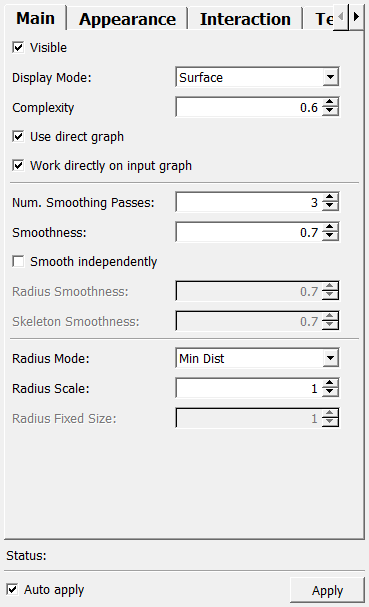
Input Fields
inputGraph
- name: inputGraph, type: Graph(MLBase)
Input graph must be of type MLVesselGraph.
For accessing this object via scripting, see the Scripting Reference:
MLGraphWrapper.
inLUT
- name: inLUT, type: LUTFunction(MLBase)
Input LUT to color the vessel segments.
Parameter Fields
Field Index
Visible Fields
Auto apply
- name: autoApply, type: Bool, default: TRUE
If checked, changes to any field triggers an update of the output scene.
Apply
- name: apply, type: Trigger
When pressed, the output scene is rendered anew.
Status
- name: status, type: String, persistent: no
Shows status information about the module.
Complexity
- name: complexity, type: Float, default: 0.60000002, minimum: 0, maximum: 1
Sets the complexity of the resulting Open Inventor scene (the number of generated polygons).
Point Size:
- name: pointSize, type: Integer, default: 1, minimum: 1, maximum: 20
Sets the point size if points are rendered.
Line Width:
- name: lineWidth, type: Integer, default: 1, minimum: 1, maximum: 10
Sets the line width if lines are rendered.
X:
- name: textureScaleX, type: Float, default: 0.5
Sets a scale factor for texture coordinates in the x-direction.
Y:
- name: textureScaleY, type: Float, default: 0.5
Sets a scale factor for texture coordinates in the y-direction.
Depth:
- name: recursionDepth, type: Integer, default: -1
Sets a value to determine the branching depth of a vessel system.
Default value is -1, which means that the entire tree is generated. A value of 10, for example, means that the tree is generated up to a branching depth of 10.
Show lines
- name: showLines, type: Bool, default: FALSE
If checked, the surface polygons (if rendered in ‘Surface’ mode) are rendered in wire frame mode.
Otherwise, the surface polygons are rendered as surface polygons. This option is some kind of an alternative transparency rendering option and meant more for testing/debugging.
Label Mode
- name: labelMode, type: Enum, default: GENERAL_LABEL
Defines how the textures relate to labels.
Values:
Title |
Name |
Description |
|---|---|---|
Hierachy Label |
HIERACHY_LABEL |
Use the hierarchy label to determine how textures are applied. The hierarchy label gives information about the branching depth. |
General Label |
GENERAL_LABEL |
Use the general label to determine how textures are applied. The general label is used to label branches with user-determined attributes such as supply areas. |
Free Label |
FREE_LABEL |
Use the free label to determine how textures are applied. The free label is similar to the general label. |
Mode:
- name: textureMode, type: Enum, default: SIZE_ALMOST_EQUAL
Defines the texture mode.
Values:
Title |
Name |
Description |
|---|---|---|
Scale By Radius |
SCALE_BY_RADIUS |
Textures appear small on branches with a small average circumference and big on branches with a big average circumference. |
Size Almost Equal |
SIZE_ALMOST_EQUAL |
Textures are approximately the same size across all branches. Wrapping depends on the vessel’s radius, rounded to the nearest whole number. This avoids visible seams, but could cause a distortion of the textures. |
Size Almost Equal With Seams |
SIZE_ALMOST_EQUAL_WITH_SEAMS |
Textures have approximately the same size on all branches. In contrast to the mode explained above, no rounding is applied here. This causes visible seams but minimizes texture distortion. |
Generate
- name: textureCoordinateMode, type: Enum, default: FOR_ALL_ELEMENTS
Defines how texture coordinates are generated.
Values:
Title |
Name |
Description |
|---|---|---|
For All Elements |
FOR_ALL_ELEMENTS |
Generates texture coordinates for all elements of the vascular system (caps, intermediate nodes, edges). |
Only For Edges And Caps |
ONLY_FOR_EDGES_AND_CAPS |
Do not generate texture coordinates for intermediate nodes, but for caps and edges. |
Only For Edges And Intermediate Nodes |
ONLY_FOR_EDGES_AND_INTERMEDIATE_NODES |
Do not generate texture coordinates for caps, but for edges and intermediate nodes. |
Only For Edges |
ONLY_FOR_EDGES |
Do not generate texture coordinates for caps and for intermediate nodes, only for edges. |
Radius Mode
- name: radiusMode, type: Enum, default: MIN_DIST
Defines the radius mode.
Values:
Title |
Name |
Description |
|---|---|---|
Min Dist |
MIN_DIST |
The measured min. distance is taken as a radius. That is not really the minimum distance but has its name from the method to measure the radius. |
Max Dist |
MAX_DIST |
The measured max. distance is taken as a radius. That is not really the maximum distance but has its name from the method to measure the radius. |
Average Dist |
AVERAGE_DIST |
The average between min. and max. distance. |
Fixed Radius |
FIXED_RADIUS |
A fixed radius is set. |
Display Mode
- name: displayMode, type: Enum, default: DISPLAY_SURFACE
Defines the display of the data as a vascular system.
Values:
Title |
Name |
Description |
|---|---|---|
Skeleton |
DISPLAY_SKELETON |
Only the skeleton is displayed as lines. |
Points |
DISPLAY_POINTS |
The skeleton is displayed by rendering a point at a measured skeleton point. |
Random Points |
DISPLAY_RANDOM_POINTS |
Around each measure skeleton point, a point cloud of random points with a radius in the set mode is rendered. |
Random And Skeleton |
DISPLAY_RANDOM_AND_SKELETON |
Combination of skeleton as a line and cloud of random points in the measured radius. |
Points And Skeleton |
DISPLAY_POINTS_AND_SKELETON |
Shows the measured skeleton points and the measured vessel points (if the latter are stored in the vessel graph). |
Surface |
DISPLAY_SURFACE |
Displays the vascular system with surface polygons. |
Points Jittered |
DISPLAY_POINTS_JITTERED |
The measured vessel points are rendered using random jittering to break the pattern. |
Points And Skel Jittered |
DISPLAY_POINTS_AND_SKEL_JITTERED |
Combination of the skeleton line and jittered measured vessel points. |
Fast Edges |
DISPLAY_FAST_EDGES |
Displays a surface polygon rendering with straight edges between nodes, which do not take any measured skeleton points into account. |
Radius Scale
- name: radiusScale, type: Float, default: 1
Sets a scale factor for all radii.
Radius Fixed Size
- name: radiusFixedSize, type: Float, default: 1
Sets a fixed radius (if in fixed radius mode).
Visible
- name: visible, type: Bool, default: TRUE
If checked, the rendering is visible.
Generate texture coordinates
- name: texture, type: Bool, default: FALSE
If checked, texture coordinates are being generated.
Num. Smoothing Passes
- name: numSmoothingPasses, type: Integer, default: 3, minimum: 0, maximum: 100
Sets the number of smoothing passes for the Laplacian smoothing that is applied to the skeleton points and the radii.
Smoothness
- name: overallSmoothness, type: Float, default: 0.69999999, minimum: 0, maximum: 1
Sets a smoothing factor for the Laplacian smoothing of skeleton points and radii.
Smooth independently
- name: smoothIndependently, type: Bool, default: FALSE
If checked, the skeleton positions and the radii can be smoothed by using independent smoothing factors.
Radius Smoothness
- name: radiusSmoothness, type: Float, default: 0.69999999, minimum: 0, maximum: 1
Sets the smoothing factor for radius smoothing.
Skeleton Smoothness
- name: skeletonSmoothness, type: Float, default: 0.69999999, minimum: 0, maximum: 1
Sets the smoothing factor for skeleton position smoothing.
Cap Scaling:
- name: endCapScaling, type: Float, default: 1, minimum: 0, maximum: 10
Sets a factor to scale the length the ending caps of vessels.
Use general color
- name: useGeneralColor, type: Bool, default: FALSE
If checked, the entire vascular system is colored with one general color.
General Color
- name: generalColor, type: Color, default: 1 1 1
Sets the general color for general coloring.
Use integer LUT
- name: useIntegerLUT, type: Bool, default: TRUE
If checked, the internally used LUT is an integer LUT; so only integer values are used as a look-up.
If unchecked, float/double values can be used as look-up values; this is especially important if the (skeletons’) label values are in range [0..1].
Use alt. transp.
- name: useAlternativeTransparency, type: Bool, default: TRUE
If checked, transparent colors are mapped to
Alt. Transp. Color.
Alt. Transp. Color
- name: alternativeTransparencyColor, type: Color, default: 0 0 0
Sets an alternative color that is used instead of transparent colors.
Selected Coordinate
- name: selectedCoordinate, type: Vector3, default: 0 0 0
Shows the picked coordinate.
Snap Mode
- name: snapMode, type: Enum, default: SNAP_TO_SKELETON
Defines the snapping mode for picking.
Values:
Title |
Name |
Description |
|---|---|---|
Surface |
SNAP_TO_SURFACE |
The original picking point is shown. |
Skeleton |
SNAP_TO_SKELETON |
The position of the nearest skeleton point is shown. |
Node |
SNAP_TO_NODE |
The position of the nearest node is shown. |
Enable
- name: enableSelection, type: Bool, default: TRUE
If checked, picking is enabled.
Continuous Hit Check
- name: continuousHitCheck, type: Bool, default: FALSE
If checked, the mouse cursor will be a selection cursor only if over the rendering of the vascular system.
Also, if this mode is enabled, the interactive preview can be activated.
Has Clicked On Surface
- name: hasClickedOnSurface, type: Trigger
This is triggered from the inside if the surface has been clicked on.
This is to be used to differentiate between a change of
Selected Coordinateby clicking or by moving the mouse over the surface.
Nearest Coordinate
Edge ID
- name: selectedEdgeId, type: Integer, persistent: no
Shows the ID of the selected edge.
Nearest Radius
- name: nearestRadius, type: Float, persistent: no
Shows the radius of the nearest structure.
Nearest Label
- name: nearestLabel, type: Integer, persistent: no
Shows the label value of the nearest structure.
Nearest Color
- name: nearestColor, type: Color, persistent: no
Shows the color of the nearest structure.
Enable Interactive Preview Mode
- name: enableInteractivePreviewMode, type: Bool, default: FALSE
If checked, the module colors the edges and nodes from the position under the mouse cursor to the leaves in the selected color/alpha.
Enable Recursive Highlighting
- name: enableRecursiveHighlighting, type: Bool, default: TRUE
If checked, all edges are highlighted recursively down to the leaves.
Highlight Mode
- name: highlightMode, type: Enum, default: HIGHLIGHT_OFF, deprecated name: highlightWholeEdge
Defines the highlighting mode.
Values:
Title |
Name |
Deprecated Name |
Description |
|---|---|---|---|
Off |
HIGHLIGHT_OFF |
FALSE |
No highlighting. |
Skeleton |
HIGHLIGHT_SKELETON |
Highlights only the skeleton under the cursor. |
|
Edge |
HIGHLIGHT_EDGE |
TRUE |
Highlights only the edge under the cursor. |
Tree |
HIGHLIGHT_TREE |
Highlights the entire tree under the cursor. |
|
Nearest Node |
HIGHLIGHT_NEAREST_NODE |
Highlights the nearest node of the selected edge. |
|
Smart Snap |
HIGHLIGHT_SMART_SNAP |
Highlights the nearest node towards the root if the hit skeleton’s distance to that node is less or equal to If an edge has more than one label set (there is a label difference in the edge’s skeleton), the first skeleton of the hit label section towards the root is selected if within range of |
Interactive Preview Color
- name: interactivePreviewColor, type: Color, default: 1 1 0
Sets a color for the interactive preview from the position under the mouse to all leaves.
Interactive Preview Alpha
- name: interactivePreviewAlpha, type: Float, default: 0.5, minimum: 0, maximum: 1
Sets an alpha value for the interactive preview from the position under the mouse to all leaves.
Range for Smart Snap in Skeletons
- name: numSkeletonsSmartSnap, type: Integer, default: 5, minimum: 0
Sets the distance in edge skeletons towards a node for the smart snapping.
Use Min Radius Cut Off
- name: useMinRadiusCutOff, type: Bool, default: FALSE
If checked, the resulting vessel visualization is colored as follows:
from all roots down to the leaves, while the skeletons’ min radius is greater/equal than
Min Radius Cut Off Value, the color set inCut Off Color(andCut Off Alpha) is usedif a skeleton’s radius is less than the cut-off value, the original color is used from that skeleton on down to the leaves recursively
Min Radius Cut Off Value
- name: minRadiusCutOffValue, type: Float, default: 1
Sets the cut-off value for recursively separating the vessel trees by the min radius of skeletons for coloring.
Cut Off Color
- name: cutOffColor, type: Color, default: 1 1 1
Sets a color that is used for skeletons with a greater radius than
Cut Off Colorfrom the roots to those skeletons.
Cut Off Alpha
- name: cutOffAlpha, type: Float, default: 1, minimum: 0, maximum: 1
Sets an alpha value that is used for skeletons with a greater radius than
Cut Off Colorfrom the roots to those skeletons.
Use Direct Graph
- name: useDirectGraph, type: Bool, default: TRUE
If checked, the module internally directs the input graph.
Note that this might cause also a splitting of the graph, so handle with care!
Work Directly On Input Graph
- name: workDirectlyOnInputGraph, type: Bool, default: TRUE
If enabled (default), the module works on the input Graph object, directs the graph and performs some cleanup on the graph.
This can have unexpected side-effects because the input Graph object is modified by these actions. If disabled, a copy of the graph is made, so that the input graph is not modified.
Use skeleton colors
- name: useSkeletonColors, type: Bool, default: TRUE
If checked, an internal LUT is use to color the vascular system.