SoView2DVectorMarkerEditor
- InventorModule
author
package
dll
definition
inherits from
Purpose
The module SoView2DVectorMarkerEditor allows for rendering and editing vector markers in 2D.
Details
Stippling
If the depth visibility value (set by the field Value) is greater than 0 and any part of the vector lies within the defined volume around the current slice, the vector is rendered with stippling to indicate whether it lies above or below the slice. A dashed stippling pattern indicates the vector lies below the current slice; a dotted pattern indicates it lies above.
If the vector crosses the current slice, it is always rendered. The part of the vector on the current slice is drawn slightly thicker without any stippling; the part below the slice is drawn with a dashed stippling pattern, and the part above with a dotted pattern.
Style Palette
If a StylePalette is attached, the style of rendered markers is defined by the StylePalette. Otherwise, this module controls the style of all rendered markers.
However, anti-aliasing can be toggled globally.
This module also sets the rendering of a shadow, the shadow color, and a general alpha factor.
Since the stippling of the vector line encodes the relative position of the vector (or its segments), the line style (StylePalette.lineStyle) does not affect the vector rendering.
Interaction
A vector marker can be grabbed at its start handle, end handle, or along the middle (the vector line), provided that both handles lie on the current slice.
The mouse-over highlighting (see Size Mode and Color Mode) indicates whether interaction is possible.
Canceling an interaction
The module SoView2DVectorMarkerEditor behaves differently on canceling an interaction by pressing ESC, depending on whether an UndoManager is attached.
For example:
If no UndoManager is attached, pressing ESC while adding and immediately moving a marker cancels the movement, but the marker is still added at the position of the mouse pointer when the interaction was canceled.
If an UndoManager is attached, pressing ESC undoes both the addition and the immediate movement of the marker, so the marker is not added at all.
Tips
Just attach this module to an XMarkerListContainer.
If used with other modules that output an XMarkerList, attach an XMarkerListContainer to the module that outputs the XMarkerList and set the XMarkerListContainer to copy and take ownership of the XMarkerList (XMarkerListContainer.copyAndTakeOwnership). Then, attach SoView2DVectorMarkerEditor to the XMarkerListContainer.
Windows
Default Panel
Input Fields
inMarkerList
- name: inMarkerList, type: XMarkerList(MLBase)
For accessing this object via scripting, see the Scripting Reference:
MLXMarkerListWrapper.
inStylePalette
- name: inStylePalette, type: StylePalette(MLBase)
inArrowheadSettings
- name: inArrowheadSettings, type: ArrowHeadSettings(MLBase)
inUndoContext
- name: inUndoContext, type: UndoContext(MLBase)
For accessing this object via scripting, see the Scripting Reference:
MLUndoContextWrapper.
inMarkerTextRenderer
- name: inMarkerTextRenderer, type: MarkerTextRenderer(MLBase)
Output Fields
self
- name: self, type: SoNode
Parameter Fields
Field Index
|
|
|
|
|
|
|
||
|
|
|
|
|
|
|
|
|
|
|
|
|
|
|
|
|
|
|
|
|
|
|
|
|
|
|
|
|
|
|
|
|
|
|
|
|
|
Visible Fields
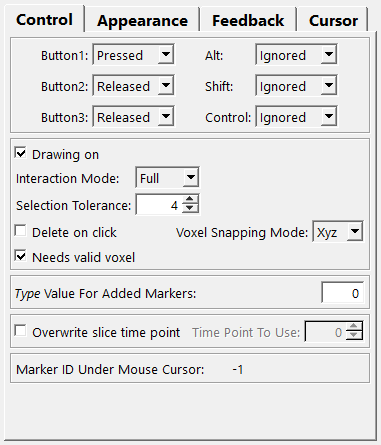
Drawing On
- name: drawingOn, type: Bool, default: TRUE
If checked, the vector XMarkers are rendered.
see also SoView2DExtension.drawingOn
Handle Size
- name: selectionTolerance, type: Float, default: 4, minimum: 2
Sets the size of a vector’s handles in pixels.
Needs Valid Voxel
- name: needsValidVoxel, type: Bool, default: TRUE
Style Palette Lookup
- name: stylePaletteLookup, type: Enum, default: LOOKUP_TYPE
Defines how to look up a style from the
StylePalette.
Values:
Title |
Name |
Description |
|---|---|---|
Index |
LOOKUP_INDEX |
The index of a marker is used as a lookup. |
Type |
LOOKUP_TYPE |
The type value of a marker is used as a lookup. The type value is an integer that is stored for each marker under the name ‘type’. |
Id |
LOOKUP_ID |
The ID of a marker is used as a lookup. |
Marker Color
- name: markerColor, type: Color, default: 1 1 1
Sets the color of rendered markers when no
StylePaletteis attached.
Marker Alpha
- name: markerAlpha, type: Float, default: 1, minimum: 0, maximum: 1
Sets the overall alpha factor for all rendered markers.
Use anti-aliasing
- name: useAntiAliasing, type: Bool, default: TRUE
If checked, all markers are rendered with anti-aliasing.
When a
StylePaletteis attached, anti-aliasing can be toggled individually for each style, but this setting overrides the individual marker settings in theStylePalette.
Overwrite slice time point
- name: shouldOverwriteTimePoint, type: Bool, default: FALSE
If checked, existing markers render at the time point specified in
Time Point To Use, and newly created markers use this time point instead of the one displayed in the viewer.
Time Point To Use
- name: timePointToUse, type: Integer, default: 0
Sets a time point to render existing markers and newly created markers will have this time point.
Use Shadow
Color
- name: shadowColor, type: Color, default: 0 0 0
Sets the shadow color when
Use Shadowis checked.
Voxel Snapping Mode
- name: snapMode, type: Enum, default: SNAP_XYZ
Defines the voxel snapping mode for newly created and moved markers.
Values:
Title |
Name |
Description |
|---|---|---|
Off |
SNAP_OFF |
Voxel snapping is turned off. |
Xy |
SNAP_XY |
A handle’s position snaps to the voxel center in the x/y direction. |
Z |
SNAP_Z |
A handle’s position snaps to the voxel center in the z direction. |
Xyz |
SNAP_XYZ |
A handle’s position snaps to the voxel center in the x/y/z direction. |
Added Marker Type
- name: addedMarkerType, type: Integer, default: 0
Sets the type value for an added marker.
The type value is an arbitrary integer stored with each XMarker.
Interaction Mode
- name: interactionMode, type: Enum, default: FULL
Defines the interaction mode.
Values:
Title |
Name |
Description |
|---|---|---|
None |
NONE |
The module does not react to any interaction at all. |
Full |
FULL |
The module supports adding, selecting, moving, and removing of markers. |
Select |
SELECT |
The module only allows for selecting markers. |
Size Mode (mouseOverSizeMode)
- name: mouseOverSizeMode, type: Enum, default: MOUSE_OVER_ENLARGE
Defines how to adjust the visible size of a marker’s handle on mouse-over.
Values:
Title |
Name |
Description |
|---|---|---|
Enlarge |
MOUSE_OVER_ENLARGE |
The rendered marker handle is enlarged by |
Size |
MOUSE_OVER_SIZE |
The rendered marker handle is set to the size defined in |
Color Mode (mouseOverColorMode)
- name: mouseOverColorMode, type: Enum, default: MOUSE_OVER_BRIGHTEN
Defines how to adjust the visible color of a marker on mouse-over.
Values:
Title |
Name |
Description |
|---|---|---|
Brighten |
MOUSE_OVER_BRIGHTEN |
The rendered marker is brightened by |
Color |
MOUSE_OVER_COLOR |
The rendered marker is set to the color defined in |
Enlarge Value (mouseOverEnlargeValue)
- name: mouseOverEnlargeValue, type: Float, default: 1
Sets an enlargement value for the size of a rendered vector marker’s handle on mouse-over, adding it to the vector handle’s size.
Size Value (mouseOverSizeValue)
- name: mouseOverSizeValue, type: Float, default: 5
Sets the size of a rendered vector marker’s handle on mouse-over.
Brighten Value (mouseOverBrightenValue)
- name: mouseOverBrightenValue, type: Float, default: 0.2
Sets a brighten value for the color of a rendered marker on mouse-over, adding it to each RGB component of the displayed color, with RGB values clamped to [0..1].
Color Value (mouseOverColorValue)
- name: mouseOverColorValue, type: Color, default: 1 0.899999976158142 0.5
Sets the color of a rendered marker on mouse-over.
Size Mode (selectionSizeMode)
- name: selectionSizeMode, type: Enum, default: SELECTION_ENLARGE
Defines how to adjust the visible size of a vector marker’s handles upon selection.
Values:
Title |
Name |
Description |
|---|---|---|
Enlarge |
SELECTION_ENLARGE |
The rendered vector marker’s handles size is enlarged by |
Size |
SELECTION_SIZE |
The rendered vector marker’s handles size is set to the size defined in |
Color Mode (selectionColorMode)
- name: selectionColorMode, type: Enum, default: SELECTION_BRIGHTEN
Defines how to adjust the visible color of a marker upon selection.
Values:
Title |
Name |
Description |
|---|---|---|
Brighten |
SELECTION_BRIGHTEN |
The rendered marker is brightened by |
Color |
SELECTION_COLOR |
The rendered marker is set to the color defined in |
Enlarge Value (selectionEnlargeValue)
- name: selectionEnlargeValue, type: Float, default: 1
Sets an enlargement value for the size of a rendered vector marker’s handles upon selection, adding it to the vector marker’s handle’s size.
Size Value (selectionSizeValue)
- name: selectionSizeValue, type: Float, default: 6
Sets the size of a rendered vector marker’s handles upon selection.
Brighten Value (selectionBrightenValue)
- name: selectionBrightenValue, type: Float, default: 0.30000001
Sets a brighten value for the color of a rendered marker upon selection, adding it to each RGB component of the displayed color, with RGB values clamped to [0..1].
Color Value (selectionColorValue)
- name: selectionColorValue, type: Color, default: 1 0.400000005960464 0.100000001490116
Sets the color of a rendered marker upon selection.
Mode
- name: depthVisibilityMode, type: Enum, default: DEPTH_SLICES
Defines the depth visualization mode (ghosting). Markers on adjacent slices appear visible, with their distance to the current slice indicated by the alpha value used for rendering.
Additionally, a stippling pattern—dashed or dotted—indicates whether the vector lies below or above the current slice.
Values:
Title |
Name |
Description |
|---|---|---|
Slices |
DEPTH_SLICES |
The |
Mm |
DEPTH_MM |
The |
Value
Marker ID Under Mouse Cursor
- name: markerIDUnderMouseCursor, type: Integer, persistent: no
Shows the ID of the marker currently under the mouse cursor, or -1 if no marker is present.
Add
- name: cursorShapeAdd, type: Enum, default: CROSS_VECTOR_CURSOR
Defines the cursor shape for adding a marker.
This cursor shape is applied when the mouse is not over any marker, provided that adding is allowed (see
Interaction Mode).
Values:
Title |
Name |
|---|---|
Undefined Cursor |
UNDEFINED_CURSOR |
Default Cursor |
DEFAULT_CURSOR |
Forbidden Cursor |
FORBIDDEN_CURSOR |
Pointing Hand Cursor |
POINTING_HAND_CURSOR |
Open Hand Cursor |
OPEN_HAND_CURSOR |
Closed Hand Cursor |
CLOSED_HAND_CURSOR |
Move All Cursor |
MOVE_ALL_CURSOR |
Move Hori Cursor |
MOVE_HORI_CURSOR |
Move Vert Cursor |
MOVE_VERT_CURSOR |
Move Fdiag Cursor |
MOVE_FDIAG_CURSOR |
Move Bdiag Cursor |
MOVE_BDIAG_CURSOR |
Move Inout Cursor |
MOVE_INOUT_CURSOR |
Rotate X Cursor |
ROTATE_X_CURSOR |
Rotate Y Cursor |
ROTATE_Y_CURSOR |
Rotate Z Cursor |
ROTATE_Z_CURSOR |
Rotate Xy Cursor |
ROTATE_XY_CURSOR |
Zoom Cursor |
ZOOM_CURSOR |
Zoom In Cursor |
ZOOM_IN_CURSOR |
Zoom Out Cursor |
ZOOM_OUT_CURSOR |
Cross Cursor |
CROSS_CURSOR |
Cross Plus Cursor |
CROSS_PLUS_CURSOR |
Cross Minus Cursor |
CROSS_MINUS_CURSOR |
Cross Move Cursor |
CROSS_MOVE_CURSOR |
Cross Rotate Cursor |
CROSS_ROTATE_CURSOR |
Cross Rect Cursor |
CROSS_RECT_CURSOR |
Cross Oval Cursor |
CROSS_OVAL_CURSOR |
Cross Vector Cursor |
CROSS_VECTOR_CURSOR |
Cross Freeform Cursor |
CROSS_FREEFORM_CURSOR |
Cross Point Cursor |
CROSS_POINT_CURSOR |
Cross Line Cursor |
CROSS_LINE_CURSOR |
Cross Curve Cursor |
CROSS_CURVE_CURSOR |
Cross Polyline Cursor |
CROSS_POLYLINE_CURSOR |
Cross Polygon Cursor |
CROSS_POLYGON_CURSOR |
Cross Fill Cursor |
CROSS_FILL_CURSOR |
Cross Link Cursor |
CROSS_LINK_CURSOR |
Cross 0 Cursor |
CROSS_0_CURSOR |
Cross 1 Cursor |
CROSS_1_CURSOR |
Cross 2 Cursor |
CROSS_2_CURSOR |
Cross 3 Cursor |
CROSS_3_CURSOR |
Cross 4 Cursor |
CROSS_4_CURSOR |
Cross 5 Cursor |
CROSS_5_CURSOR |
Cross 6 Cursor |
CROSS_6_CURSOR |
Cross 7 Cursor |
CROSS_7_CURSOR |
Cross 8 Cursor |
CROSS_8_CURSOR |
Cross 9 Cursor |
CROSS_9_CURSOR |
Lut Cursor |
LUT_CURSOR |
Lut 1 Cursor |
LUT_1_CURSOR |
Lut 2 Cursor |
LUT_2_CURSOR |
Lut 3 Cursor |
LUT_3_CURSOR |
Slicing Cursor |
SLICING_CURSOR |
Blank Cursor |
BLANK_CURSOR |
Other Cursor 0 |
OTHER_CURSOR_0 |
Other Cursor 1 |
OTHER_CURSOR_1 |
Other Cursor 2 |
OTHER_CURSOR_2 |
Other Cursor 3 |
OTHER_CURSOR_3 |
Other Cursor 4 |
OTHER_CURSOR_4 |
Other Cursor 5 |
OTHER_CURSOR_5 |
Other Cursor 6 |
OTHER_CURSOR_6 |
Other Cursor 7 |
OTHER_CURSOR_7 |
Other Cursor 8 |
OTHER_CURSOR_8 |
Other Cursor 9 |
OTHER_CURSOR_9 |
Other Cursor 10 |
OTHER_CURSOR_10 |
Other Cursor 11 |
OTHER_CURSOR_11 |
Other Cursor 12 |
OTHER_CURSOR_12 |
Other Cursor 13 |
OTHER_CURSOR_13 |
Other Cursor 14 |
OTHER_CURSOR_14 |
Other Cursor 15 |
OTHER_CURSOR_15 |
Other Cursor 16 |
OTHER_CURSOR_16 |
Other Cursor 17 |
OTHER_CURSOR_17 |
Other Cursor 18 |
OTHER_CURSOR_18 |
Other Cursor 19 |
OTHER_CURSOR_19 |
Other Cursor 20 |
OTHER_CURSOR_20 |
Other Cursor 21 |
OTHER_CURSOR_21 |
Other Cursor 22 |
OTHER_CURSOR_22 |
Other Cursor 23 |
OTHER_CURSOR_23 |
Other Cursor 24 |
OTHER_CURSOR_24 |
Other Cursor 25 |
OTHER_CURSOR_25 |
Other Cursor 26 |
OTHER_CURSOR_26 |
Other Cursor 27 |
OTHER_CURSOR_27 |
Other Cursor 28 |
OTHER_CURSOR_28 |
Other Cursor 29 |
OTHER_CURSOR_29 |
Other Cursor 30 |
OTHER_CURSOR_30 |
Other Cursor 31 |
OTHER_CURSOR_31 |
Other Cursor 32 |
OTHER_CURSOR_32 |
Other Cursor 33 |
OTHER_CURSOR_33 |
Other Cursor 34 |
OTHER_CURSOR_34 |
Other Cursor 35 |
OTHER_CURSOR_35 |
Other Cursor 36 |
OTHER_CURSOR_36 |
Other Cursor 37 |
OTHER_CURSOR_37 |
Other Cursor 38 |
OTHER_CURSOR_38 |
Other Cursor 39 |
OTHER_CURSOR_39 |
Other Cursor 40 |
OTHER_CURSOR_40 |
Other Cursor 41 |
OTHER_CURSOR_41 |
Other Cursor 42 |
OTHER_CURSOR_42 |
Other Cursor 43 |
OTHER_CURSOR_43 |
Other Cursor 44 |
OTHER_CURSOR_44 |
Other Cursor 45 |
OTHER_CURSOR_45 |
Other Cursor 46 |
OTHER_CURSOR_46 |
Other Cursor 47 |
OTHER_CURSOR_47 |
Other Cursor 48 |
OTHER_CURSOR_48 |
Other Cursor 49 |
OTHER_CURSOR_49 |
Other Cursor 50 |
OTHER_CURSOR_50 |
Other Cursor 51 |
OTHER_CURSOR_51 |
Other Cursor 52 |
OTHER_CURSOR_52 |
Other Cursor 53 |
OTHER_CURSOR_53 |
Other Cursor 54 |
OTHER_CURSOR_54 |
Other Cursor 55 |
OTHER_CURSOR_55 |
Other Cursor 56 |
OTHER_CURSOR_56 |
Other Cursor 57 |
OTHER_CURSOR_57 |
Other Cursor 58 |
OTHER_CURSOR_58 |
Other Cursor 59 |
OTHER_CURSOR_59 |
Other Cursor 60 |
OTHER_CURSOR_60 |
Other Cursor 61 |
OTHER_CURSOR_61 |
Other Cursor 62 |
OTHER_CURSOR_62 |
Other Cursor 63 |
OTHER_CURSOR_63 |
Other Cursor 64 |
OTHER_CURSOR_64 |
Other Cursor 65 |
OTHER_CURSOR_65 |
Other Cursor 66 |
OTHER_CURSOR_66 |
Other Cursor 67 |
OTHER_CURSOR_67 |
Other Cursor 68 |
OTHER_CURSOR_68 |
Other Cursor 69 |
OTHER_CURSOR_69 |
Mouse Over
- name: cursorShapeMouseOver, type: Enum, default: CROSS_MOVE_CURSOR
Defines the cursor shape for mouse-overing a marker.
This cursor shape is applied when the mouse is over any marker, provided that selection is allowed (see
Interaction Mode).
Values:
Title |
Name |
|---|---|
Undefined Cursor |
UNDEFINED_CURSOR |
Default Cursor |
DEFAULT_CURSOR |
Forbidden Cursor |
FORBIDDEN_CURSOR |
Pointing Hand Cursor |
POINTING_HAND_CURSOR |
Open Hand Cursor |
OPEN_HAND_CURSOR |
Closed Hand Cursor |
CLOSED_HAND_CURSOR |
Move All Cursor |
MOVE_ALL_CURSOR |
Move Hori Cursor |
MOVE_HORI_CURSOR |
Move Vert Cursor |
MOVE_VERT_CURSOR |
Move Fdiag Cursor |
MOVE_FDIAG_CURSOR |
Move Bdiag Cursor |
MOVE_BDIAG_CURSOR |
Move Inout Cursor |
MOVE_INOUT_CURSOR |
Rotate X Cursor |
ROTATE_X_CURSOR |
Rotate Y Cursor |
ROTATE_Y_CURSOR |
Rotate Z Cursor |
ROTATE_Z_CURSOR |
Rotate Xy Cursor |
ROTATE_XY_CURSOR |
Zoom Cursor |
ZOOM_CURSOR |
Zoom In Cursor |
ZOOM_IN_CURSOR |
Zoom Out Cursor |
ZOOM_OUT_CURSOR |
Cross Cursor |
CROSS_CURSOR |
Cross Plus Cursor |
CROSS_PLUS_CURSOR |
Cross Minus Cursor |
CROSS_MINUS_CURSOR |
Cross Move Cursor |
CROSS_MOVE_CURSOR |
Cross Rotate Cursor |
CROSS_ROTATE_CURSOR |
Cross Rect Cursor |
CROSS_RECT_CURSOR |
Cross Oval Cursor |
CROSS_OVAL_CURSOR |
Cross Vector Cursor |
CROSS_VECTOR_CURSOR |
Cross Freeform Cursor |
CROSS_FREEFORM_CURSOR |
Cross Point Cursor |
CROSS_POINT_CURSOR |
Cross Line Cursor |
CROSS_LINE_CURSOR |
Cross Curve Cursor |
CROSS_CURVE_CURSOR |
Cross Polyline Cursor |
CROSS_POLYLINE_CURSOR |
Cross Polygon Cursor |
CROSS_POLYGON_CURSOR |
Cross Fill Cursor |
CROSS_FILL_CURSOR |
Cross Link Cursor |
CROSS_LINK_CURSOR |
Cross 0 Cursor |
CROSS_0_CURSOR |
Cross 1 Cursor |
CROSS_1_CURSOR |
Cross 2 Cursor |
CROSS_2_CURSOR |
Cross 3 Cursor |
CROSS_3_CURSOR |
Cross 4 Cursor |
CROSS_4_CURSOR |
Cross 5 Cursor |
CROSS_5_CURSOR |
Cross 6 Cursor |
CROSS_6_CURSOR |
Cross 7 Cursor |
CROSS_7_CURSOR |
Cross 8 Cursor |
CROSS_8_CURSOR |
Cross 9 Cursor |
CROSS_9_CURSOR |
Lut Cursor |
LUT_CURSOR |
Lut 1 Cursor |
LUT_1_CURSOR |
Lut 2 Cursor |
LUT_2_CURSOR |
Lut 3 Cursor |
LUT_3_CURSOR |
Slicing Cursor |
SLICING_CURSOR |
Blank Cursor |
BLANK_CURSOR |
Other Cursor 0 |
OTHER_CURSOR_0 |
Other Cursor 1 |
OTHER_CURSOR_1 |
Other Cursor 2 |
OTHER_CURSOR_2 |
Other Cursor 3 |
OTHER_CURSOR_3 |
Other Cursor 4 |
OTHER_CURSOR_4 |
Other Cursor 5 |
OTHER_CURSOR_5 |
Other Cursor 6 |
OTHER_CURSOR_6 |
Other Cursor 7 |
OTHER_CURSOR_7 |
Other Cursor 8 |
OTHER_CURSOR_8 |
Other Cursor 9 |
OTHER_CURSOR_9 |
Other Cursor 10 |
OTHER_CURSOR_10 |
Other Cursor 11 |
OTHER_CURSOR_11 |
Other Cursor 12 |
OTHER_CURSOR_12 |
Other Cursor 13 |
OTHER_CURSOR_13 |
Other Cursor 14 |
OTHER_CURSOR_14 |
Other Cursor 15 |
OTHER_CURSOR_15 |
Other Cursor 16 |
OTHER_CURSOR_16 |
Other Cursor 17 |
OTHER_CURSOR_17 |
Other Cursor 18 |
OTHER_CURSOR_18 |
Other Cursor 19 |
OTHER_CURSOR_19 |
Other Cursor 20 |
OTHER_CURSOR_20 |
Other Cursor 21 |
OTHER_CURSOR_21 |
Other Cursor 22 |
OTHER_CURSOR_22 |
Other Cursor 23 |
OTHER_CURSOR_23 |
Other Cursor 24 |
OTHER_CURSOR_24 |
Other Cursor 25 |
OTHER_CURSOR_25 |
Other Cursor 26 |
OTHER_CURSOR_26 |
Other Cursor 27 |
OTHER_CURSOR_27 |
Other Cursor 28 |
OTHER_CURSOR_28 |
Other Cursor 29 |
OTHER_CURSOR_29 |
Other Cursor 30 |
OTHER_CURSOR_30 |
Other Cursor 31 |
OTHER_CURSOR_31 |
Other Cursor 32 |
OTHER_CURSOR_32 |
Other Cursor 33 |
OTHER_CURSOR_33 |
Other Cursor 34 |
OTHER_CURSOR_34 |
Other Cursor 35 |
OTHER_CURSOR_35 |
Other Cursor 36 |
OTHER_CURSOR_36 |
Other Cursor 37 |
OTHER_CURSOR_37 |
Other Cursor 38 |
OTHER_CURSOR_38 |
Other Cursor 39 |
OTHER_CURSOR_39 |
Other Cursor 40 |
OTHER_CURSOR_40 |
Other Cursor 41 |
OTHER_CURSOR_41 |
Other Cursor 42 |
OTHER_CURSOR_42 |
Other Cursor 43 |
OTHER_CURSOR_43 |
Other Cursor 44 |
OTHER_CURSOR_44 |
Other Cursor 45 |
OTHER_CURSOR_45 |
Other Cursor 46 |
OTHER_CURSOR_46 |
Other Cursor 47 |
OTHER_CURSOR_47 |
Other Cursor 48 |
OTHER_CURSOR_48 |
Other Cursor 49 |
OTHER_CURSOR_49 |
Other Cursor 50 |
OTHER_CURSOR_50 |
Other Cursor 51 |
OTHER_CURSOR_51 |
Other Cursor 52 |
OTHER_CURSOR_52 |
Other Cursor 53 |
OTHER_CURSOR_53 |
Other Cursor 54 |
OTHER_CURSOR_54 |
Other Cursor 55 |
OTHER_CURSOR_55 |
Other Cursor 56 |
OTHER_CURSOR_56 |
Other Cursor 57 |
OTHER_CURSOR_57 |
Other Cursor 58 |
OTHER_CURSOR_58 |
Other Cursor 59 |
OTHER_CURSOR_59 |
Other Cursor 60 |
OTHER_CURSOR_60 |
Other Cursor 61 |
OTHER_CURSOR_61 |
Other Cursor 62 |
OTHER_CURSOR_62 |
Other Cursor 63 |
OTHER_CURSOR_63 |
Other Cursor 64 |
OTHER_CURSOR_64 |
Other Cursor 65 |
OTHER_CURSOR_65 |
Other Cursor 66 |
OTHER_CURSOR_66 |
Other Cursor 67 |
OTHER_CURSOR_67 |
Other Cursor 68 |
OTHER_CURSOR_68 |
Other Cursor 69 |
OTHER_CURSOR_69 |
Drag
- name: cursorShapeDrag, type: Enum, default: CLOSED_HAND_CURSOR
Defines the cursor shape for dragging a marker.
This cursor shape is applied when a marker is being dragged, provided that dragging is allowed (see
Interaction Mode).
Values:
Title |
Name |
|---|---|
Undefined Cursor |
UNDEFINED_CURSOR |
Default Cursor |
DEFAULT_CURSOR |
Forbidden Cursor |
FORBIDDEN_CURSOR |
Pointing Hand Cursor |
POINTING_HAND_CURSOR |
Open Hand Cursor |
OPEN_HAND_CURSOR |
Closed Hand Cursor |
CLOSED_HAND_CURSOR |
Move All Cursor |
MOVE_ALL_CURSOR |
Move Hori Cursor |
MOVE_HORI_CURSOR |
Move Vert Cursor |
MOVE_VERT_CURSOR |
Move Fdiag Cursor |
MOVE_FDIAG_CURSOR |
Move Bdiag Cursor |
MOVE_BDIAG_CURSOR |
Move Inout Cursor |
MOVE_INOUT_CURSOR |
Rotate X Cursor |
ROTATE_X_CURSOR |
Rotate Y Cursor |
ROTATE_Y_CURSOR |
Rotate Z Cursor |
ROTATE_Z_CURSOR |
Rotate Xy Cursor |
ROTATE_XY_CURSOR |
Zoom Cursor |
ZOOM_CURSOR |
Zoom In Cursor |
ZOOM_IN_CURSOR |
Zoom Out Cursor |
ZOOM_OUT_CURSOR |
Cross Cursor |
CROSS_CURSOR |
Cross Plus Cursor |
CROSS_PLUS_CURSOR |
Cross Minus Cursor |
CROSS_MINUS_CURSOR |
Cross Move Cursor |
CROSS_MOVE_CURSOR |
Cross Rotate Cursor |
CROSS_ROTATE_CURSOR |
Cross Rect Cursor |
CROSS_RECT_CURSOR |
Cross Oval Cursor |
CROSS_OVAL_CURSOR |
Cross Vector Cursor |
CROSS_VECTOR_CURSOR |
Cross Freeform Cursor |
CROSS_FREEFORM_CURSOR |
Cross Point Cursor |
CROSS_POINT_CURSOR |
Cross Line Cursor |
CROSS_LINE_CURSOR |
Cross Curve Cursor |
CROSS_CURVE_CURSOR |
Cross Polyline Cursor |
CROSS_POLYLINE_CURSOR |
Cross Polygon Cursor |
CROSS_POLYGON_CURSOR |
Cross Fill Cursor |
CROSS_FILL_CURSOR |
Cross Link Cursor |
CROSS_LINK_CURSOR |
Cross 0 Cursor |
CROSS_0_CURSOR |
Cross 1 Cursor |
CROSS_1_CURSOR |
Cross 2 Cursor |
CROSS_2_CURSOR |
Cross 3 Cursor |
CROSS_3_CURSOR |
Cross 4 Cursor |
CROSS_4_CURSOR |
Cross 5 Cursor |
CROSS_5_CURSOR |
Cross 6 Cursor |
CROSS_6_CURSOR |
Cross 7 Cursor |
CROSS_7_CURSOR |
Cross 8 Cursor |
CROSS_8_CURSOR |
Cross 9 Cursor |
CROSS_9_CURSOR |
Lut Cursor |
LUT_CURSOR |
Lut 1 Cursor |
LUT_1_CURSOR |
Lut 2 Cursor |
LUT_2_CURSOR |
Lut 3 Cursor |
LUT_3_CURSOR |
Slicing Cursor |
SLICING_CURSOR |
Blank Cursor |
BLANK_CURSOR |
Other Cursor 0 |
OTHER_CURSOR_0 |
Other Cursor 1 |
OTHER_CURSOR_1 |
Other Cursor 2 |
OTHER_CURSOR_2 |
Other Cursor 3 |
OTHER_CURSOR_3 |
Other Cursor 4 |
OTHER_CURSOR_4 |
Other Cursor 5 |
OTHER_CURSOR_5 |
Other Cursor 6 |
OTHER_CURSOR_6 |
Other Cursor 7 |
OTHER_CURSOR_7 |
Other Cursor 8 |
OTHER_CURSOR_8 |
Other Cursor 9 |
OTHER_CURSOR_9 |
Other Cursor 10 |
OTHER_CURSOR_10 |
Other Cursor 11 |
OTHER_CURSOR_11 |
Other Cursor 12 |
OTHER_CURSOR_12 |
Other Cursor 13 |
OTHER_CURSOR_13 |
Other Cursor 14 |
OTHER_CURSOR_14 |
Other Cursor 15 |
OTHER_CURSOR_15 |
Other Cursor 16 |
OTHER_CURSOR_16 |
Other Cursor 17 |
OTHER_CURSOR_17 |
Other Cursor 18 |
OTHER_CURSOR_18 |
Other Cursor 19 |
OTHER_CURSOR_19 |
Other Cursor 20 |
OTHER_CURSOR_20 |
Other Cursor 21 |
OTHER_CURSOR_21 |
Other Cursor 22 |
OTHER_CURSOR_22 |
Other Cursor 23 |
OTHER_CURSOR_23 |
Other Cursor 24 |
OTHER_CURSOR_24 |
Other Cursor 25 |
OTHER_CURSOR_25 |
Other Cursor 26 |
OTHER_CURSOR_26 |
Other Cursor 27 |
OTHER_CURSOR_27 |
Other Cursor 28 |
OTHER_CURSOR_28 |
Other Cursor 29 |
OTHER_CURSOR_29 |
Other Cursor 30 |
OTHER_CURSOR_30 |
Other Cursor 31 |
OTHER_CURSOR_31 |
Other Cursor 32 |
OTHER_CURSOR_32 |
Other Cursor 33 |
OTHER_CURSOR_33 |
Other Cursor 34 |
OTHER_CURSOR_34 |
Other Cursor 35 |
OTHER_CURSOR_35 |
Other Cursor 36 |
OTHER_CURSOR_36 |
Other Cursor 37 |
OTHER_CURSOR_37 |
Other Cursor 38 |
OTHER_CURSOR_38 |
Other Cursor 39 |
OTHER_CURSOR_39 |
Other Cursor 40 |
OTHER_CURSOR_40 |
Other Cursor 41 |
OTHER_CURSOR_41 |
Other Cursor 42 |
OTHER_CURSOR_42 |
Other Cursor 43 |
OTHER_CURSOR_43 |
Other Cursor 44 |
OTHER_CURSOR_44 |
Other Cursor 45 |
OTHER_CURSOR_45 |
Other Cursor 46 |
OTHER_CURSOR_46 |
Other Cursor 47 |
OTHER_CURSOR_47 |
Other Cursor 48 |
OTHER_CURSOR_48 |
Other Cursor 49 |
OTHER_CURSOR_49 |
Other Cursor 50 |
OTHER_CURSOR_50 |
Other Cursor 51 |
OTHER_CURSOR_51 |
Other Cursor 52 |
OTHER_CURSOR_52 |
Other Cursor 53 |
OTHER_CURSOR_53 |
Other Cursor 54 |
OTHER_CURSOR_54 |
Other Cursor 55 |
OTHER_CURSOR_55 |
Other Cursor 56 |
OTHER_CURSOR_56 |
Other Cursor 57 |
OTHER_CURSOR_57 |
Other Cursor 58 |
OTHER_CURSOR_58 |
Other Cursor 59 |
OTHER_CURSOR_59 |
Other Cursor 60 |
OTHER_CURSOR_60 |
Other Cursor 61 |
OTHER_CURSOR_61 |
Other Cursor 62 |
OTHER_CURSOR_62 |
Other Cursor 63 |
OTHER_CURSOR_63 |
Other Cursor 64 |
OTHER_CURSOR_64 |
Other Cursor 65 |
OTHER_CURSOR_65 |
Other Cursor 66 |
OTHER_CURSOR_66 |
Other Cursor 67 |
OTHER_CURSOR_67 |
Other Cursor 68 |
OTHER_CURSOR_68 |
Other Cursor 69 |
OTHER_CURSOR_69 |
Delete
- name: cursorShapeDelete, type: Enum, default: CROSS_MINUS_CURSOR
Defines the cursor shape for deleting a marker on click. See
Delete On Click
Values:
Title |
Name |
|---|---|
Undefined Cursor |
UNDEFINED_CURSOR |
Default Cursor |
DEFAULT_CURSOR |
Forbidden Cursor |
FORBIDDEN_CURSOR |
Pointing Hand Cursor |
POINTING_HAND_CURSOR |
Open Hand Cursor |
OPEN_HAND_CURSOR |
Closed Hand Cursor |
CLOSED_HAND_CURSOR |
Move All Cursor |
MOVE_ALL_CURSOR |
Move Hori Cursor |
MOVE_HORI_CURSOR |
Move Vert Cursor |
MOVE_VERT_CURSOR |
Move Fdiag Cursor |
MOVE_FDIAG_CURSOR |
Move Bdiag Cursor |
MOVE_BDIAG_CURSOR |
Move Inout Cursor |
MOVE_INOUT_CURSOR |
Rotate X Cursor |
ROTATE_X_CURSOR |
Rotate Y Cursor |
ROTATE_Y_CURSOR |
Rotate Z Cursor |
ROTATE_Z_CURSOR |
Rotate Xy Cursor |
ROTATE_XY_CURSOR |
Zoom Cursor |
ZOOM_CURSOR |
Zoom In Cursor |
ZOOM_IN_CURSOR |
Zoom Out Cursor |
ZOOM_OUT_CURSOR |
Cross Cursor |
CROSS_CURSOR |
Cross Plus Cursor |
CROSS_PLUS_CURSOR |
Cross Minus Cursor |
CROSS_MINUS_CURSOR |
Cross Move Cursor |
CROSS_MOVE_CURSOR |
Cross Rotate Cursor |
CROSS_ROTATE_CURSOR |
Cross Rect Cursor |
CROSS_RECT_CURSOR |
Cross Oval Cursor |
CROSS_OVAL_CURSOR |
Cross Vector Cursor |
CROSS_VECTOR_CURSOR |
Cross Freeform Cursor |
CROSS_FREEFORM_CURSOR |
Cross Point Cursor |
CROSS_POINT_CURSOR |
Cross Line Cursor |
CROSS_LINE_CURSOR |
Cross Curve Cursor |
CROSS_CURVE_CURSOR |
Cross Polyline Cursor |
CROSS_POLYLINE_CURSOR |
Cross Polygon Cursor |
CROSS_POLYGON_CURSOR |
Cross Fill Cursor |
CROSS_FILL_CURSOR |
Cross Link Cursor |
CROSS_LINK_CURSOR |
Cross 0 Cursor |
CROSS_0_CURSOR |
Cross 1 Cursor |
CROSS_1_CURSOR |
Cross 2 Cursor |
CROSS_2_CURSOR |
Cross 3 Cursor |
CROSS_3_CURSOR |
Cross 4 Cursor |
CROSS_4_CURSOR |
Cross 5 Cursor |
CROSS_5_CURSOR |
Cross 6 Cursor |
CROSS_6_CURSOR |
Cross 7 Cursor |
CROSS_7_CURSOR |
Cross 8 Cursor |
CROSS_8_CURSOR |
Cross 9 Cursor |
CROSS_9_CURSOR |
Lut Cursor |
LUT_CURSOR |
Lut 1 Cursor |
LUT_1_CURSOR |
Lut 2 Cursor |
LUT_2_CURSOR |
Lut 3 Cursor |
LUT_3_CURSOR |
Slicing Cursor |
SLICING_CURSOR |
Blank Cursor |
BLANK_CURSOR |
Other Cursor 0 |
OTHER_CURSOR_0 |
Other Cursor 1 |
OTHER_CURSOR_1 |
Other Cursor 2 |
OTHER_CURSOR_2 |
Other Cursor 3 |
OTHER_CURSOR_3 |
Other Cursor 4 |
OTHER_CURSOR_4 |
Other Cursor 5 |
OTHER_CURSOR_5 |
Other Cursor 6 |
OTHER_CURSOR_6 |
Other Cursor 7 |
OTHER_CURSOR_7 |
Other Cursor 8 |
OTHER_CURSOR_8 |
Other Cursor 9 |
OTHER_CURSOR_9 |
Other Cursor 10 |
OTHER_CURSOR_10 |
Other Cursor 11 |
OTHER_CURSOR_11 |
Other Cursor 12 |
OTHER_CURSOR_12 |
Other Cursor 13 |
OTHER_CURSOR_13 |
Other Cursor 14 |
OTHER_CURSOR_14 |
Other Cursor 15 |
OTHER_CURSOR_15 |
Other Cursor 16 |
OTHER_CURSOR_16 |
Other Cursor 17 |
OTHER_CURSOR_17 |
Other Cursor 18 |
OTHER_CURSOR_18 |
Other Cursor 19 |
OTHER_CURSOR_19 |
Other Cursor 20 |
OTHER_CURSOR_20 |
Other Cursor 21 |
OTHER_CURSOR_21 |
Other Cursor 22 |
OTHER_CURSOR_22 |
Other Cursor 23 |
OTHER_CURSOR_23 |
Other Cursor 24 |
OTHER_CURSOR_24 |
Other Cursor 25 |
OTHER_CURSOR_25 |
Other Cursor 26 |
OTHER_CURSOR_26 |
Other Cursor 27 |
OTHER_CURSOR_27 |
Other Cursor 28 |
OTHER_CURSOR_28 |
Other Cursor 29 |
OTHER_CURSOR_29 |
Other Cursor 30 |
OTHER_CURSOR_30 |
Other Cursor 31 |
OTHER_CURSOR_31 |
Other Cursor 32 |
OTHER_CURSOR_32 |
Other Cursor 33 |
OTHER_CURSOR_33 |
Other Cursor 34 |
OTHER_CURSOR_34 |
Other Cursor 35 |
OTHER_CURSOR_35 |
Other Cursor 36 |
OTHER_CURSOR_36 |
Other Cursor 37 |
OTHER_CURSOR_37 |
Other Cursor 38 |
OTHER_CURSOR_38 |
Other Cursor 39 |
OTHER_CURSOR_39 |
Other Cursor 40 |
OTHER_CURSOR_40 |
Other Cursor 41 |
OTHER_CURSOR_41 |
Other Cursor 42 |
OTHER_CURSOR_42 |
Other Cursor 43 |
OTHER_CURSOR_43 |
Other Cursor 44 |
OTHER_CURSOR_44 |
Other Cursor 45 |
OTHER_CURSOR_45 |
Other Cursor 46 |
OTHER_CURSOR_46 |
Other Cursor 47 |
OTHER_CURSOR_47 |
Other Cursor 48 |
OTHER_CURSOR_48 |
Other Cursor 49 |
OTHER_CURSOR_49 |
Other Cursor 50 |
OTHER_CURSOR_50 |
Other Cursor 51 |
OTHER_CURSOR_51 |
Other Cursor 52 |
OTHER_CURSOR_52 |
Other Cursor 53 |
OTHER_CURSOR_53 |
Other Cursor 54 |
OTHER_CURSOR_54 |
Other Cursor 55 |
OTHER_CURSOR_55 |
Other Cursor 56 |
OTHER_CURSOR_56 |
Other Cursor 57 |
OTHER_CURSOR_57 |
Other Cursor 58 |
OTHER_CURSOR_58 |
Other Cursor 59 |
OTHER_CURSOR_59 |
Other Cursor 60 |
OTHER_CURSOR_60 |
Other Cursor 61 |
OTHER_CURSOR_61 |
Other Cursor 62 |
OTHER_CURSOR_62 |
Other Cursor 63 |
OTHER_CURSOR_63 |
Other Cursor 64 |
OTHER_CURSOR_64 |
Other Cursor 65 |
OTHER_CURSOR_65 |
Other Cursor 66 |
OTHER_CURSOR_66 |
Other Cursor 67 |
OTHER_CURSOR_67 |
Other Cursor 68 |
OTHER_CURSOR_68 |
Other Cursor 69 |
OTHER_CURSOR_69 |
Delete On Click
- name: deleteOnClick, type: Bool, default: FALSE
If checked, a marker is deleted by clicking on it.
Vector Line Width
- name: vectorLineWidth, type: Float, default: 1, minimum: 0.5
Sets the line width of rendered vector markers when no
StylePaletteis attached.
Placement
- name: vectorTextPlacement, type: Enum, default: VECTOR_TEXT_MIDDLE
Defines where the optional text is rendered. Use
SoMarkerTextRendererto render the text.
Values:
Title |
Name |
Description |
|---|---|---|
Start |
VECTOR_TEXT_START |
The text is rendered at the start of the vector if it is visible on the current slice. |
End |
VECTOR_TEXT_END |
The text is rendered at the end of the vector if it is visible on the current slice. |
Middle |
VECTOR_TEXT_MIDDLE |
The text is rendered at the middle of the vector or at the middle of the part that crosses the current slice. |